

C# 13 brings new features designed to make coding easier and more efficient. One highlight is the scoped lock feature, introduced through the System.Threading.Lock class. This makes thread synchronization simpler and helps reduce errors in multithreaded programs.
In this blog, we’ll look at how scoped locks work, why they are helpful, and how to use them in your code.
The source code is available on GitHub.
What are Scoped Locks?
Scoped locks make thread synchronization easier to manage with Lock.EnterScope() inside a using block, the lock is automatically released when the block ends, even if an error happens. This helps prevent forgetting to release locks and makes synchronization code simpler.
Key Benefits
- Automatic Lock Release: Locks are always released automatically, lowering the chance of deadlocks.
- Simpler Code: No need to manually match the Monitor.Enter() with Monitor.Exit().
- Better Error Handling: Exceptions are managed safely, ensuring locks are always released.
Example. How to Use Scoped Locks in C# 13.
Let's look at a simple example to show how scoped locks work in a multithreaded situation.
using System;
using System.Threading;
using System.Threading.Tasks;
class Program
{
    // Define a shared lock object
    private static readonly Lock myLock = new Lock();
    // Shared resource
    private static int sharedResource = 0;
    static async Task Main(string[] args)
    {
        // Simulate multiple tasks accessing the shared resource
        var mytask1 = Task.Run(() => AccessSharedResource("My Task 1"));
        var mytask2 = Task.Run(() => AccessSharedResource("My Task 2"));

        // Wait for both tasks to complete
        await Task.WhenAll(mytask1, mytask2);
    }
    static void AccessSharedResource(string taskName)
    {
        // Use scoped lock to synchronize access
        using (myLock.EnterScope())
        {
            Console.WriteLine($"{taskName} entered the lock.");
            // Safely access and modify the shared resource
            sharedResource++;
            Console.WriteLine($"{taskName} incremented the shared resource to {sharedResource}.");
            // Simulate some work
            Thread.Sleep(1000);
            Console.WriteLine($"{taskName} leaving the lock.");
        }
    }
}
How Does It Work?
- Scoped Synchronization: The Lock. The EnterScope() method is used inside a block, automatically releasing the lock when the block ends.
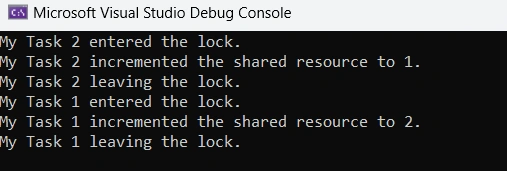
- Thread-Safe Resource Access: The shared resource is accessed safely, allowing only one thread to enter the critical section at a time.
- Exception Safety: If an exception happens within the using block, the lock is still released correctly.
Console Output
Comparison with Regular Locks
Before C# 13, developers often used Monitor.Enter() and Monitor.Exit() to manage thread synchronization. While this method worked, it had some drawbacks.
Traditional Approach
lock (lockObject)
{
    // Critical section
}
- Requires manually matching Monitor.Enter() with Monitor.Exit().
- There’s a risk of human error, like forgetting to release the lock in complicated situations.
Scoped Lock Approach
lock (lockObject)
{
    // Critical section
}
- Automatically releases the lock.
- Results in cleaner code with fewer mistakes.
When to use Scoped Locks?
Scoped locks are perfect for situations where.
- You are dealing with shared resources in multithreaded environments.
- It’s important to ensure locks are properly released for application stability.
- You want to reduce repetitive code and make your code easier to read.
Conclusion
Scoped locks in C# 13 make thread synchronization simpler and safer. By using Lock.EnterScope() inside using blocks, developers can write cleaner, more reliable multithreaded code with less risk of deadlocks or synchronization issues.
If you're using C# 13, try using this feature in your projects to improve your multithreading logic and make resource management easier.
Happy Coding!
Join the conversation! Your thoughts help the community grow.