

Introduction
This article demonstrates how to create and use a scalar function in the SQL Server Database. In this blog, we won't go very far but will only work on some basic functions.
Creating a function
In figure 1, there are two columns - farmer address and identity type. Identity type is predefined in digits and if we want the identity, we need to type the identity name in figure 2.
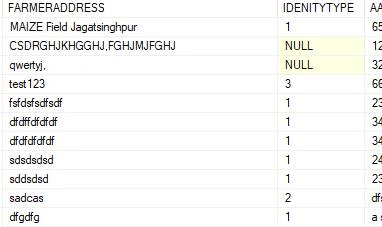
Figure 1
Create Function
- CREATE FUNCTION [dbo].[Identitytype] (@IDENITYTYPE VARCHAR(50))
- returns VARCHAR(50)
- AS
- BEGIN
- DECLARE @IDENITYTYPE1 VARCHAR(50);
- SELECT @IDENITYTYPE1 = CASE
- WHEN @IDENITYTYPE = 1 THEN 'Aadhar No '
- WHEN @IDENITYTYPE = 2 THEN 'Pan Card '
- WHEN @IDENITYTYPE = 3 THEN 'Voter Id '
- ELSE 'Not Specified '
- END
- RETURN @IDENITYTYPE1
- END
Now, call the function in a query
You can write a function in the query and pass column name in the parameter.
- SELECT FARMERADDRESS,[DBO].[IDENTITYTYPE](IDENITYTYPE) AS IDENTITYTYPE FROM M_FARMERMASTER
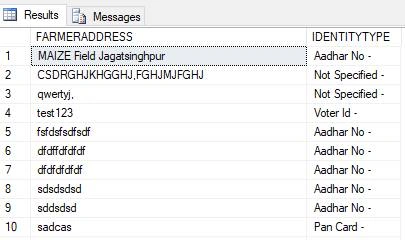
Figure 2
Note
- You can check if the function is working or not.
example: SELECT [DBO].[IDENTITYTYPE](1) - You have to always use the full name of the function and always use [dbo].FunctionName. Otherwise, it generates an error like - 'IDENTITYTYPE' is not a recognized built-in function name.
- You can also use it in a stored procedure in the same way.
Summary
In this article, I discussed how we can create a scalar function in SQL Server. We also saw how we can use a case in a function and how to use it. After that, we saw how we use it in a query and in a stored procedure.
Sagar RathodPosted Jan 2, 2019, 4:47 AM
Hey Yogesh thank you for such information, following you to get updated with short and simple information like this, great work.