

Error Logging is one of the key attributes of application development. Most of the applications we write must have the logging mechanism to see the error log when some exception happens. We write lots of unit testing, do lots of manual testing in development but still there are some points we cannot anticipate will cause an error.
For example some code works fine in local machines, staging, and UAT but when it goes to production it fails. So where to look for what could be the issue? As we know, in production environments most of the systems don’t have Visual Studio to debug the code. To see these exception errors, log files are used widely.
Now we will create a sample ASP.NET MVC application and get the NLog Library references using Nuget.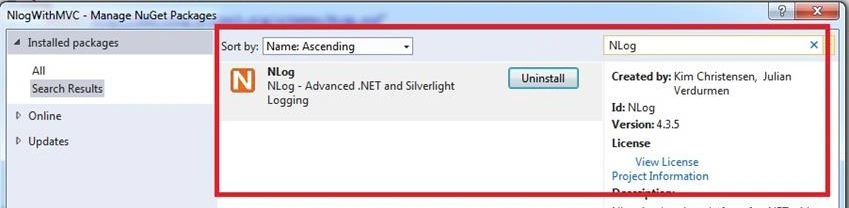
We have the NLog from the Nuget now. We will create a config file named NLog.config as shown below to the project.
- <?xml version="1.0" encoding="utf-8" ?>
- <nlog xmlns="http://www.nlog-project.org/schemas/NLog.xsd" xmlns:xsi="http://www.w3.org/2001/XMLSchema-instance" autoReload="true" throwExceptions="false" internalLogFile="G:\NLogErrors\log.txt">
- <extensions>
- <!-- load NLog.Extended to enable ASP.NET-specific functionality -->
- <add assembly="NLog.Extended" />
- </extensions>
- <!--Define Various Log Targets like files, database or asp.net trace files-->
- <targets>
- <target name="console" xsi:type="ColoredConsole" layout="${message}" />
- <!--Write logs to File where we want to write error logs-->
- <target name="file" xsi:type="File" fileName="G:\NLogErrors\ErrorLogFile.log" layout="
- --------------------- ${level}(${longdate})${machinename}-------------------- ${newline}
- ${newline}
- Exception Type:${exception:format=Type}${newline}
- Exception Message:${exception:format=Message}${newline}
- Stack Trace:${exception:format=Stack Trace}${newline}
- Additional Info:${message}${newline}
- ">
- </target>
- </targets>
- <rules>
- <logger name="*" minlevel="trace" writeTo="file" />
- </rules>
- </nlog>
We will write some code for logging. In the Home Controller, Index action, we will create a exception forcibly and write it into logger using logger.ErrorException() method.
Controller Code- using NLog;
- using System;
- using System.Collections.Generic;
- using System.Linq;
- using System.Web;
- using System.Web.Mvc;
- namespace NlogWithMVC.Controllers
- {
- public class HomeController : Controller
- {
- Logger logger = LogManager.GetCurrentClassLogger();
- public ActionResult Index()
- {
- try
- {
- int x = 0;
- int y = 5;
- int z = y / x;
- }
- catch (Exception ex)
- {
- logger.ErrorException("Error occured in Home controller Index Action", ex);
- }
- return View();
- }
- public ActionResult About()
- {
- ViewBag.Message = "Your application description page.";
- return View();
- }
- public ActionResult Contact()
- {
- ViewBag.Message = "Your contact page.";
- return View();
- }
- }
- }
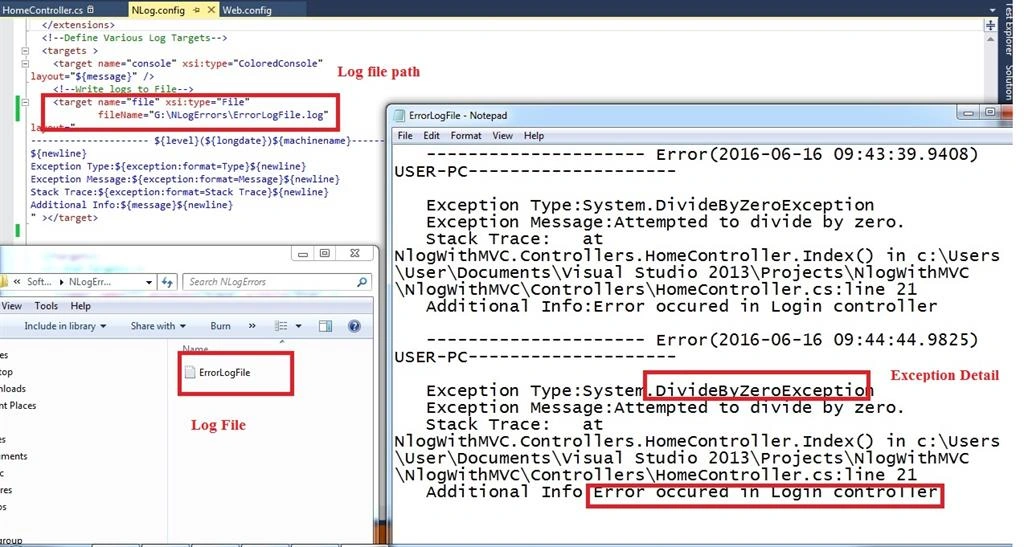
When we run the page we see that the log file is created at the file which is defined in the NLog.Config file.
Output when we run the page is as shown below
We saw how to handle logging in an ASP.NET MVC application using NLog. Thanks for reading.
sai jamesPosted Aug 11, 2023, 12:25 AM
I want to save the logs in database using the simple asp.net webapi controller , can you please share the code.
Vikki KumarPosted Jul 15, 2021, 11:58 AM
Not working
Amir NavedPosted Sep 1, 2019, 1:31 AM
Better to tellhow to add Nlog.config file
Amir NavedPosted Sep 1, 2019, 1:31 AM
Nice article
Saineshwar BageriPosted Aug 2, 2017, 6:20 AM
Nice Article to learn something new in Logging other than Elmah
Humayun Kabir MamunPosted Jun 18, 2016, 12:54 PM
Nice...