
“Run To Cursor” it’s an alternative option of Breakpoints we can use that option to debug my source code without breakpoints from where you want line by line, by the “Run To Cursor” we can save time of debugging, directly we can run from that line which we have to test by debugging and no need to start debugging by visual studio, try it must be use full for every developer, Let’s see how we can use “Run To Cursor”.
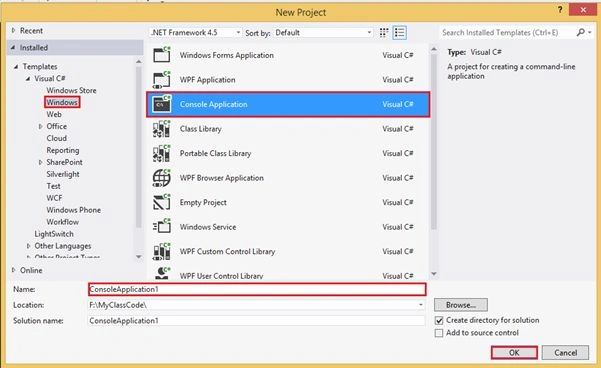
Step 1: Open visual studio-> file -> new Project->.
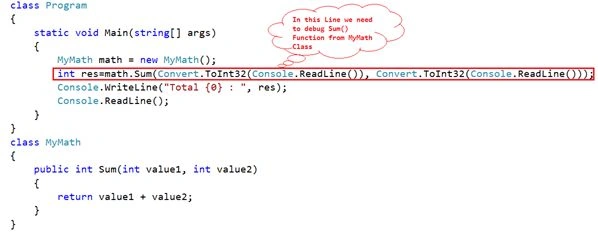
And Write a class MyMath with a function name Sum(int Value1,int Value2) which we have to into Main() and we have to debug that line we no need to use Breakpoints.
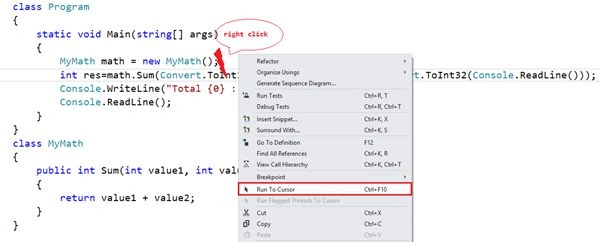
Now right click on that line from we have to start Debugging and go to “Run To Cursor”.
And then my output will be shows as the code.
Now enter two value and press enter and for next press F11 so we can debug line by line without breakpoints.
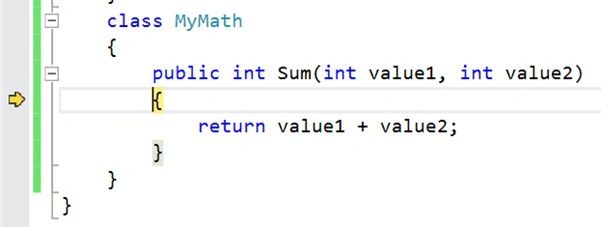
Now u can see the output.
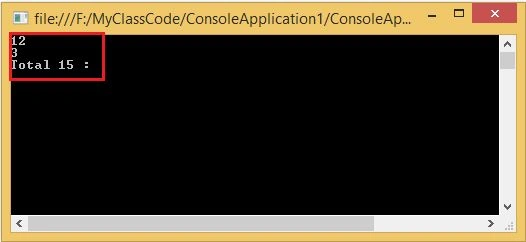
Hope you will enjoy thanks ☺.

Run to the Cursor in Visual Studio
Join the conversation! Your thoughts help the community grow.
Sign in to leave a comment
It is the same account you read, post and publish with — and you will come straight back to this page.
SubashPosted Sep 9, 2016, 12:55 PM
Thanks sir,just now i checked
Rupesh KumarPosted Dec 14, 2015, 7:31 AM
Thank's Nitin sir,Today i learned a new thing.
Rupali ShindePosted Oct 16, 2015, 1:21 AM
good
Ajeet MishraPosted Sep 14, 2015, 8:08 AM
nice
manish tiwariPosted Jan 21, 2015, 6:28 AM
Thanks sir for such a good concept..
Aman GuptaPosted Jan 9, 2015, 7:45 AM
this is very beneficial. Thanks Sir :)
Harpreet SinghPosted Jan 9, 2015, 1:48 AM
wow!! this is something new. Thanks for sharing with us sir :)
Vipin TyagiPosted Jan 8, 2015, 11:10 PM
Sir what is the basic benefit to use this type of technique........
Rajeev RanjanPosted Jan 8, 2015, 10:47 PM
today i learned a new thing. Thnx @nitin sir
Michal HabalcikPosted Jan 8, 2015, 8:55 AM
Honestly, I've never noticed that. Thanks for sharing.