

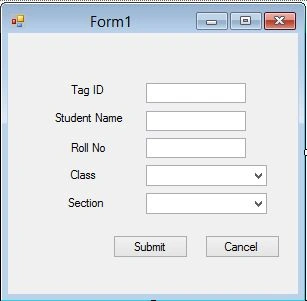
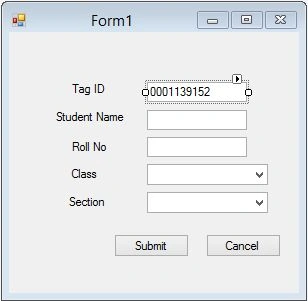
Here am shows how to read RFID data and store information in to database
Form1.designer.cs
Code:
- namespace AMS
- {
- partial class Form1
- {
- /// <summary>
- /// Required designer variable.
- /// </summary>
- private System.ComponentModel.IContainer components = null;
- /// <summary>
- /// Clean up any resources being used.
- /// </summary>
- /// <param name="disposing">true if managed resources should be disposed; otherwise, false.</param>
- protected override void Dispose(bool disposing)
- {
- if (disposing && (components != null))
- {
- components.Dispose();
- }
- base.Dispose(disposing);
- }
- #region Windows Form Designer generated code
- /// <summary>
- /// Required method for Designer support - do not modify
- /// the contents of this method with the code editor.
- /// </summary>
- private void InitializeComponent()
- {
- this.txttag = new System.Windows.Forms.TextBox();
- this.label1 = new System.Windows.Forms.Label();
- this.label2 = new System.Windows.Forms.Label();
- this.label3 = new System.Windows.Forms.Label();
- this.label4 = new System.Windows.Forms.Label();
- this.label5 = new System.Windows.Forms.Label();
- this.txtstudname = new System.Windows.Forms.TextBox();
- this.txtrollno = new System.Windows.Forms.TextBox();
- this.comboclass = new System.Windows.Forms.ComboBox();
- this.combosec = new System.Windows.Forms.ComboBox();
- this.btnsubmit = new System.Windows.Forms.Button();
- this.btncancel = new System.Windows.Forms.Button();
- this.SuspendLayout();
- //
- // txttag
- //
- this.txttag.Location = new System.Drawing.Point(138, 50);
- this.txttag.Name = "txttag";
- this.txttag.Size = new System.Drawing.Size(100, 20);
- this.txttag.TabIndex = 0;
- //
- // label1
- //
- this.label1.AutoSize = true;
- this.label1.Location = new System.Drawing.Point(60, 50);
- this.label1.Name = "label1";
- this.label1.Size = new System.Drawing.Size(40, 13);
- this.label1.TabIndex = 1;
- this.label1.Text = "Tag ID";
- //
- // label2
- //
- this.label2.AutoSize = true;
- this.label2.Location = new System.Drawing.Point(44, 78);
- this.label2.Name = "label2";
- this.label2.Size = new System.Drawing.Size(75, 13);
- this.label2.TabIndex = 2;
- this.label2.Text = "Student Name";
- //
- // label3
- //
- this.label3.AutoSize = true;
- this.label3.Location = new System.Drawing.Point(60, 108);
- this.label3.Name = "label3";
- this.label3.Size = new System.Drawing.Size(42, 13);
- this.label3.TabIndex = 3;
- this.label3.Text = "Roll No";
- //
- // label4
- //
- this.label4.AutoSize = true;
- this.label4.Location = new System.Drawing.Point(60, 135);
- this.label4.Name = "label4";
- this.label4.Size = new System.Drawing.Size(32, 13);
- this.label4.TabIndex = 4;
- this.label4.Text = "Class";
- //
- // label5
- //
- this.label5.AutoSize = true;
- this.label5.Location = new System.Drawing.Point(57, 163);
- this.label5.Name = "label5";
- this.label5.Size = new System.Drawing.Size(43, 13);
- this.label5.TabIndex = 5;
- this.label5.Text = "Section";
- //
- // txtstudname
- //
- this.txtstudname.Location = new System.Drawing.Point(138, 78);
- this.txtstudname.Name = "txtstudname";
- this.txtstudname.Size = new System.Drawing.Size(100, 20);
- this.txtstudname.TabIndex = 6;
- //
- // txtrollno
- //
- this.txtrollno.Location = new System.Drawing.Point(138, 105);
- this.txtrollno.Name = "txtrollno";
- this.txtrollno.Size = new System.Drawing.Size(100, 20);
- this.txtrollno.TabIndex = 7;
- //
- // comboclass
- //
- this.comboclass.FormattingEnabled = true;
- this.comboclass.Items.AddRange(new object[] {
- "I",
- "II",
- "III",
- "IV",
- "V",
- "VI",
- "VII",
- "VIII",
- "IX",
- "X"});
- this.comboclass.Location = new System.Drawing.Point(138, 132);
- this.comboclass.Name = "comboclass";
- this.comboclass.Size = new System.Drawing.Size(121, 21);
- this.comboclass.TabIndex = 8;
- //
- // combosec
- //
- this.combosec.FormattingEnabled = true;
- this.combosec.Items.AddRange(new object[] {
- "A",
- "B",
- "C",
- "D",
- "E",
- "F",
- "G",
- "H"});
- this.combosec.Location = new System.Drawing.Point(138, 160);
- this.combosec.Name = "combosec";
- this.combosec.Size = new System.Drawing.Size(121, 21);
- this.combosec.TabIndex = 9;
- //
- // btnsubmit
- //
- this.btnsubmit.Location = new System.Drawing.Point(105, 202);
- this.btnsubmit.Name = "btnsubmit";
- this.btnsubmit.Size = new System.Drawing.Size(75, 23);
- this.btnsubmit.TabIndex = 10;
- this.btnsubmit.Text = "Submit";
- this.btnsubmit.UseVisualStyleBackColor = true;
- this.btnsubmit.Click += new System.EventHandler(this.btnsubmit_Click);
- //
- // btncancel
- //
- this.btncancel.Location = new System.Drawing.Point(197, 202);
- this.btncancel.Name = "btncancel";
- this.btncancel.Size = new System.Drawing.Size(75, 23);
- this.btncancel.TabIndex = 11;
- this.btncancel.Text = "Cancel";
- this.btncancel.UseVisualStyleBackColor = true;
- //
- // Form1
- //
- this.AutoScaleDimensions = new System.Drawing.SizeF(6F, 13F);
- this.AutoScaleMode = System.Windows.Forms.AutoScaleMode.Font;
- this.ClientSize = new System.Drawing.Size(290, 261);
- this.Controls.Add(this.btncancel);
- this.Controls.Add(this.btnsubmit);
- this.Controls.Add(this.combosec);
- this.Controls.Add(this.comboclass);
- this.Controls.Add(this.txtrollno);
- this.Controls.Add(this.txtstudname);
- this.Controls.Add(this.label5);
- this.Controls.Add(this.label4);
- this.Controls.Add(this.label3);
- this.Controls.Add(this.label2);
- this.Controls.Add(this.label1);
- this.Controls.Add(this.txttag);
- this.Name = "Form1";
- this.Text = "Form1";
- this.Load += new System.EventHandler(this.Form1_Load);
- this.ResumeLayout(false);
- this.PerformLayout();
- }
- #endregion
- private System.Windows.Forms.TextBox txttag;
- private System.Windows.Forms.Label label1;
- private System.Windows.Forms.Label label2;
- private System.Windows.Forms.Label label3;
- private System.Windows.Forms.Label label4;
- private System.Windows.Forms.Label label5;
- private System.Windows.Forms.TextBox txtstudname;
- private System.Windows.Forms.TextBox txtrollno;
- private System.Windows.Forms.ComboBox comboclass;
- private System.Windows.Forms.ComboBox combosec;
- private System.Windows.Forms.Button btnsubmit;
- private System.Windows.Forms.Button btncancel;
- }
- }
Form1.cs
Code:
Adding namespaces for serial port connection.
- using System.IO.Ports;
- using System.Threading;
- using System.Data.Sql;
- using System.Data.SqlClient;
- using System.IO.Ports;
- using System.Threading;
- using System.Data.Sql;
- using System.Data.SqlClient;
- Full Code:
- using System;
- using System.Collections.Generic;
- using System.ComponentModel;
- using System.Data;
- using System.Drawing;
- using System.Linq;
- using System.Text;
- using System.Windows.Forms;
- using System.IO.Ports;
- using System.Threading;
- using System.Data.Sql;
- using System.Data.SqlClient;
- namespace AMS
- {
- public partial class Form1 : Form
- {
- string str = "Data Source=.;Initial Catalog=AMS;Integrated Security=True";
- private SerialPort RFID;
- private string DispString;
- public Form1()
- {
- InitializeComponent();
- }
- private void Form1_Load(object sender, EventArgs e)
- {
- RFID = new SerialPort();
- RFID.PortName = "COM5";
- RFID.BaudRate = 9600;
- RFID.DataBits = 8;
- RFID.Parity = Parity.None;
- RFID.StopBits = StopBits.One;
- RFID.Open();
- RFID.ReadTimeout = 200;
- if (RFID.IsOpen)
- {
- DispString = "";
- txttag.Text = "";
- }
- else
- {
- RFID.Close();
- }
- RFID.DataReceived += new SerialDataReceivedEventHandler(RFID_DataReceived);
- }
- private void button1_Click(object sender, EventArgs e)
- {
- }
- private void RFID_DataReceived(object sender, SerialDataReceivedEventArgs e)
- {
- if (txttag.Text.Length >= 12)
- {
- RFID.Close();
- }
- else
- {
- DispString = RFID.ReadExisting();
- this.Invoke(new EventHandler(DisplayText));
- }
- }
- private void DisplayText(object sender, EventArgs e)
- {
- txttag.AppendText(DispString);
- }
- private void btnsubmit_Click(object sender, EventArgs e)
- {
- switch (btnsubmit.Text)
- {
- case "Submit":
- if (txttag.Text.Length == 0 || txtrollno.Text.Length == 0 || txtstudname.Text.Length == 0)
- { return; }
- if (!CheckDuplicateRFID())
- {
- MessageBox.Show("Already Saved");
- txttag.Text = "";
- return;
- }
- break;
- }
- SqlConnection con = new SqlConnection(str);
- con.Open();
- SqlCommand cmd = new SqlCommand("insert into tbl_Studentdet(RFID,Student_Name,RollNo,Class,Section) values (@RFID,@Student_Name,@RollNo,@Class,@Section)", con);
- cmd.Parameters.AddWithValue("@RFID", txttag.Text);
- cmd.Parameters.AddWithValue("@Student_Name", txtstudname.Text);
- cmd.Parameters.AddWithValue("@RollNo", txtrollno.Text);
- cmd.Parameters.AddWithValue("@Section", combosec.SelectedItem.ToString());
- cmd.Parameters.AddWithValue("@Class", comboclass.SelectedItem.ToString());
- cmd.ExecuteNonQuery();
- MessageBox.Show("Student added");
- con.Close();
- }
- private bool CheckDuplicateRFID()
- {
- SqlConnection con = new SqlConnection(str);
- con.Open();
- SqlCommand cmd = new SqlCommand("select * from tbl_Studentdet where RFID='" + txttag.Text + "'", con);
- SqlDataReader rd = cmd.ExecuteReader();
- if (rd.HasRows)
- {
- rd.Close();
- return false;
- }
- else
- {
- rd.Close();
- return true;
- }
- }
- }
- }
Rudra NarayanPosted Nov 3, 2018, 10:54 PM
Once data recieved second time no responce, why?
Nino CarbaPosted Feb 11, 2018, 1:15 AM
At first it work well but at the second try it can't get the tag. why?
Sameer AliPosted Dec 29, 2017, 12:13 AM
Please attached the complete project with hardware photo if it is possible\
Sameer AliPosted Dec 29, 2017, 12:12 AM
Kindly attached the file of project
kea feaPosted Nov 13, 2017, 10:38 AM
Hi, may i know how can we know which port are connected with RFID smart card reader? I had checked my device manager, there is no state it.
Ajit Kumar PanditPosted Mar 4, 2017, 4:41 AM
Please help me for below error: private void RFID_DataReceived(object sender, SerialDataReceivedEventArgs e){if (txttag.Text.Length >= 12){ RFID.Close(); } else { DispString = RFID.ReadExisting(); // Getting error on below this.Invoke method this.Invoke(new EventHandler(DisplayText)); } } Error - 'MainWindow' does not contains a definition for 'Invoke' and no extension method 'Invoke' accepting a first argument of type 'MainWindow' could be found(are you missing a using directive or an assembly reference?)
kumar gargPosted Oct 14, 2016, 6:55 AM
Pls tell me which RFID reader device is working with this code. pls refer me
leyla kazemiPosted May 17, 2016, 12:56 AM
hy , i use ur code but i dont no why if (txttag.Text.Length >= 12) ,why 12?explain please .thanks
Mahesh ChandPosted Feb 2, 2015, 9:27 AM
RFID connectivity will be a major need now since most of the IoTs, smart homes, and smart cars.