

In this blog, You will see how to use DBCC CHECKIDENT in SQl Server. First of all we create a table which named [student table]. Table has a column named stu_id with identity property (1,1). The following is the sample data for the [student table] Table:

Using DBCC CHECKIDENT
DBCC CHECKIDENT is used to manually set a new current identity value for the identity column.
Example
The following example show the current identity value in the sty_id column in the [student table] table to a value of 5. Because the table has existing rows, the next row inserted will use 5 as the value, that is, the new current increment value defined for the column value plus 1.
use master
GO
DBCC CHECKIDENT ([student table], reseed, 5)
GO
Press F5 to execute it.
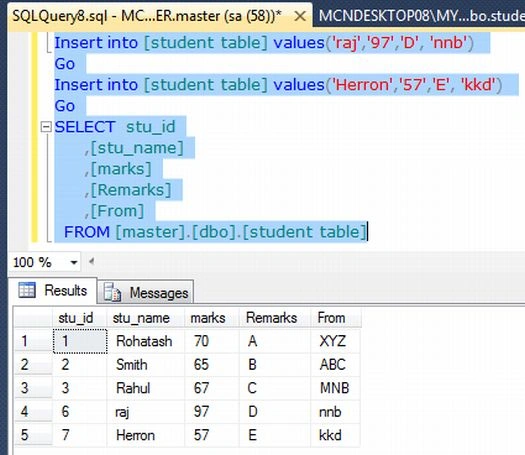
Now to check identity value insert some data into the table.
Insert into [student table] values('raj','97','D', 'nnb')
Go
Insert into [student table] values('Herron','57','E', 'kkd')
Go
SELECT stu_id
,[stu_name]
,[marks]
,[Remarks]
,[From]
FROM [master].[dbo].[student table]
Now press F5.
Join the conversation! Your thoughts help the community grow.