

Today, I will tell you how to recover the data, in the case of accidental deletion of the data. This operation is tested on Enterprise Edition 2012.
Please follow the steps and execute the next step only when the previous step is finished.
Step 1
Create a new fresh database and a table inside this database.
- USE master
- GO
- CREATE DATABASE TestDb
- GO
- USE TestDb
- GO
- CREATE TABLE TestTable (
- id INT identity(1, 1)
- ,NAME VARCHAR(50)
- ,Value INT
- ,ValueAt DATETIME DEFAULT(GetDate())
- )
- GO
Create a full backup of this database.
- BACKUP DATABASE TestDb TO DISK = 'D:\TestDb_Full.bak'
- WITH init
- ,format
- ,stats = 10
- GO
Follow the below DML on table dbo.TestTable.
- USE TestDb
- GO
- INSERT INTO TestTable ( NAME,Value)
- SELECT 'Vimal' ,50
- UNION
- SELECT 'Kamal' ,250
- UNION
- SELECT 'Raj' ,1200
- UNION
- SELECT 'Swastika',150
- UNION
- SELECT 'Sibin' ,125
- UNION
- SELECT 'Manas' ,560
- UNION
- SELECT 'Amit' ,3200
- GO
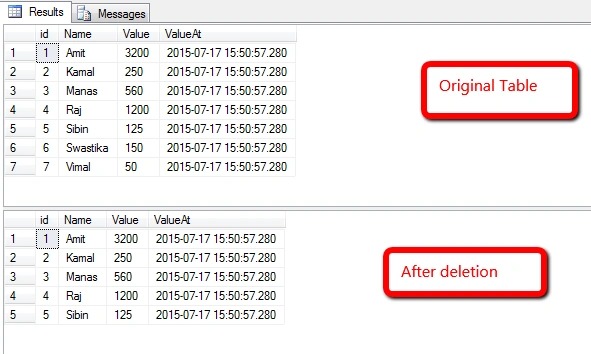
- SELECT * FROM TestTable
- GO
- DELETE FROM TestTable WHERE id > 5
- GO
- SELECT * FROM TestTable
- GO
Step 4
As the data has been deleted, now it's time to recover that data.
Note - Here, database is new, so is the table. It is easy to recover. If you know the time of the deleted data or approximate time, you can recover the data easily. But, you will find it difficult if the time range is too long or you have forgotten the time.
As the data has been deleted, now it's time to recover that data.
Note - Here, database is new, so is the table. It is easy to recover. If you know the time of the deleted data or approximate time, you can recover the data easily. But, you will find it difficult if the time range is too long or you have forgotten the time.
- SELECT [Current LSN]
- ,[Transaction ID]
- ,[Operation]
- ,[Context]
- ,[AllocUnitName]
- FROM fn_dblog(NULL, NULL)
- WHERE [Operation] = 'LOP_DELETE_ROWS'
- AND [AllocUnitName] = 'dbo.TestTable'
- SELECT [Current LSN]
- ,[Operation]
- ,[Transaction ID]
- ,[Begin Time]
- ,[Transaction Name]
- ,[Transaction SID]
- ,[AllocUnitName]
- FROM fn_dblog(NULL, NULL)
- WHERE [Transaction ID] = '0000:00000343'--<<Paste the TransactionID
- AND [Operation] = 'LOP_BEGIN_XACT'
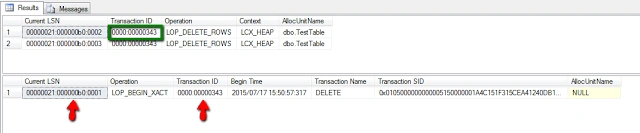
- --Copy CurrentLSN 00000021:000000b0:0001
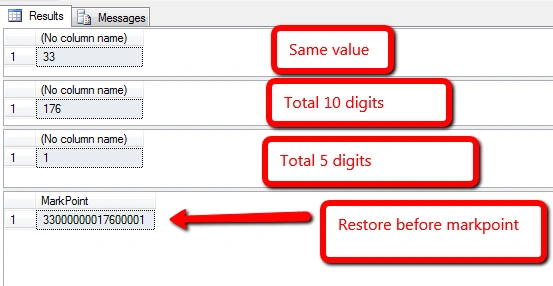
- SELECT CONVERT(INT, CONVERT(VARBINARY, '0x00000021', 1)) --Same Value
- SELECT CONVERT(INT, CONVERT(VARBINARY, '0x000000b0', 1)) --Total 10 digit preceeded by 0
- SELECT CONVERT(INT, CONVERT(VARBINARY, '0x0001', 1)) --Total 5 digit preceeded by 0
- -->33000000017600001
- SELECT Cast(CONVERT(INT, CONVERT(VARBINARY, '0x00000021', 1)) AS VARCHAR(5)) + RIGHT('0000000000' + CAST(CONVERT(INT, CONVERT(VARBINARY, '0x000000b0', 1)) AS NVARCHAR), 10) + RIGHT('00000' + CAST(CONVERT(INT, CONVERT(VARBINARY, '0x0001', 1)) AS NVARCHAR), 5) AS 'MarkPoint'
- GO
Step 5
Take a log backup now. For this, the recovery model of database should be Full or Bulk-logged (Right click on Database>>Properties>>Options>>Recovery Model).
- BACKUP log TestDb TO DISK = 'D:\TestDb_log.trn'
- GO
Restore Full backup of database.
- -- Starting first with restoring the FULL BACKUP with NORECOVERY
- RESTORE filelistonly
- FROM DISK = 'D:\TestDb_Full.bak';
- RESTORE DATABASE [TestDb_New]
- FROM DISK = 'D:\TestDb_Full.bak'
- WITH MOVE 'TestDb' TO 'C:\TestDb.mdf'
- ,MOVE 'TestDb_log' TO 'C:\TestDb_log.ldf'
- ,REPLACE
- ,NORECOVERY;
- GO
Restore log backup of database, like below.
- RESTORE LOG TestDb_New
- FROM DISK = 'D:\TestDb_log.trn'
- WITH STOPBEFOREMARK = 'lsn:33000000017600001'
- GO
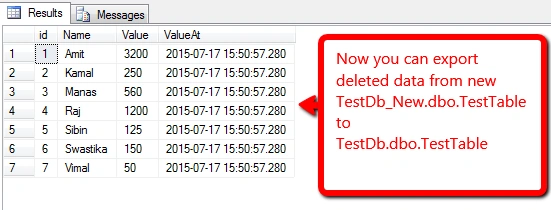
Check the table data.
- USE TestDb_New
- GO
- SELECT * FROM dbo.TestTable
- --Export the deleted rows from this table to original table
Step 9
Drop tables.
- USE master
- GO
- DROP DATABASE TestDb
- DROP DATABASE TestDb_New
- -->The End<--
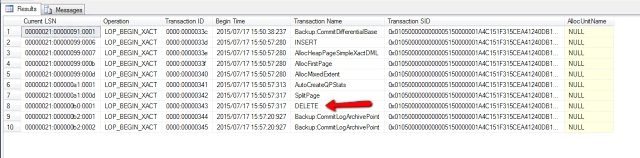
- SELECT [Current LSN]
- ,[Operation]
- ,[Transaction ID]
- ,[Begin Time]
- ,[Transaction Name]
- ,[Transaction SID]
- ,[AllocUnitName]
- FROM fn_dblog(NULL, NULL)
- WHERE --[Operation] = 'LOP_BEGIN_XACT'
- --and
- [Begin Time] BETWEEN '2015/07/17 15:30:00:000'
- AND '2015/07/17 16:00:00:000'
Krish gurujuPosted Jul 25, 2018, 2:32 PM
Nice, well done...