

Reading An XML File Using HTML5 And jQuery
In this blog, we will learn how to read an XML file from the client-side and display its contents in an HTML table by making use of the FileReader() method in HTML5 & jQuery.
First, we will create a file upload button, HTML table, which is hidden first, and an input button, which on clicking calls the function to export XML data to the table.
- <input type="file" id="xmlfile" />
- <input type="button" id="viewfile" value="Export To Table" onclick="ExportToTable()" />
- <br />
- <br />
- <table id="xmltable">
- <thead>
- <tr>
- <th>
- Name
- </th>
- <th>
- Job
- </th>
- <th>
- City
- </th>
- <th>
- State
- </th>
- </tr>
- </thead>
- <tbody></tbody>
- </table>
Now, our JavaScript function ExportToTable() is given below.
- < script type = "text/javascript" >
- function ExportToTable() {
- var regex = /^([a-zA-Z0-9\s_\\.\-:])+(.xml)$/;
- //Checks whether the file is a valid xml file
- if (regex.test($("#xmlfile").val().toLowerCase())) {
- //Checks whether the browser supports HTML5
- if (typeof(FileReader) != "undefined") {
- var reader = new FileReader();
- reader.onload = function(e) {
- var xmlDoc = $.parseXML(e.target.result);
- //Splitting of Rows in the xml file
- var xmlrows = $(xmlDoc).find("Employee");
- var table = $("#xmltable > tbody");
- for (var i = 0; i < xmlrows.length; i++) {
- if (xmlrows[i] != "") {
- var row = "<tr>";
- var xmlcols = $(xmlrows[i]).children();
- //Looping through each nodes in a xml row
- for (var j = 0; j < xmlcols.length; j++) {
- var cols = "<td>" + $(xmlcols[j]).text() + "</td>";
- row += cols;
- }
- row += "</tr>";
- table.append(row);
- }
- }
- $('#xmltable').show();
- }
- reader.readAsText($("#xmlfile")[0].files[0]);
- } else {
- alert("Sorry! Your browser does not support HTML5!");
- }
- } else {
- alert("Please upload a valid XML file!");
- }
- } <
- /script>
Our sample XML file contains the data of certain employees, as given below.
- <?xml version="1.0" encoding="utf-8" ?>
- <Employeedetails>
- <Employee>
- <Name>Rajeev</Name>
- <Job>Developer</Job>
- <City>
- Mumbai
- </City>
- <State>
- Maharashtra
- </State>
- </Employee>
- <Employee>
- <Name>Ranjith</Name>
- <Job>Developer</Job>
- <City>
- Pune
- </City>
- <State>
- Maharashtra
- </State>
- </Employee>
- <Employee>
- <Name>Samuel</Name>
- <Job>Tester</Job>
- <City>
- Bangalore
- </City>
- <State>
- Karnataka
- </State>
- </Employee>
- <Employee>
- <Name>Karthik</Name>
- <Job>Tester</Job>
- <City>
- Chennai
- </City>
- <State>
- Tamilnadu
- </State>
- </Employee>
- </Employeedetails>
Now, on selecting this XML file and clicking on the Export To Table button will export the data to the table, as shown below.
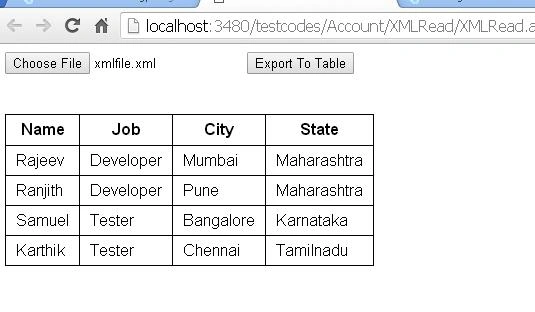
In this blog, we learned how to make use of FileReader() method of HTML5 & jQuery to export the data from an XML file to an HTML table.
Hope this will be helpful.
Join the conversation! Your thoughts help the community grow.