

Introduction
In this blog, you will learn how to display Google sheet data in your MVC application by using the Google console account and key.
You can add the data into a Google sheet and run your application so your Google sheet data shows on your website.
Step 1
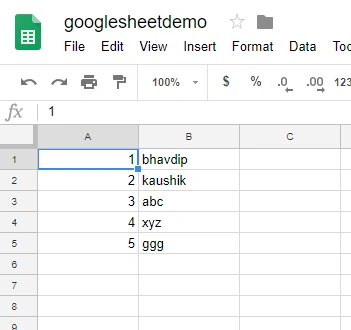
Create a new sheet in your live account from your Google account. Go here and make the new sheet,
Create a new sheet in your live account from your Google account. Go here and make the new sheet,
Step 2
Create a new MVC application and make the code. Install the NuGet package for the integration of this sheet. Install the package from https://www.nuget.org/packages/Google.Apis/
Package Name - Install-Package Google.Apis
Step 3
Login into your Google developer account and make the new create service account link for the developer account: https://console.developers.google.com/.
Go to the service account and create a new service and download the Jason file and put into your project.
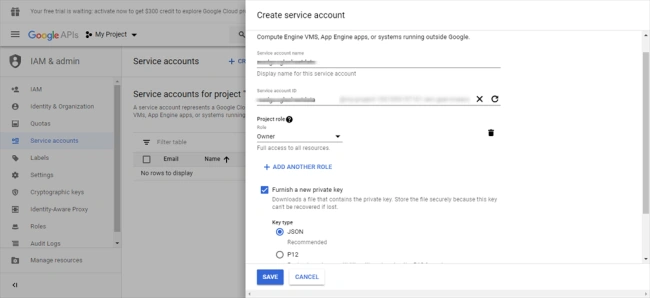
After downloading the JSON file copy this file and paste it into your MVC project.
Step 4
Add this code into your index action result in the controller.
- public ActionResult Index()
- {
- var credential = GoogleCredential.FromStream(new FileStream(Server.MapPath("~/client_secret.json"), FileMode.Open)).CreateScoped(Scopes);
- var service = new SheetsService(new BaseClientService.Initializer()
- {
- HttpClientInitializer = credential,
- ApplicationName = ApplicationName,
- });
- // Define request parameters.
- String spreadsheetId = "enter here your spread sheet id"; eg.: spreadsheetId ="1JSGeY4mjJ557UAqMM";
- String range = "Sheet1";
- SpreadsheetsResource.ValuesResource.GetRequest request =
- service.Spreadsheets.Values.Get(spreadsheetId, range);
- // Prints the names and majors of students in a sample spreadsheet:
- ValueRange response = request.Execute();
- IList<IList<Object>> values = response.Values;
- ViewBag.List = values;
- return View();
- }
Make sure your spreadsheet ID is the same you can get from your Google sheet URL, your sheet ID starts after this URL - https://docs.google.com/spreadsheets/d/
Your ID looks like this in the URL,
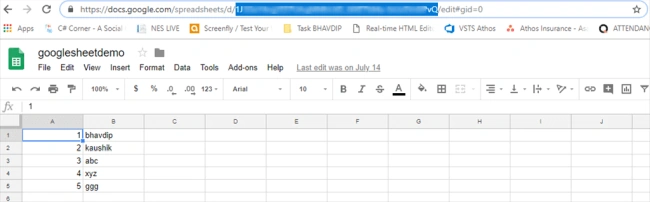
Your ID looks like this in the URL,
So, now all the data will get into your ViewBag.List,
In your cshtml page code like this:
- <div class="col-md-6">
- <h3>Read Data From Google Live sheet</h3>
- <table class="table" id="customers">
- <thead>
- <tr>
- <th>
- id
- </th>
- <th>
- Name
- </th>
- </tr>
- </thead>
- <tbody>
- @{
- foreach (var item in ViewBag.List)
- {
- <tr>
- <td>@item[0]</td>
- <td>@item[1]</td>
- </tr>
- }
- }
- </tbody>
- </table>
- </div>
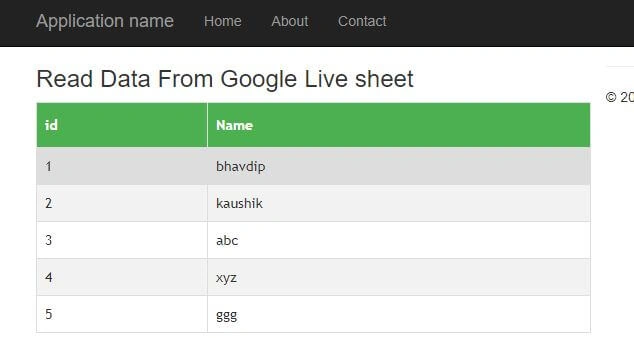
Then the file result will be displayed like this:
Summary
First, create the Google sheet and open the Google console app and download the JSON file (credentials). Then you need to put this file into your MVC application and then make code and run it.
Le Cao CuongPosted Apr 24, 2024, 7:18 AM
Thank for your post. I've read data from google sheet success.
Le Cao CuongPosted Apr 24, 2024, 6:58 AM
I had an error at ApplicationName = ApplicationName.
Jishan SiddiquePosted Jul 29, 2021, 10:10 AM
Hi Talaviya Bhavdip , It's free or paid service?
prince kumarPosted Jul 13, 2021, 9:51 AM
What should the value of 'Scopes' in line no:3
senthil nathanPosted Aug 1, 2019, 6:13 AM
Am getting permission error Can you please help me out
Kaushik DudhatPosted Jun 19, 2019, 11:12 PM
Very helpful for me, thanks.
Joachim AllyPosted Feb 14, 2019, 3:59 PM
I deeply respect your post here. I was looking to do exactly what you describe here but did not find a solution for two hours until you helped me out. :)