

To create a list view in React Native using SectionList, first import the SectionList component in code from the React Native library.
- import { SectionList } from 'react-native';
- Sections: Contain actual data to render on the screen.
- renderItem: To display the items inside the SectionList.
- renderSectionHeader: To show the section header title on each section.
- keyExtractor: To extract the unique key for a given item when SectionList render.
Code
- import React, { Component } from "react";
- import { SectionList, Text, StyleSheet, View } from 'react-native';
- const Regions = [
- { title: 'Asia', data: ['India', 'Bangladesh', 'Bhutan', 'China', 'Japan'] },
- { title: 'Europe', data: ['Denmark', 'France', 'Germany', 'Italy'] },
- { title: 'North America', data: ['Canada', 'Mexico', 'The United States of America'] }
- ];
- class App extends Component {
- render() {
- return (
- <View >
- <SectionList
- sections={Regions}
- renderItem={({ item }) => <Text style={styles.ItemStyle}>{item}</Text>}
- renderSectionHeader={({ section }) => <Text style={styles.HeaderStyle}>{section.title}</Text>}
- keyExtractor={(item, index) => index}
- />
- </View>
- );
- }
- }
- const styles = StyleSheet.create({
- HeaderStyle: {
- backgroundColor: '#1A237E',
- fontSize: 20,
- padding: 5,
- color: "yellow",
- borderRadius: 10,
- textAlign: 'center',
- },
- ItemStyle: {
- padding: 5,
- color: '#fff',
- backgroundColor: '#B08395',
- fontStyle: 'italic',
- fontFamily: "French Script MT",
- borderWidth: 1,
- borderColor: '#d6d7da',
- fontSize: 20,
- paddingLeft: 20
- }
- });
- export default App;
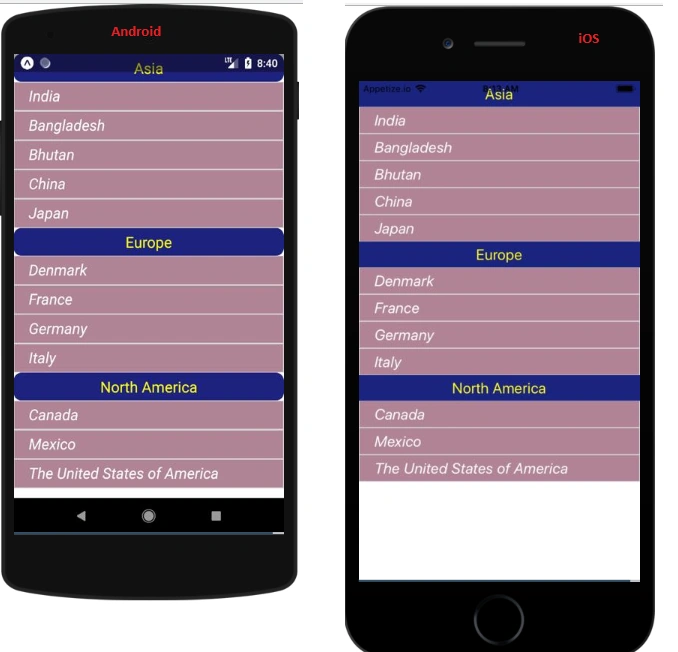
Summary
The SectionList component is very easy to use in React Native to create a list view. In my next blog, I will talk more about the SectionList component. Hopefully this helped!
Join the conversation! Your thoughts help the community grow.