

Introduction
In this blog, you will learn basic concepts
of puzzle game in JavaScript and purpose of JavaScript used in
Applications. It gives the puzzle game an initial stage to start within JavaScript. JavaScript is a scripting language, it's used for within
HTML Web pages. It is a lightweight programming language. JavaScript
code is used directly in HTML pages.
Step 1
First, open a Sublime Text editor,
- Open start -> Sublime Text Editor.
- Go to file -> File -> New File
Step 2
Now, that in the below sample, you can insert CSS styles inside the <style> tag.
- html {
- height: 100%;
- }
- body {
- height: 100%;
- background-image: linear-gradient(#7B9F35, #226666);
- display: flex;
- justify-content: center;
- align-items: center;
- flex-direction: column;
- }
- .game {
- /* position: absolute;
- top: 50%;
- left: 50%;
- transform: translate(-50%, -50%); */
- box-shadow: 0 1px 4px rgba(0, 0, 0, 0.5);
- padding: 15px;
- background-color: #AA3939;
- border-radius: 5px;
- }
- .grid {
- display: grid;
- grid-template-columns: 80px 80px 80px 80px;
- grid-template-rows: 80px 80px 80px 80px;
- border: 1px solid #550000;
- }
- .grid button {
- background-color: #cfcfcf;
- color: #003333;
- font-size: 24px;
- font-weight: bold;
- border: 1px solid #550000;
- outline: none;
- cursor: pointer;
- }
- .footer {
- margin-top: 15px;
- display: flex;
- justify-content: space-between;
- }
- .footer button {
- border: none;
- font-size: 20px;
- font-weight: bold;
- border-radius: 5px;
- box-shadow: 0 1px 4px rgba(0, 0, 0, 0.5);
- padding: 5px;
- width: 80px;
- background-color: #D4EE9F;
- color: #003333;
- outline: none;
- cursor: pointer;
- }
- .footer button:hover {
- color: #D4EE9F;
- background-color: #003333;
- }
- .footer span {
- flex: 1;
- text-align: center;
- font-size: 20px;
- color: #D4EE9F;
- font-weight: bold;
- margin: auto 0;
- }
- .message {
- color:#AA3939;
- height: 80px;
- }
Step 3
Now
let's write a function to an object in JavaScript. In the following example, you will see how to do that with the following code.
- class Box {
- constructor(x, y) {
- this.x = x;
- this.y = y;
- }
- getTopBox() {
- if (this.y === 0) return null;
- return new Box(this.x, this.y - 1);
- }
- getRightBox() {
- if (this.x === 3) return null;
- return new Box(this.x + 1, this.y);
- }
- getBottomBox() {
- if (this.y === 3) return null;
- return new Box(this.x, this.y + 1);
- }
- getLeftBox() {
- if (this.x === 0) return null;
- return new Box(this.x - 1, this.y);
- }
Step 4
- getNextdoorBoxes() {
- return [
- this.getTopBox(),
- this.getRightBox(),
- this.getBottomBox(),
- this.getLeftBox()
- ].filter(box => box !== null);
- }
- getRandomNextdoorBox() {
- const nextdoorBoxes = this.getNextdoorBoxes();
- return nextdoorBoxes[Math.floor(Math.random() * nextdoorBoxes.length)];
- }
- }
- const swapBoxes = (grid, box1, box2) => {
- const temp = grid[box1.y][box1.x];
- grid[box1.y][box1.x] = grid[box2.y][box2.x];
- grid[box2.y][box2.x] = temp;
- };
- const isSolved = grid => {
- return (
- grid[0][0] === 1 &&
- grid[0][1] === 2 &&
- grid[0][2] === 3 &&
- grid[0][3] === 4 &&
- grid[1][0] === 5 &&
- grid[1][1] === 6 &&
- grid[1][2] === 7 &&
- grid[1][3] === 8 &&
- grid[2][0] === 9 &&
- grid[2][1] === 10 &&
- grid[2][2] === 11 &&
- grid[2][3] === 12 &&
- grid[3][0] === 13 &&
- grid[3][1] === 14 &&
- grid[3][2] === 15 &&
- grid[3][3] === 0
- );
- };
- const getRandomGrid = () => {
- let grid = [[1, 2, 3, 4], [5, 6, 7, 8], [9, 10, 11, 12], [13, 14, 15, 0]];
- // Shuffle
- let blankBox = new Box(3, 3);
- for (let i = 0; i < 1000; i++) {
- const randomNextdoorBox = blankBox.getRandomNextdoorBox();
- swapBoxes(grid, blankBox, randomNextdoorBox);
- blankBox = randomNextdoorBox;
- }
- if (isSolved(grid)) return getRandomGrid();
- return grid;
- };
- class State {
- constructor(grid, move, time, status) {
- this.grid = grid;
- this.move = move;
- this.time = time;
- this.status = status;
- }
- static ready() {
- return new State(
- [[0, 0, 0, 0], [0, 0, 0, 0], [0, 0, 0, 0], [0, 0, 0, 0]],
- 0,
- 0,
- "ready"
- );
- }
- static start() {
- return new State(getRandomGrid(), 0, 0, "playing");
- }
- }
- class Game {
- constructor(state) {
- this.state = state;
- this.tickId = null;
- this.tick = this.tick.bind(this);
- this.render();
- this.handleClickBox = this.handleClickBox.bind(this);
- }
- static ready() {
- return new Game(State.ready());
- }
- tick() {
- this.setState({ time: this.state.time + 1 });
- }
- setState(newState) {
- this.state = { ...this.state, ...newState };
- this.render();
- }
- handleClickBox(box) {
- return function() {
- const nextdoorBoxes = box.getNextdoorBoxes();
- const blankBox = nextdoorBoxes.find(
- nextdoorBox => this.state.grid[nextdoorBox.y][nextdoorBox.x] === 0
- );
- if (blankBox) {
- const newGrid = [...this.state.grid];
- swapBoxes(newGrid, box, blankBox);
- if (isSolved(newGrid)) {
- clearInterval(this.tickId);
- this.setState({
- status: "won",
- grid: newGrid,
- move: this.state.move + 1
- });
- } else {
- this.setState({
- grid: newGrid,
- move: this.state.move + 1
- });
- }
- }
- }.bind(this);
- }
- render() {
- const { grid, move, time, status } = this.state;
- // Render grid
- const newGrid = document.createElement("div");
- newGrid.className = "grid";
- for (let i = 0; i < 4; i++) {
- for (let j = 0; j < 4; j++) {
- const button = document.createElement("button");
- if (status === "playing") {
- button.addEventListener("click", this.handleClickBox(new Box(j, i)));
- }
- button.textContent = grid[i][j] === 0 ? "" : grid[i][j].toString();
- newGrid.appendChild(button);
- }
- }
- document.querySelector(".grid").replaceWith(newGrid);
- // Render button
- const newButton = document.createElement("button");
- if (status === "ready") newButton.textContent = "Play";
- if (status === "playing") newButton.textContent = "Reset";
- if (status === "won") newButton.textContent = "Play";
- newButton.addEventListener("click", () => {
- clearInterval(this.tickId);
- this.tickId = setInterval(this.tick, 1000);
- this.setState(State.start());
- });
- document.querySelector(".footer button").replaceWith(newButton);
- // Render move
- document.getElementById("move").textContent = `Move: ${move}`;
- // Render time
- document.getElementById("time").textContent = `Time: ${time}`;
- // Render message
- if (status === "won") {
- document.querySelector(".message").textContent = "You win!";
- } else {
- document.querySelector(".message").textContent = "";
- }
- }
- }
- const GAME = Game.ready();
The HTML 5 code below shows how to complete the code for this awesome puzzle game!
- <!doctype html>
- <html>
- <head>
- <title>Puzzle game</title>
- <link rel="stylesheet" type="text/css" href="style.css">
- </head>
- <body>
- <h1>PRABAKARAN ACT</h1>
- <div class="game">
- <div class="grid">
- <button>1</button>
- <button>2</button>
- <button>3</button>
- <button>4</button>
- <button>5</button>
- <button>6</button>
- <button>7</button>
- <button>8</button>
- <button>9</button>
- <button>10</button>
- <button>11</button>
- <button>12</button>
- <button>13</button>
- <button>14</button>
- <button>15</button>
- <button></button>
- </div>
- <div class="footer">
- <button>Play</button>
- <span id="move">Move: 100</span>
- <span id="time">Time: 100</span>
- </div>
- </div>
- <h1 class="message">You win!</h1>
- <script src="script.js"></script>
- </body>
- </html>
In JavaScript, you can create an puzzle game and set a number values on move. Here is an example output of the code above.
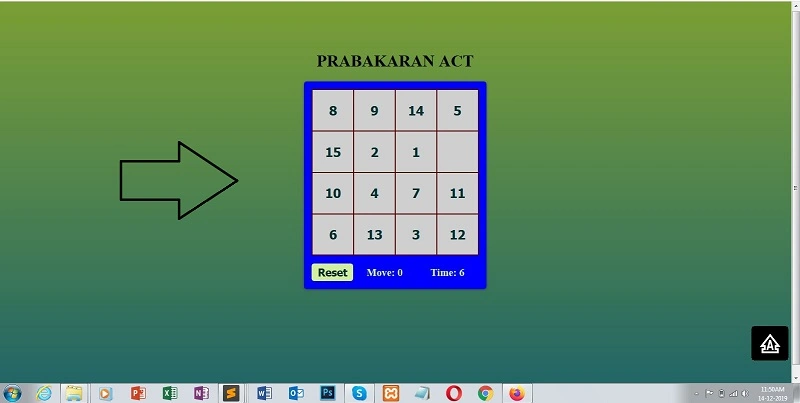
Output
The following is a simple HTML 5 code for displaying puzzle games in the browser.
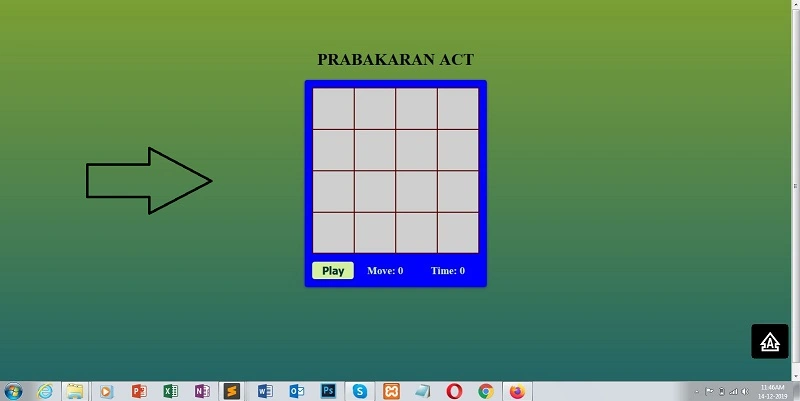
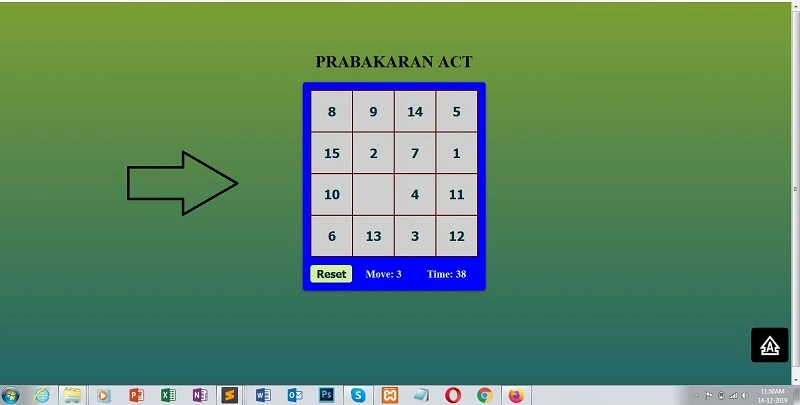
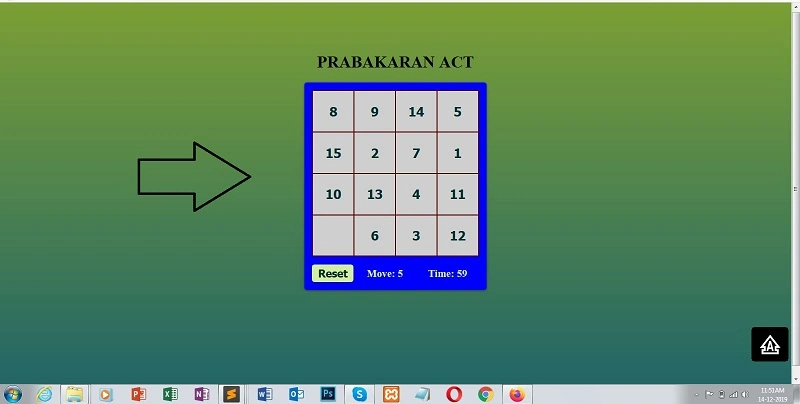
Conclusion
In this blog, you learned how to define a puzzle game in JavaScript. In the upcoming blog, you will learn some more advanced game and
application concepts in JavaScript. Thanks for reading :)
Jonas JonesPosted Jul 28, 2020, 8:44 AM
Is there a way to Insert a picture instead of the numbers and the boxes ?
Laxmidhar SahooPosted Jan 3, 2020, 8:53 AM
Thanks for good example
Guest UserPosted Dec 21, 2019, 11:31 AM
Interesting, nice programming.