

Description
About
Classes used
#1: Process class,
provides an access to local & remote processes, also enable to start & stop local
system processes. Using the Process component, we can obtain a list of the
processes that are running, or can start a new process.
Namespace Required - System. Diagnostics
Here I implemented the Code for enlisting the properties of running processes of the local system.
The Code: (do necessary changes)
1. Access the Running Processes (ProcessID & ProcessName) (code for “Refresh” Button).
//Look
for Currently Running Processes
foreach (Process var in Process.GetProcesses())
{
try
{
ListViewItem item
= newListViewItem(var.MainModule.ModuleName);
item.SubItems.Add(var.Id.ToString());
lvProcesses.Items.Add(item); //Add
Process Name & ID to ListView
}catch (Exception)
{ //Add
code for Exception (if any) }
}
Listing 1
2. Display
the Properties of Selected Process (code for “Show” Button)
//
Get ProcessID of Selected Process From Listview
Process P
= Process.GetProcessById(Convert.ToInt16(“SelectedProcess”);
try
{
lblDescription.Text
= "File
Description : " +
P.MainModule.FileVersionInfo.FileDescription;
lblCompany.Text
= "Company
Name : " +
P.MainModule.FileVersionInfo.CompanyName;
lblVersion.Text
= "Version
: " +
P.MainModule.FileVersionInfo.ProductVersion;
lblCopyright.Text
= "Copyright
: " +
P.MainModule.FileVersionInfo.LegalCopyright;
lblTrademark.Text
= "Internal
Name : " +
P.MainModule.FileVersionInfo.InternalName;
lblLanguge.Text
= "Language
: " +
P.MainModule.FileVersionInfo.Language;
txtPath.Text = P.MainModule.FileVersionInfo.FileName;
} catch (Exception) { //Add code for Exception (if any) }
Listing 2
3. Now
execute the Application and
see the result (Figure
1).
Intended Result:
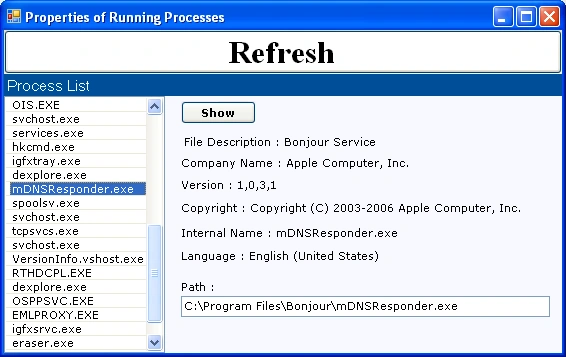
Figure 1
Summary:
In this piece of writing, using C# environment, we have seen how to access the properties of running properties on the local system
Join the conversation! Your thoughts help the community grow.