

If you want to upload an image through a file upload control in ASP.NET C# and want to preview of image with in upload time, write simple code to get out of here.
You can use given below function for it:
- <script src="//code.jquery.com/jquery-1.10.2.min.js" type="text/javascript"></script>
- <script type="text/javascript">
- function ShowpImage(input) {
- if (input.files && input.files[0]) {
- var reader = new FileReader();
- reader.onload = function (e) {
- $('#ImgShow').attr('src', e.target.result);
- }
- reader.readAsDataURL(input.files[0]);
- }
- }
- </script>
Now Full Code,
- <%@ Page Language="C#" AutoEventWireup="true" CodeFile="Default.aspx.cs" Inherits="_Default" %>
- <!DOCTYPE html PUBLIC "-//W3C//DTD XHTML 1.0 Transitional//EN" "http://www.w3.org/TR/xhtml1/DTD/xhtml1-transitional.dtd">
- <html xmlns="http://www.w3.org/1999/xhtml">
- <head runat="server">
- <title>
- Show image preview on File upload Control
- </title>
- <script src="//code.jquery.com/jquery-1.10.2.min.js" type="text/javascript"></script>
- <script type="text/javascript">
- function ShowpImage(input) {
- if (input.files && input.files[0]) {
- var reader = new FileReader();
- reader.onload = function (e) {
- $('#ImgShow').attr('src', e.target.result);
- }
- reader.readAsDataURL(input.files[0]);
- }
- }
- </script>
- </head>
- <body>
- <form id="form1" runat="server">
- <div>
- <fieldset style="width: 250px;">
- <legend>Show image preview before image upload</legend>
- <div align="center">
- <asp:Image ID="ImgShow" Height="150px" Width="150px" runat="server" /><br />
- <asp:FileUpload ID="flupImage" runat="server" onchange="ShowpImage(this);" />
- </div>
- </fieldset>
- </div>
- </form>
- </body>
- </html>
Output 1
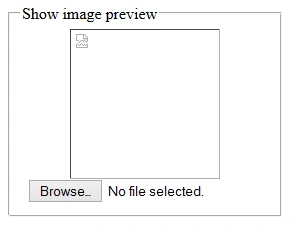
Now Click on Browse Button and select a image and click on open button.
Output 2

SubashPosted Sep 7, 2016, 2:30 AM
Good