

Introduction
Many times we have a requirement to list out all workflows which have been created in SharePoint Online in order to rewrite/scrap useless workflows or because of some other reason.
You can modify this workflow based on your requirement if you want to have more details about the list/site/item.
The current workflow performs the below actions,
- Gets all workflows from all lists and libraries from SharePoint Online site collection.
- Exports the workflow data into a CSV file
References
You need to add the below 3 references in your ps1 file,
Add-Type -Path "C:\Program Files\Common Files\Microsoft Shared\Web Server Extensions\16\ISAPI\Microsoft.SharePoint.Client.dll"
Add-Type -Path "C:\Program Files\Common Files\Microsoft Shared\Web Server Extensions\16\ISAPI\Microsoft.SharePoint.Client.Runtime.dll"
Add-Type -Path "C:\Program Files\Common Files\microsoft shared\Web Server Extensions\16\ISAPI\Microsoft.SharePoint.Client.WorkflowServices.dll"
Later you need to update only with your site collection URL at:
$SiteURL="Your SharePoint Online Site Collection URL"
Complete Script
- #Start Code
- #Load SharePoint CSOM Assemblies
- Add-Type -Path "C:\Program Files\Common Files\Microsoft Shared\Web Server Extensions\16\ISAPI\Microsoft.SharePoint.Client.dll"
- Add-Type -Path "C:\Program Files\Common Files\Microsoft Shared\Web Server Extensions\16\ISAPI\Microsoft.SharePoint.Client.Runtime.dll"
- Add-Type -Path "C:\Program Files\Common Files\microsoft shared\Web Server Extensions\16\ISAPI\Microsoft.SharePoint.Client.WorkflowServices.dll"
- #Function to Get workflows in a site
- #Set Parameters
- $SiteURL="Your Site URL"
- $CSVPath = "D:\Project\WorkflowInventoryGCP.csv"
- Function GetNintexForm(){
- $SiteUrl = "Site URL"
- $UserName = "User Name"
- #Bind to site collection
- $SecurePassword = ConvertTo-SecureString "Password" -AsPlainText -Force
- $ClientContext = New-Object Microsoft.SharePoint.Client.ClientContext($SiteUrl)
- $credentials = New-Object Microsoft.SharePoint.Client.SharePointOnlineCredentials($UserName, $SecurePassword)
- $ClientContext.Credentials = $credentials
- $ClientContext.ExecuteQuery()
- # Create WorkflowServicesManager instance
- $WorkflowServicesManager = New-Object Microsoft.SharePoint.Client.WorkflowServices.WorkflowServicesManager($ClientContext, $ClientContext.Web)
- # Connect to WorkflowSubscriptionService
- $WorkflowSubscriptionService = $WorkflowServicesManager.GetWorkflowSubscriptionService()
- # Connect WorkflowInstanceService instance
- $WorkflowInstanceService = $WorkflowServicesManager.GetWorkflowInstanceService()
- $ClientContext.Load($WorkflowServicesManager)
- $ClientContext.Load($WorkflowSubscriptionService)
- $ClientContext.Load($WorkflowInstanceService)
- $ClientContext.ExecuteQuery()
- # Get Site Workflows
- $SiteWorkflows = $WorkflowSubscriptionService.EnumerateSubscriptions()
- $ClientContext.Load($SiteWorkflows)
- $ClientContext.ExecuteQuery()
- $SiteWorkflows | Select Id, Name, StatusFieldName | FT -AutoSize
- If($SiteWorkflows) { $SiteWorkflows | Export-CSV -LiteralPath $CSVformPath -NoTypeInformation -Append}
- # Define Site Workflow
- # $SiteWorkflowID = 'mysiteworkflowid'
- # $SiteWorkflow = $WorkflowSubscriptionService.GetSubscription($SiteWorkflowID)
- # $ClientContext.Load($SiteWorkflow)
- # $ClientContext.ExecuteQuery()
- # Prepare Start Workflow Payload
- $Dict = New-Object 'System.Collections.Generic.Dictionary[System.String,System.Object]'
- # Loop Start Workflow
- For ($j=0; $j -lt 10; $j++){
- $Action = $WorkflowInstanceService.StartWorkflow($SiteWorkflow, $Dict)
- #$ClientContext.ExecuteQuery()
- # Get Workflow Status
- #$WorkflowInstance = $Action.Value
- #$WorkflowStatus = $WorkflowInstanceService.GetInstance($Action.Value)
- #$ClientContext.Load($WorkflowStatus)
- #$ClientContext.ExecuteQuery()
- #Write-Host $Action.Value $WorkflowStatus.Status
- }
- }
- #End
- #Remove the CSV file if exists
- If(Test-Path $CSVPath) { Remove-Item $CSVPath}
- #Get Credentials to connect
- $Cred= Get-Credential
- #Call the function to get workflow inventory
- GetNintexForm
- #End Code
The output of the script will be:
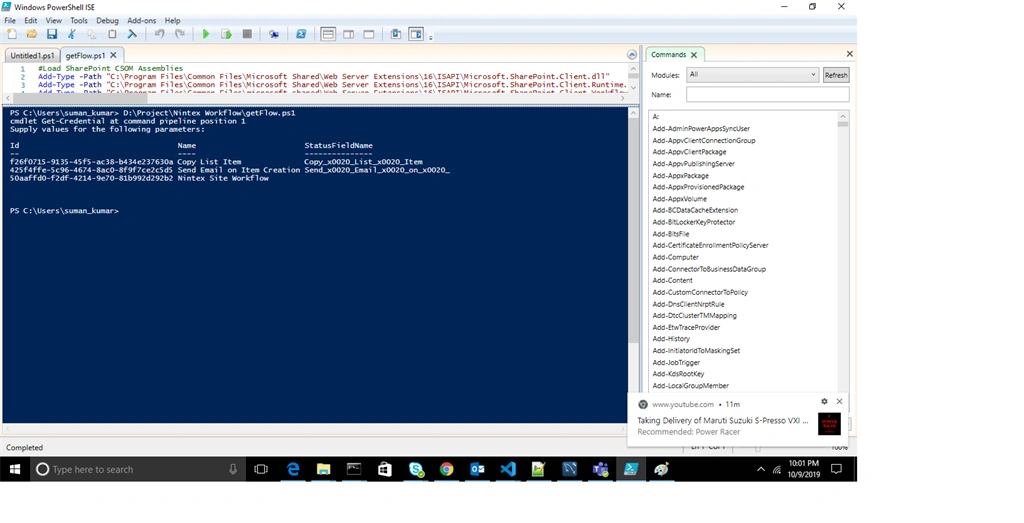
Also, I have uploaded a ps file along with this, just change the URL to yours and start using it.
Happing Coding!!
Vernon ArendsPosted Jul 24, 2020, 4:13 PM
Hi Suman, thanks for the great article , now that I have found the names of the workflows, how can i dive deeper to see what they are doing