

Introduction
Power Automate flows allow the design of simple, medium to more complex, and, at the same time, very efficient processes. Often, it becomes trickier to troubleshoot the complex design, like using conditional Blocks, scopes, and For Each. I have come across the issue that says, ‘Power flow’s logic app flow template was invalid. The template actions are nested at level 9, which exceeds the maximum nesting limit of 8.
Below is a screen capture for reference.

Error Message. The power flow's logic app flow template was invalid. The template actions 'Compose_9' are nested at level '9', which exceeds the maximum nesting limit of '8'
What is nesting in Power Automate?
Let’s get into the basics of nesting. If you define an action inside conditional logic, such as If-else or Foreach, it becomes a nesting level. Below is the screen capture for reference.
Here, the ‘Compose’ action is at nesting level 1.

If you have another condition defined under the ‘Yes’ block after the composing action and define a compose inside the ‘Yes’ block, the nesting level for this compose two actions is at level 2.
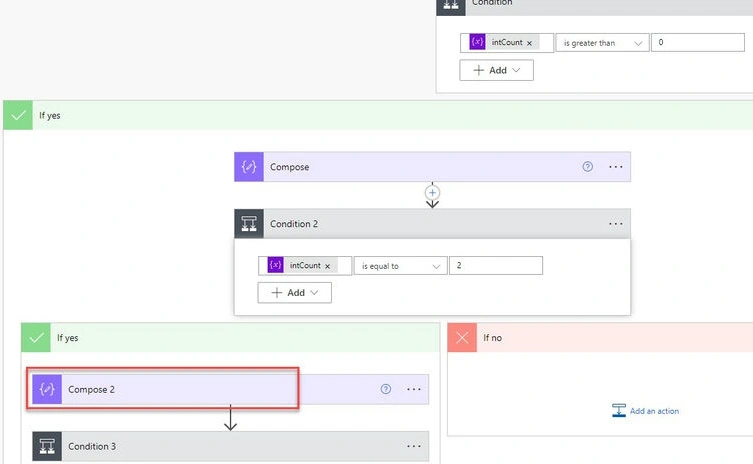
Likewise, this nesting could go up to 8 levels. After that, you end up with an error saying that the flow cannot be saved as it passes the nesting limit 8. Here, I tried to save the flow after having eight nesting conditions.

Overcoming the nesting limit
Below are some of the practices that could help in limiting the nesting condition.
- Try to combine the two or more conditions into a single condition. For instance, if you have a scenario check for the due date and are checking the assignee status, then instead of writing to conditions, try to combine the conditions check to one.
- Try referring to the config list from the SharePoint list instead of creating variables inside the flow and then checking for the values during the runtime.
- Break down the flow into child flows and have the parent flow called child flow during specific conditions.
- Try reducing ‘Apply to Each’ if possible, try using a filter, and select actions to extract the values from arrays or objects.
References
Join the conversation! Your thoughts help the community grow.