

Introduction

Firstly, we need to download the AngularJS from https://angularjs.org. Also, you can give online link in your HTML page as, given below-
- <script src="http://ajax.googleapis.com/ajax/libs/angularjs/1.4.8/angular.min.js"></script>
Use auto-bootstrap for an AngularJS Application.
This is a root element of an Application.
What is ng-init ?
This directive allows you to evaluate an expression in the current scope. It does not create a new scope.
Example
- <!DOCTYPE html>
- <html>
- <head>
- <meta name="viewport" content="width=device-width" />
- <title>Operators in AngularJS</title>
- <script src="http://ajax.googleapis.com/ajax/libs/angularjs/1.4.8/angular.min.js"></script>
- </head>
- <body>
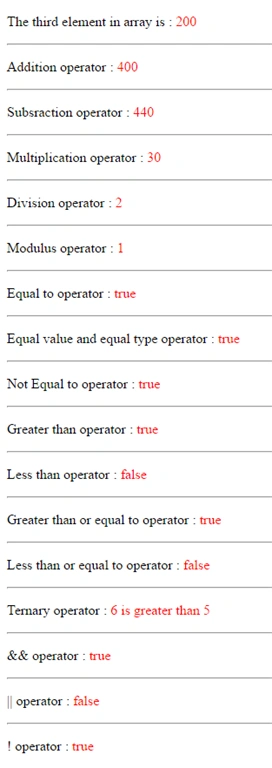
- <div ng-app="" ng-init="myArray=[100,350,200,250,540,5,6]">
- <p>The third element in array is : <span style="color:red">{{ myArray[2] }}</span></p>
- <hr />
- <p>Addition operator :<span style="color:red"> {{ myArray[2] + myArray[2]}}</span></p>
- <hr />
- <p>Subsraction operator :<span style="color:red"> {{ myArray[4] - myArray[0]}}</span></p>
- <hr />
- <p>Multiplication operator :<span style="color:red"> {{ myArray[5] * myArray[6]}}</span></p>
- <hr />
- <p>Division operator :<span style="color:red"> {{ myArray[2] / myArray[0]}}</span></p>
- <hr />
- <p>Modulus operator :<span style="color:red"> {{ myArray[6] % myArray[5]}}</span></p>
- <hr />
- <p>Equal to operator :<span style="color:red"> {{ myArray[2]==myArray[2] }}</span></p>
- <hr />
- <p>Equal value and equal type operator :<span style="color:red"> {{ myArray[2] === myArray[2]}}</span></p>
- <hr />
- <p>Not Equal to operator :<span style="color:red"> {{ myArray[6] != myArray[5]}}</span></p>
- <hr />
- <p>Greater than operator : <span style="color:red">{{ myArray[6] > myArray[5]}}</span></p>
- <hr />
- <p>Less than operator :<span style="color:red"> {{ myArray[6] < myArray[5]}}</span></p>
- <hr />
- <p>Greater than or equal to operator : <span style="color:red">{{ myArray[6] >= myArray[5]}}</span></p>
- <hr />
- <p>Less than or equal to operator : <span style="color:red">{{ myArray[6] <= myArray[5]}}</span></p>
- <hr />
- <p>Ternary operator :<span style="color:red"> {{ (myArray[6] > myArray[5]) ? "6 is greater than 5":"5 is less than 6"}}</span></p>
- <hr />
- <p> && operator : <span style="color:red">{{ myArray[5] < myArray[6] && myArray[6] > myArray[5]}}</span></p>
- <hr />
- <p> || operator :<span style="color:red"> {{ myArray[5] === myArray[6] || myArray[6] === myArray[5]}}</span></p>
- <hr />
- <p> ! operator :<span style="color:red"> {{!( myArray[5] === myArray[6])}}</span></p>
- </div>
- </body>
- </html>
Summary
This article will help fresher candidates to understand the operators in AngularJS.
Rupesh KahanePosted Sep 26, 2016, 8:50 AM
Satish Kumar Vadlavalli Yes, you are right
Satish Kumar VadlavalliPosted Sep 19, 2016, 5:58 AM
Nice, my suggestion for you is, use css instead of inline styles
Rupesh KahanePosted Sep 13, 2016, 7:44 AM
Thanks Bhuvan Pandey
Bhuvan PandeyPosted Sep 13, 2016, 7:34 AM
Good one