

Introduction
In this blog, we will discuss Node JS and how to create a Node Project. Node.js is a cross-platform runtime environment and library for running JavaScript code outside the browser.
Before the existence of Node, Javascript code can be run inside the browser. With the invention of Node JS, We can run the javascript code outside the browser as well.
To work with Node js, we need to install Node js in our system.
How to Download Node JS?
- Go to Node JS
- Download the node js software with respect to your OS and architecture.
- Open Node JSinstaller.
- Keep the default folder path while installing don't change it. (it will get installed in c://programfiles/node js).
- Once installed. Set the node js path in the environment variables section.
Setting environment variables
- Open the system properties window by searching environment variables in the search section of Windows.
- Select the Advanced tab.
- Click the Environment Variables button.
- Under the system variables section, click the path row.
- Copy the path where the node js got installed. It will usually get installed in c:\programfiles\node js\.
- Create a new row by clicking the new button.
- Paste the file path in the new row created and click ok.
- Click ok in the system variables window.
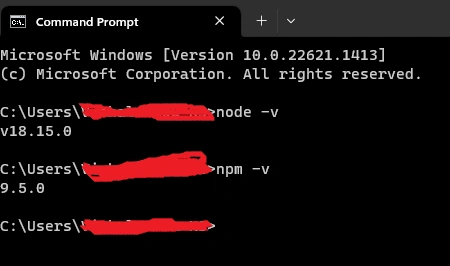
6. Open the command prompt and type node -version and npm -v to check the node and npm installation.
While installing Node, npm will also get installed.
To check whether Node is installed in your system.
Open command prompt or terminal in case of Mac or Linux.
Type
node -v
Type
npm -v
You will get the version of both Node and npm in your cmd.
How to Create a Node JS Project?
To Create a Node Project, first, we need to initialize the Node in the folder of your project.
To initialize a node in your project,
- Create a folder in your system.
- Open the folder in the visual studio code.
- Open the terminal and type node init, and hit enter.
It will ask a few configuration questions regarding the Node project we need to provide answers to it.
Configuration Questions
- Name of your project.
- A version of your project.
- Description of your project.
- The entry point of your project-> which file is the main entry point for your application.
- Git repo of your project.
- Author of the project.
- Any script you need to run --> any npm scripts if you want to run in your project. We can place commands to run unit tests, integration tests, etc.
- Keywords for your project-->These keywords will help search in the npm js website once you publish your npm project to the npm js website.
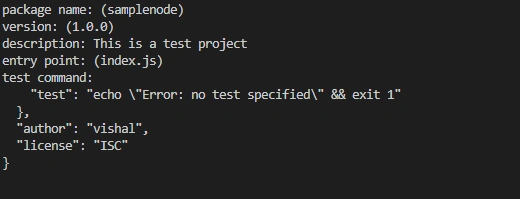
With the answers provided, npm will create a package.json file.
If you want to create a package.json file with default values, type.
npm init -y
Once your package.json file is generated, then you are good to go. You can install any library needed to work in your node js project.
The Package.json file is the heart of the node project. Every project metadata will get stored in the project.json file.
Package.json file is equivalent to a pom.xml file in Java maven technology.
Summary
The blog discusses Node.js and how to create a Node project. Node.js is a runtime environment and library for running JavaScript code outside the browser. To work with Node.js, it must be installed on the system by downloading the software from the Node.js website and setting the path in the environment variables section.
Tuhin PaulPosted May 1, 2023, 7:04 PM
Great Article. very informative for beginner!