

In .NET 9, the new ComponentBase.RendererInfo and ComponentBase.AssignedRenderMode APIs provide valuable information about a Blazor component's environment, allowing developers to adjust the rendering process based on specific conditions like interactivity or execution location.
The RendererInfo provides details about where the component is executing:
- RendererInfo.Name can indicate if the component is running in a static SSR (Server-Side Rendering), server-based interactive mode, client-side WebAssembly, or WebView (on a native device).
- RendererInfo.IsInteractive checks if the component is currently interactive, which can be useful for controlling which elements are enabled (e.g., disabling buttons or forms before full interactivity is available).
- AssignedRenderMode provides the render mode (like InteractiveServer, InteractiveWebAssembly, etc.), enabling different handling depending on the environment.
Here’s an example code that demonstrates the use of ComponentBase.RendererInfo in Blazor with .NET 9. The goal is to adjust the UI based on whether the component is interactive or in a prerendered state:
@page "/interactive-example"
@rendermode InteractiveServer
@attribute [StreamRendering]
<h3>interactive_example</h3>


@if (!RendererInfo.IsInteractive)
{
    <p>Connecting to the assistant...</p>
}
else
{
    <p>Ready for interaction!</p>
}

<button @onclick="Send" disabled="@(!RendererInfo.IsInteractive)">
    Send
</button>
<EditForm Model="MovieObj">
    <fieldset disabled="@disabled">
        <button type="submit">Save</button>
    </fieldset>
</EditForm>

@code {
    public class Movie
    {
        public string Title { get; set; }
    }
    private bool disabled = true;

    [SupplyParameterFromForm]
    private Movie? MovieObj { get; set; }

    protected override async Task OnInitializedAsync()
    {

        MovieObj ??= new Movie();
        // Simulate data fetching or processing
        await Task.Delay(2000);


        if (RendererInfo.IsInteractive)
        {
            disabled = false;
        }
    }

    protected override async Task OnAfterRenderAsync(bool firstRender)
    {

    }

    private void Send()
    {
        // Send message logic
        Console.WriteLine("Message sent!");
    }
}
In the initial state (Image 1), the system's interaction is not yet ready, so the user will see limited functionality or placeholder behavior on their screen. After a 2-second delay, as the server interaction completes, the screen transitions to the second state (Image 2), where full functionality becomes available, indicating readiness for interaction.
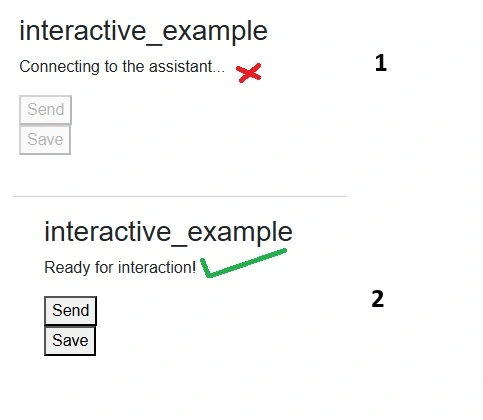
Key Elements
- RendererInfo.IsInteractive: Used to check if the component is interactive or still in a prerendered state. Before interactivity is enabled, elements like buttons or forms can be disabled.
- Button and Form Interactivity: The button and form are disabled while the component is being prerendered. Once interactivity is available, they are enabled.
This setup ensures that the UI behaves appropriately during the rendering process. For example, the Send/Save buttons remain disabled until the component is interactive, and the form inputs cannot be submitted during prerendering.
For more advanced scenarios, such as altering the render mode or handling different environments (SSR vs. WebAssembly), the AssignedRenderMode property can help fine-tune behavior across different platforms.
Join the conversation! Your thoughts help the community grow.