

In this article, we will learn about clean architecture and will walk you through a sample CRUD API in .NET 8.0.
We will use the following tools, technologies, and frameworks in this sample.
- Visual Studio 2022 and .NET 8.0
- C#
- MS SQL DB
- Clean Architecture
- Dapper (mini ORM)
- Repository Pattern
- Unit of Work
- Swagger UI
- API Authentication (Key Based)
- Logging (using log4net)
- Unit Testing (MSTest Project)
Before starting with the sample app, let us understand the clean architecture and its benefits.
The goal of software architecture is to minimize the human resources required to build and maintain the required system. ? Robert C. Martin, Clean Architecture.
Clean Architecture explained
Clean Architecture is the system architecture guideline proposed by Robert C. Martin also known as Uncle Bob. It is derived from many architectural guidelines such as Hexagonal Architecture, Onion Architecture, etc.
- The main concept of clean architecture is that the core logic of the application is changed rarely so it will be independent and considered core.
- The overriding rule that makes this architecture work is The Dependency Rule. This rule says that source code dependencies can only point inwards and nothing in an inner circle can know anything at all about something in an outer circle.
- By separating the software into layers, and conforming to The Dependency Rule, you will create an intrinsically testable system, with all the benefits that imply. When any of the external parts of the system become obsolete, like the database, or the web framework, you can replace those obsolete elements with a minimum of fuss.
- In clean architecture, the domain and application layers remain in the center of the design which is known as the core of the application.
- The domain layer contains enterprise logic, and the application layer contains business logic.
- Enterprise logic can be shared across many related systems, but business logic is not sharable as it is designed for specific business needs.
- If you do not have an enterprise and are just writing a single application, then these entities are the business objects of the application.
Advantages of clean architecture
- Frameworks Independent: The architecture does not depend on the existence of some library of feature-laden software. This allows you to use such frameworks as tools.
- UI Independent: It is loosely coupled with the UI layer. So, you can change the UI without changing the core business.
- Independent of Database: You can swap out SQL Server or Oracle, for Mongo, Bigtable, CouchDB, or something else. Your business rules are not bound to the database.
- Highly maintainable: It follows the separation of concern.
- Highly Testable: Apps built using this approach, especially the core domain model and its business rules, are extremely testable.
So now I have an understanding of clean architecture. Before starting the sample API let us briefly review the Dapper.
Dapper explained
- A dapper is a simple Object Mapper or a Micro: ORM and is responsible for mapping between a database and programming language.
- Dapper was created by the Stack Overflow team to address their issues and open-source it. Dapper used at Stack Overflow itself showcases its strength.
- It drastically reduces the database access code and focuses on getting database tasks done instead of being full-on ORM.
- It can be integrated with any database such as SQL Server, Oracle, SQLite, MySQL, PostgreSQL, etc.
- If DB is already designed, then using Dapper is an optimal and efficient option.
- Performance: Dapper is faster at querying data compared to the performance of the Entity Framework. This is because Dapper works directly with the RAW SQL and hence the time delay is relatively less.
Along with Dapper in this article, we will use Repository Pattern and Unit of Work and show you how Dapper can be used in an ASP.NET 8.0 API following Repository Pattern and Unit of Work.
Solution and Project Setup
First of all, create a new table that’ll be used to perform the CRUD operation. You can use the scripts shared under the CleanArch.Sql/Scripts folder of the code sample.
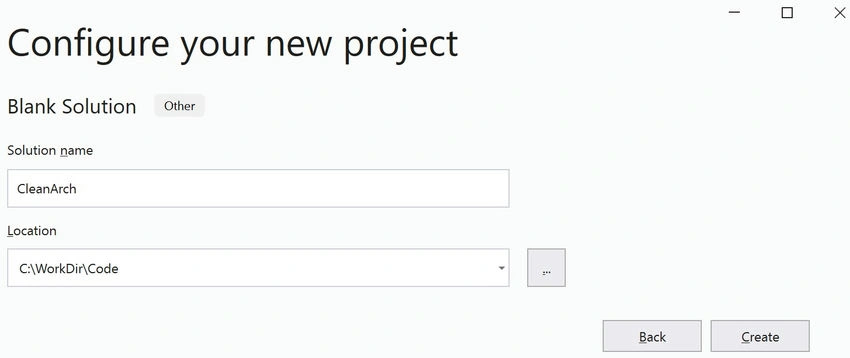
Once our back end is ready, Open Visual Studio 2022 create a blank solution project, and name it to CleanArch.
Set Up the Core Layer
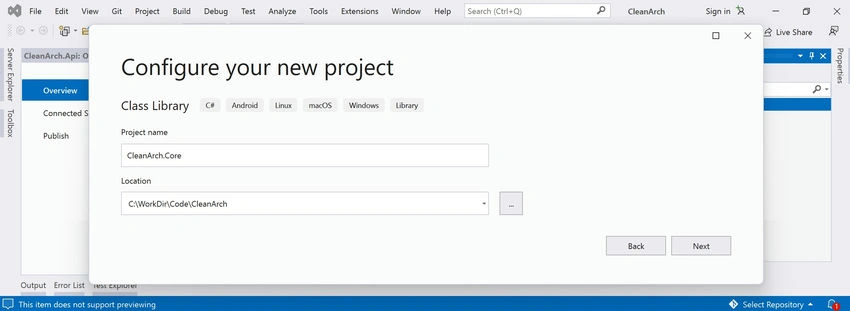
Under the solution, create a new Class Library project and name it CleanArch.Core.
Add a new folder Entities and add a new entity class with the name Contact.
public class Contact
{
    public int? ContactId { get; set; }
    public string FirstName { get; set; }
    public string LastName { get; set; }
    public string Email { get; set; }
    public string PhoneNumber { get; set; }
}
One thing to note down here is that the Core layer should not depend on any other Project or Layer. This is very important while working with Clean Architecture.
Set Up the Application Layer
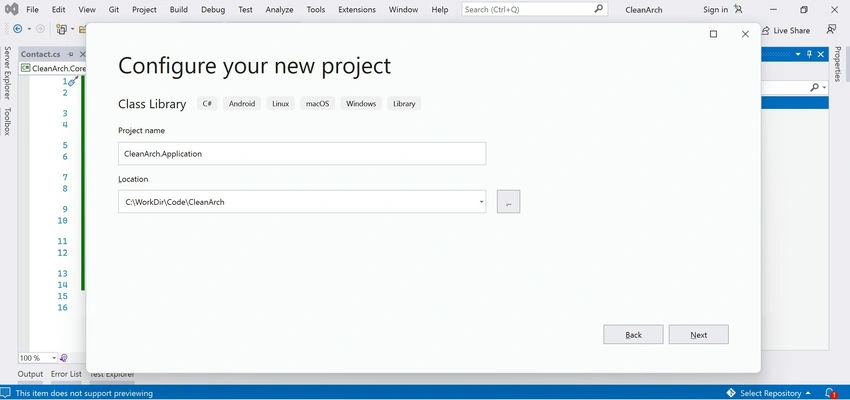
- Add another Class Library Project and name it CleanArch.Application.
- Add a new folder Application and under this, we will define the interfaces that will be implemented at another layer.
- Create a generic IRepository interface and define the CRUD methods.
public interface IRepository<T> where T : class { Task<IReadOnlyList<T>> GetAllAsync(); Task<T> GetByIdAsync(long id); Task<string> AddAsync(T entity); Task<string> UpdateAsync(T entity); Task<string> DeleteAsync(long id); } - Add a reference to the Core project, The Application project always depends only on the Core Project.
- After that add a Contact specific repository (IContactRepository), and inherit it from IRepository
- Also, create a new interface, and name it IUnitOfWork since we will be using Unit of Work in our implementation.
// IContactRepository.cs file public interface IContactRepository : IRepository<Contact> { } // IUnitOfWork.cs file public interface IUnitOfWork { IContactRepository Contacts { get; } } - As we are also implementing the logging, so add an ILogger interface and add methods for different log levels.
/// <summary>
/// Logger class contract.
/// </summary>
public interface ILogger
{
    // Log a message object
    void Debug(object message);
    void Info(object message);
    void Warn(object message);
    void Error(object message);
    void Fatal(object message);
    // Log a message object and exception
    void Debug(object message, Exception exception);
    void Info(object message, Exception exception);
    void Warn(object message, Exception exception);
    void Error(object message, Exception exception);
    void Fatal(object message, Exception exception);
    // Log an exception including the stack trace of exception
    void Error(Exception exception);
    void Fatal(Exception exception);
}
Set Up Logging
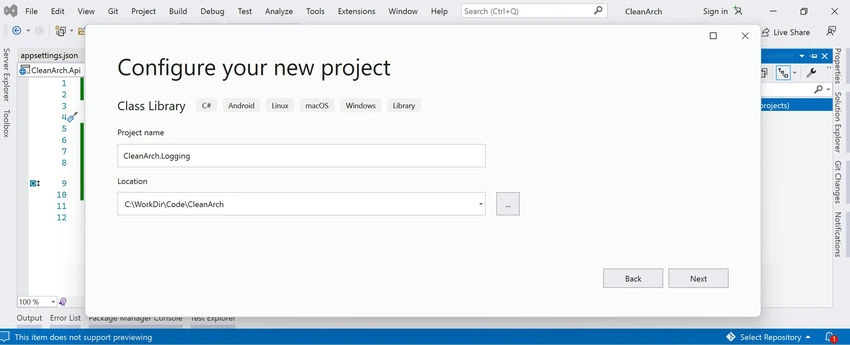
- Add a new Class Library Project (CleanArch.Logging)
- We will be using the Log4Net library for logging, hence install the Log4Net package from the Nuget Package Manager.
- Add a reference to the Application project and after that add a new class Logger and implement the ILogger interface.
public sealed class Logger : Application.Interfaces.ILogger
{
    #region ===[ Private Members ]=============================================================

    private static readonly ILog _logger = LogManager.GetLogger(MethodBase.GetCurrentMethod().DeclaringType);
    private static readonly Lazy<Logger> _loggerInstance = new Lazy<Logger>(() => new Logger());
    private const string ExceptionName = "Exception";
    private const string InnerExceptionName = "Inner Exception";
    private const string ExceptionMessageWithoutInnerException = "{0}{1}: {2}Message: {3}{4}StackTrace: {5}.";
    private const string ExceptionMessageWithInnerException = "{0}{1}{2}";
    #endregion
    #region ===[ Properties ]==================================================================
    /// <summary>
    /// Gets the Logger instance.
    /// </summary>
    public static Logger Instance
    {
        get { return _loggerInstance.Value; }
    }
    #endregion
    #region ===[ ILogger Members ]=============================================================
    /// <summary>
    /// Logs a message object with the log4net.Core.Level.Debug level.
    /// </summary>
    /// <param name="message"></param>
    public void Debug(object message)
    {
        if (_logger.IsDebugEnabled)
            _logger.Debug(message);
    }
    /// <summary>
    /// Logs a message object with the log4net.Core.Level.Info level.
    /// </summary>
    /// <param name="message"></param>
    public void Info(object message)
    {
        if (_logger.IsInfoEnabled)
            _logger.Info(message);
    }
    /// <summary>
    /// Logs a message object with the log4net.Core.Level.Info Warning.
    /// </summary>
    /// <param name="message"></param>
    public void Warn(object message)
    {
        if (_logger.IsWarnEnabled)
            _logger.Warn(message);
    }
    /// <summary>
    /// Logs a message object with the log4net.Core.Level.Error level.
    /// </summary>
    /// <param name="message"></param>
    public void Error(object message)
    {
        _logger.Error(message);
    }

    /// <summary>
    /// Logs a message object with the log4net.Core.Level.Fatal level.
    /// </summary>
    /// <param name="message"></param>
    public void Fatal(object message)
    {
        _logger.Fatal(message);
    }
    /// <summary>
    /// Logs a message object with the log4net.Core.Level.Debug level including the exception.
    /// </summary>
    /// <param name="message"></param>
    /// <param name="exception"></param>
    public void Debug(object message, Exception exception)
    {
        if (_logger.IsDebugEnabled)
            _logger.Debug(message, exception);
    }
    /// <summary>
    /// Logs a message object with the log4net.Core.Level.Info level including the exception.
    /// </summary>
    /// <param name="message"></param>
    /// <param name="exception"></param>
    public void Info(object message, Exception exception)
    {
        if (_logger.IsInfoEnabled)
            _logger.Info(message, exception);
    }
    /// <summary>
    /// Logs a message object with the log4net.Core.Level.Warn level including the exception.
    /// </summary>
    /// <param name="message"></param>
    /// <param name="exception"></param>
    public void Warn(object message, Exception exception)
    {
        if (_logger.IsWarnEnabled)
            _logger.Warn(message, exception);
    }
    /// <summary>
    /// Logs a message object with the log4net.Core.Level.Error level including the exception.
    /// </summary>
    /// <param name="message"></param>
    /// <param name="exception"></param>
    public void Error(object message, Exception exception)
    {
        _logger.Error(message, exception);
    }
    /// <summary>
    /// Logs a message object with the log4net.Core.Level.Fatal level including the exception.
    /// </summary>
    /// <param name="message"></param>
    /// <param name="exception"></param>
    public void Fatal(object message, Exception exception)
    {
        _logger.Fatal(message, exception);
    }
    /// <summary>
    /// Log an exception with the log4net.Core.Level.Error level including the stack trace of the System.Exception passed as a parameter.
    /// </summary>
    /// <param name="exception"></param>
    public void Error(Exception exception)
    {
        _logger.Error(SerializeException(exception, ExceptionName));
    }
    /// <summary>
    /// Log an exception with the log4net.Core.Level.Fatal level including the stack trace of the System.Exception passed as a parameter.
    /// </summary>
    /// <param name="exception"></param>
    public void Fatal(Exception exception)
    {
        _logger.Fatal(SerializeException(exception, ExceptionName));
    }
    #endregion
    #region ===[ Public Methods ]==============================================================
    /// <summary>
    /// Serialize Exception to get the complete message and stack trace.
    /// </summary>
    /// <param name="exception"></param>
    /// <returns></returns>
    public static string SerializeException(Exception exception)
    {
        return SerializeException(exception, string.Empty);
    }
    #endregion
    #region ===[ Private Methods ]=============================================================
    /// <summary>
    /// Serialize Exception to get the complete message and stack trace.
    /// </summary>
    /// <param name="ex"></param>
    /// <param name="exceptionMessage"></param>
    /// <returns></returns>
    private static string SerializeException(Exception ex, string exceptionMessage)
    {
        var mesgAndStackTrace = string.Format(ExceptionMessageWithoutInnerException, Environment.NewLine,
            exceptionMessage, Environment.NewLine, ex.Message, Environment.NewLine, ex.StackTrace);
        if (ex.InnerException != null)
        {
            mesgAndStackTrace = string.Format(ExceptionMessageWithInnerException, mesgAndStackTrace,
                Environment.NewLine,
                SerializeException(ex.InnerException, InnerExceptionName));
        }
        return mesgAndStackTrace + Environment.NewLine;
    }
    #endregion
}
Set Up SQL Project
- Add a new Class Library Project (CleanArch.Sql). We’ll be using this project to manage the Dapper Queries.
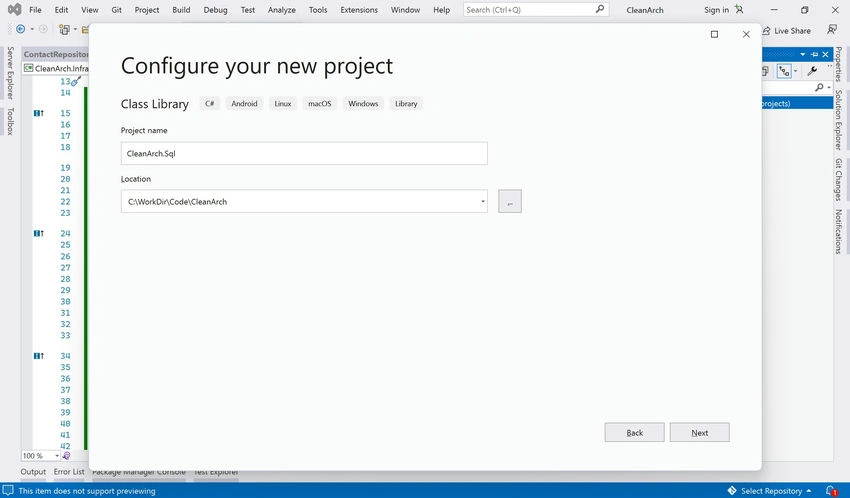
- Add a new folder Queries and add a new class under it ContactQueries (to manage dapper queries for the Contact object).
public static class ContactQueries { public static string AllContact => "SELECT * FROM [Contact] (NOLOCK)"; public static string ContactById => "SELECT * FROM [Contact] (NOLOCK) WHERE [ContactId] = @ContactId"; public static string AddContact => @"INSERT INTO [Contact] ([FirstName], [LastName], [Email], [PhoneNumber]) VALUES (@FirstName, @LastName, @Email, @PhoneNumber)"; public static string UpdateContact => @"UPDATE [Contact] SET [FirstName] = @FirstName, [LastName] = @LastName, [Email] = @Email, [PhoneNumber] = @PhoneNumber WHERE [ContactId] = @ContactId"; public static string DeleteContact => "DELETE FROM [Contact] WHERE [ContactId] = @ContactId"; } - Besides that, Scripts folder is added that contains prerequisite scripts of table used in the sample.
Set Up Infrastructure Layer
- Since our base code is ready, now add a new Class Library Project and name itmCleanArch.Infrastructure.
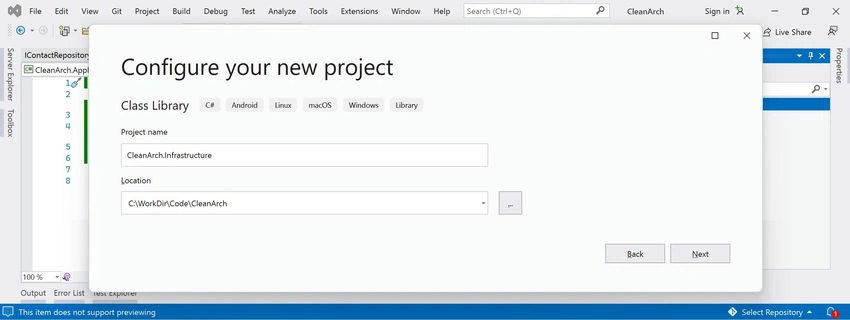
- Add the required packages to be used in this project.
Install-Package Dapper Install-Package Microsoft.Extensions.Configuration Install-Package Microsoft.Extensions.DependencyInjection.Abstractions Install-Package System.Data.SqlClient - Add the reference to projects (Application, Core, and Sql), and add a new folder Repository.
- After that let’s implement the IContactRepository interface, by creating a new class ContactRepository and injecting IConfiguration to get the connection string from appsettings.json.
public class ContactRepository : IContactRepository { #region ===[ Private Members ]============================================================= private readonly IConfiguration configuration; #endregion #region ===[ Constructor ]================================================================= public ContactRepository(IConfiguration configuration) { this.configuration = configuration; } #endregion #region ===[ IContactRepository Methods ]================================================== public async Task<IReadOnlyList<Contact>> GetAllAsync() { using (IDbConnection connection = new SqlConnection(configuration.GetConnectionString("DBConnection"))) { connection.Open(); var result = await connection.QueryAsync<Contact>(ContactQueries.AllContact); return result.ToList(); } } public async Task<Contact> GetByIdAsync(long id) { using (IDbConnection connection = new SqlConnection(configuration.GetConnectionString("DBConnection"))) { connection.Open(); var result = await connection.QuerySingleOrDefaultAsync<Contact>(ContactQueries.ContactById, new { ContactId = id }); return result; } } public async Task<string> AddAsync(Contact entity) { using (IDbConnection connection = new SqlConnection(configuration.GetConnectionString("DBConnection"))) { connection.Open(); var result = await connection.ExecuteAsync(ContactQueries.AddContact, entity); return result.ToString(); } } public async Task<string> UpdateAsync(Contact entity) { using (IDbConnection connection = new SqlConnection(configuration.GetConnectionString("DBConnection"))) { connection.Open(); var result = await connection.ExecuteAsync(ContactQueries.UpdateContact, entity); return result.ToString(); } } public async Task<string> DeleteAsync(long id) { using (IDbConnection connection = new SqlConnection(configuration.GetConnectionString("DBConnection"))) { connection.Open(); var result = await connection.ExecuteAsync(ContactQueries.DeleteContact, new { ContactId = id }); return result.ToString(); } } #endregion } - Also, implement the IUnitOfWork interface, by creating a new class UnitOfWork.
public class UnitOfWork : IUnitOfWork { public UnitOfWork(IContactRepository contactRepository) { Contacts = contactRepository; } public IContactRepository Contacts { get; set; } } - Finally, register the interfaces with implementations to the .NET Core service container. Add a new class static ServiceCollectionExtension and add the RegisterServices method under it by injecting IServiceCollection.
- Later, we will register this under the API’s ConfigureService method.
public static class ServiceCollectionExtension
{
    public static void RegisterServices(this IServiceCollection services)
    {
        services.AddTransient<IContactRepository, ContactRepository>();
        services.AddTransient<IUnitOfWork, UnitOfWork>();
    }
}
Set up API Project
- Add a new .NET 8.0 Web API project and name it CleanArch.Api.
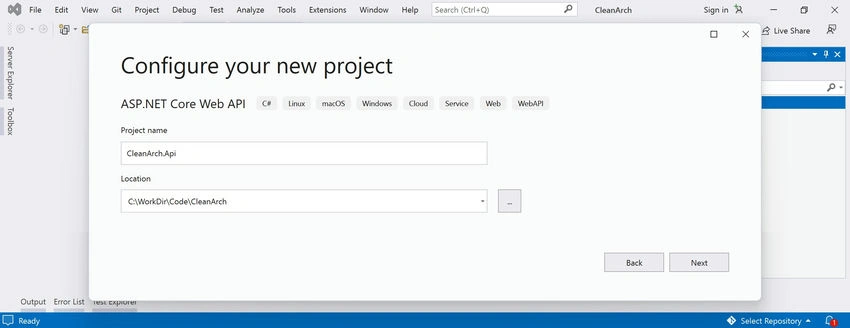
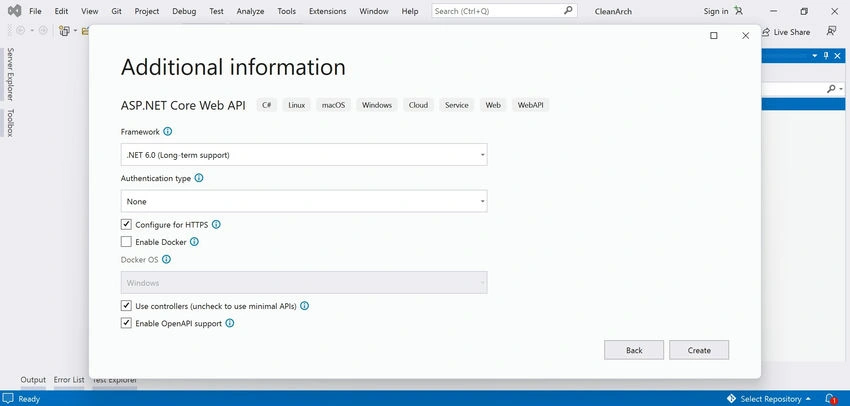
- Add the reference to projects (Application, Infrastructure, and Logging), and add the Swashbuckle.AspNetCore package.
- Set up the appsettings.json file to manage the API settings and replace your DB connection string under the ConnectionStrings section.
{ "Environment": "Development", "EnvironmentVersion": "1.0.0.0", "ConnectionStrings": { "DBConnection": "Data Source=<server-name>; Initial Catalog=<db-name>; User ID=<user-name>; PWD=<password>" }, "SecretKeys": { "ApiKey": "04577BA6-3E32-456C-B528-E41E20D28D79", "ApiKeySecondary": "6D5D1ABA-4F78-4DD3-A69D-C2D15F2E259A,709C95E7-F59D-4CC4-9638-4CDE30B2FCFD", "UseSecondaryKey": true }, "Logging": { "LogLevel": { "Default": "Information", "Microsoft.AspNetCore": "Warning" } }, "AllowedHosts": "*" } - Add log4net.config and add logging-related settings under it. Make sure to set its Copy to Output Directory property to Copy Always.
<?xml version="1.0" encoding="utf-8" ?> <log4net> <appender name="Console" type="log4net.Appender.ConsoleAppender"> <layout type="log4net.Layout.PatternLayout"> <!-- Pattern to output the caller's file name and line number --> <conversionPattern value="%date %5level %logger.%method [%line] - MESSAGE: %message%newline %exception" /> </layout> </appender> <appender name="RollingFile" type="log4net.Appender.RollingFileAppender"> <file type="log4net.Util.PatternString" value="C:\Logs\CleanArch_API\Log.%property{log4net:HostName}.log" /> <!-- If you don't have permission to write logs on C drive, then you can test by writing in api bin folder. --> <!--<file type="log4net.Util.PatternString" value="bin\Logs\Log.%property{log4net:HostName}.log" />--> <appendToFile value="true" /> <rollingStyle value="Size" /> <maxSizeRollBackups value="5" /> <maximumFileSize value="10MB" /> <layout type="log4net.Layout.PatternLayout"> <conversionPattern value="%date %5level %logger.%method [%line] - MESSAGE: %message%newline %exception" /> </layout> </appender> <appender name="TraceAppender" type="log4net.Appender.TraceAppender"> <layout type="log4net.Layout.PatternLayout"> <conversionPattern value="%date %5level %logger.%method [%line] - MESSAGE: %message%newline %exception" /> </layout> </appender> <appender name="ConsoleAppender" type="log4net.Appender.ManagedColoredConsoleAppender"> <mapping> <level value="ERROR" /> <foreColor value="Red" /> </mapping> <mapping> <level value="WARN" /> <foreColor value="Yellow" /> </mapping> <mapping> <level value="INFO" /> <foreColor value="White" /> </mapping> <mapping> <level value="DEBUG" /> <foreColor value="Green" /> </mapping> <layout type="log4net.Layout.PatternLayout"> <conversionPattern value="%date %5level %logger.%method [%line] - MESSAGE: %message%newline %exception" /> </layout> </appender> <root> <level value="WARN" /> <appender-ref ref="RollingFile" /> <appender-ref ref="TraceAppender" /> <appender-ref ref="ConsoleAppender" /> <appender-ref ref="JSONFileAppender" /> </root> </log4net> - Configure Startup settings, such as RegisterServices (defined under CleanArch.Infrastructure project), configure log4net, and add the Swagger UI (with authentication scheme).
using log4net.Config; using Microsoft.OpenApi.Models; var builder = WebApplication.CreateBuilder(args); // Configure Log4net. XmlConfigurator.Configure(new FileInfo("log4net.config")); // Injecting services -> defined under CleanArch.Infrastructure project. builder.Services.RegisterServices(); // Add services to the container. builder.Services.AddControllers(); // Learn more about configuring Swagger/OpenAPI at https://aka.ms/aspnetcore/swashbuckle builder.Services.AddEndpointsApiExplorer(); builder.Services.AddSwaggerGen(c => { c.AddSecurityDefinition("basic", new OpenApiSecurityScheme { Description = "api key.", Name = "Authorization", In = ParameterLocation.Header, Type = SecuritySchemeType.ApiKey, Scheme = "basic" }); c.AddSecurityRequirement(new OpenApiSecurityRequirement { { new OpenApiSecurityScheme { Reference = new OpenApiReference { Type = ReferenceType.SecurityScheme, Id = "basic" }, In = ParameterLocation.Header }, new List<string>() } }); }); var app = builder.Build(); // Configure the HTTP request pipeline. if (app.Environment.IsDevelopment()) { app.UseSwagger(); app.UseSwaggerUI(); } app.UseHttpsRedirection(); app.UseAuthorization(); app.MapControllers(); app.Run(); - Remove the default controller/model classes and add a new class under Model (ApiResponse), to manage a generic response format for API responses.
public class ApiResponse<T> { public bool Success { get; set; } public string Message { get; set; } public T Result { get; set; } } - Add a new controller and name it AuthController, to implement Not Authorized implementation since we will be using the key-based authentication.
[Produces("application/json")] [Route("api/[controller]")] [ApiExplorerSettings(IgnoreApi = true)] public class AuthController : Controller { [HttpGet] public IActionResult NotAuthorized() { return Unauthorized(); } } - Add AuthorizationFilter, as shown below to manage the API key-based authentication.
- This allows authentication based on the main key and secondary keys.
- We can add multiple secondary keys and we can turn on or off their usage from app settings.
- This will help to keep our main key safe and distribute the secondary keys to different clients on a need basis.
public class AuthorizationFilterAttribute : Attribute, IAuthorizationFilter
{
    private readonly string _apiKey;
    private readonly string _apiKeySecondary;
    private readonly bool _canUseSecondaryApiKey;
    public AuthorizationFilterAttribute(IConfiguration configuration)
    {
        _apiKey = configuration["SecretKeys:ApiKey"];
        _apiKeySecondary = configuration["SecretKeys:ApiKeySecondary"];
        _canUseSecondaryApiKey = configuration["SecretKeys:UseSecondaryKey"] == "True";
    }
    public void OnAuthorization(AuthorizationFilterContext context)
    {
        var apiKeyHeader = context.HttpContext.Request.Headers["Authorization"].ToString();
        var authController = new Controllers.AuthController();
        if (apiKeyHeader.Any())
        {
            var keys = new List<string>
            {
                _apiKey
            };
            if (_canUseSecondaryApiKey)
            {
                keys.AddRange(_apiKeySecondary.Split(','));
            }
            if (keys.FindIndex(x => x.Equals(apiKeyHeader, StringComparison.OrdinalIgnoreCase)) == -1)
            {
                context.Result = authController.NotAuthorized();
            }
        }
        else
        {
            context.Result = authController.NotAuthorized();
        }
    }
}
- Add a new controller and name it BaseApiController, this controller will contain the common implementation and will serve as a base controller for all other API controllers.
[Route("api/[controller]")] [TypeFilter(typeof(AuthorizationFilterAttribute))] [ApiController] public class BaseApiController : ControllerBase { } - Finally, add a new API controller to expose the Contact API by injecting an object type of IUnitOfWork and adding all the CRUD operations.
public class ContactController : BaseApiController
{
    private readonly IUnitOfWork _unitOfWork;
    public ContactController(IUnitOfWork unitOfWork)
    {
        _unitOfWork = unitOfWork;
    }
    [HttpGet]
    public async Task<ApiResponse<List<Contact>>> GetAll()
    {
        var apiResponse = new ApiResponse<List<Contact>>();
        try
        {
            var data = await _unitOfWork.Contacts.GetAllAsync();
            apiResponse.Success = true;
            apiResponse.Result = data.ToList();
        }
        catch (SqlException ex)
        {
            HandleApiException(apiResponse, ex);
        }
        catch (Exception ex)
        {
            HandleApiException(apiResponse, ex);
        }
        return apiResponse;
    }
    [HttpGet("{id}")]
    public async Task<ApiResponse<Contact>> GetById(int id)
    {
        var apiResponse = new ApiResponse<Contact>();
        try
        {
            var data = await _unitOfWork.Contacts.GetByIdAsync(id);
            apiResponse.Success = true;
            apiResponse.Result = data;
        }
        catch (SqlException ex)
        {
            HandleApiException(apiResponse, ex);
        }
        catch (Exception ex)
        {
            HandleApiException(apiResponse, ex);
        }
        return apiResponse;
    }
    [HttpPost]
    public async Task<ApiResponse<string>> Add(Contact contact)
    {
        var apiResponse = new ApiResponse<string>();
        try
        {
            var data = await _unitOfWork.Contacts.AddAsync(contact);
            apiResponse.Success = true;
            apiResponse.Result = data;
        }
        catch (SqlException ex)
        {
            HandleApiException(apiResponse, ex);
        }
        catch (Exception ex)
        {
            HandleApiException(apiResponse, ex);
        }
        return apiResponse;
    }
    [HttpPut]
    public async Task<ApiResponse<string>> Update(Contact contact)
    {
        var apiResponse = new ApiResponse<string>();
        try
        {
            var data = await _unitOfWork.Contacts.UpdateAsync(contact);
            apiResponse.Success = true;
            apiResponse.Result = data;
        }
        catch (SqlException ex)
        {
            HandleApiException(apiResponse, ex);
        }
        catch (Exception ex)
        {
            HandleApiException(apiResponse, ex);
        }
        return apiResponse;
    }
    [HttpDelete]
    public async Task<ApiResponse<string>> Delete(int id)
    {
        var apiResponse = new ApiResponse<string>();
        try
        {
            var data = await _unitOfWork.Contacts.DeleteAsync(id);
            apiResponse.Success = true;
            apiResponse.Result = data;
        }
        catch (SqlException ex)
        {
            HandleApiException(apiResponse, ex);
        }
        catch (Exception ex)
        {
            HandleApiException(apiResponse, ex);
        }
        return apiResponse;
    }
    private void HandleApiException(ApiResponseBase response, Exception ex)
    {
        response.Success = false;
        response.Message = ex.Message;
        Logger.Instance.Error("Exception:", ex);
    }
}
Set up a Test Project
- Add a new MSTest Test project and name it CleanArch.Test and add the below packages.
Install-Package Microsoft.Extensions.Configuration
Install-Package MSTest.TestFramework
Install-Package MSTest.TestAdapter
Install-Package Moq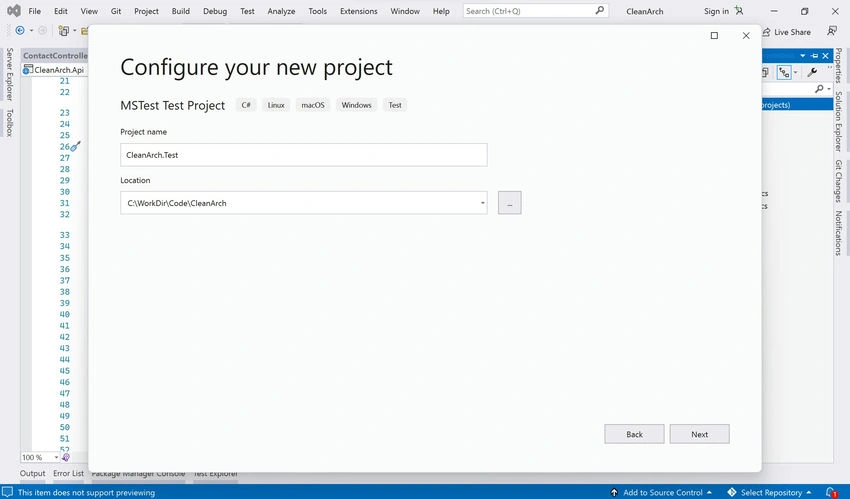
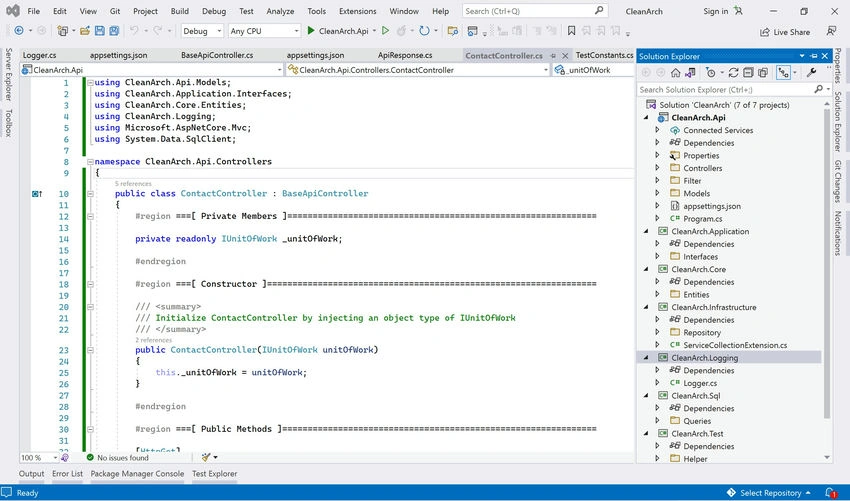
- After that create a new class ContactControllerShould and set up all the possible test cases, review the code of CleanArch.Test project for further understanding.
- Review the project structure in the solution explorer.
Build and Run Test Cases
Build the solution and run the code coverage, this will run all the test cases and show you the test code coverage.

Run and Test API
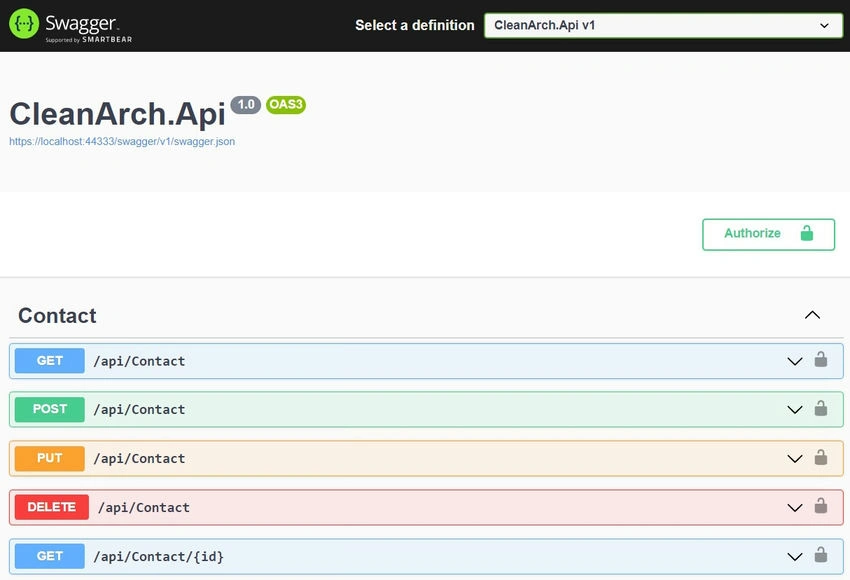
Run the project and test all the CRUD API methods. (Make sure CleanArch.API is set as a startup project).
- Swagger UI
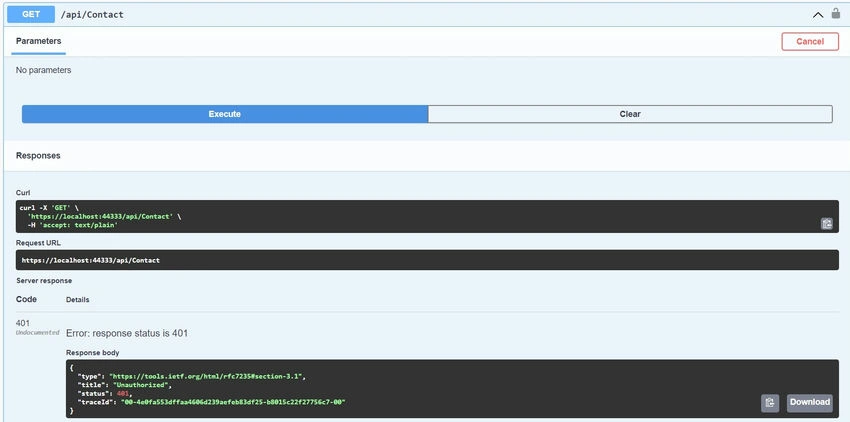
- Running API without authentication throws an error.
- Add API Authorization.
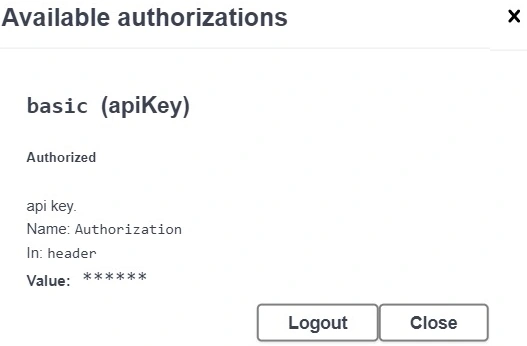
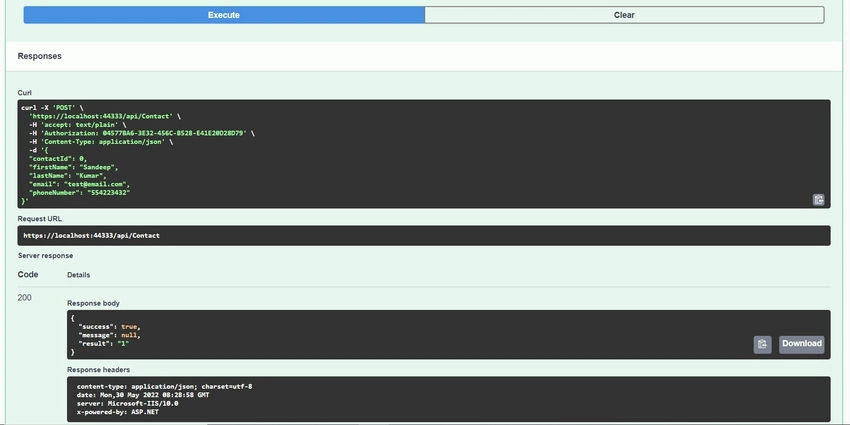
- POST: Add new record.
]
- GET: Get All records.
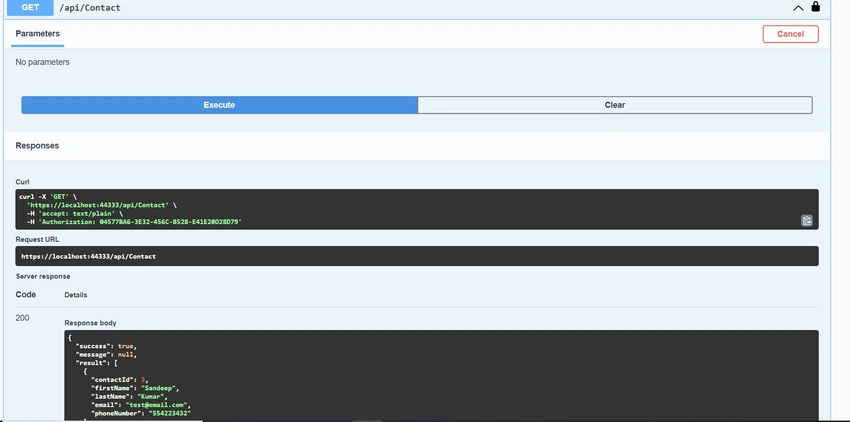
- PUT: Update the existing record.
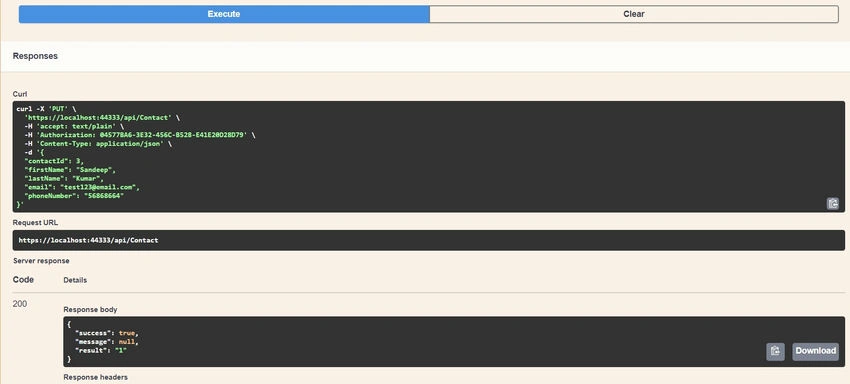
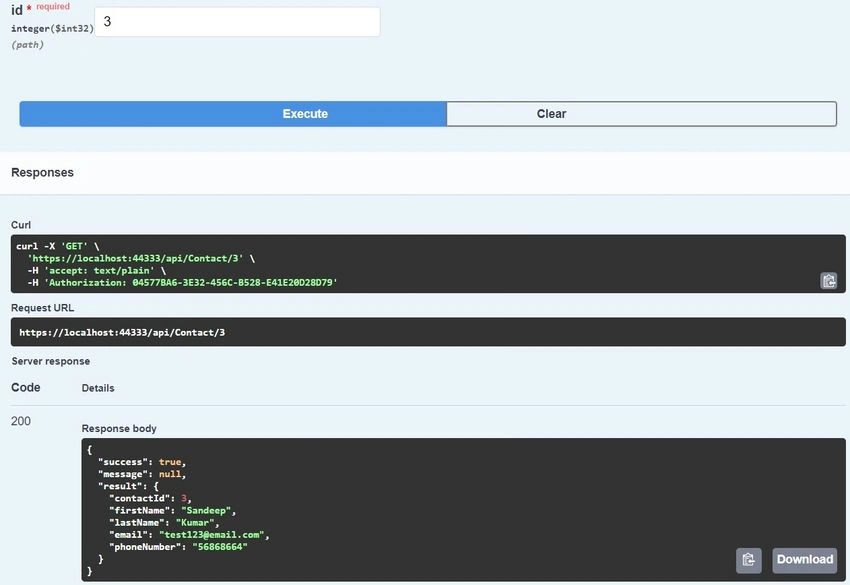
- GET: Get single record.
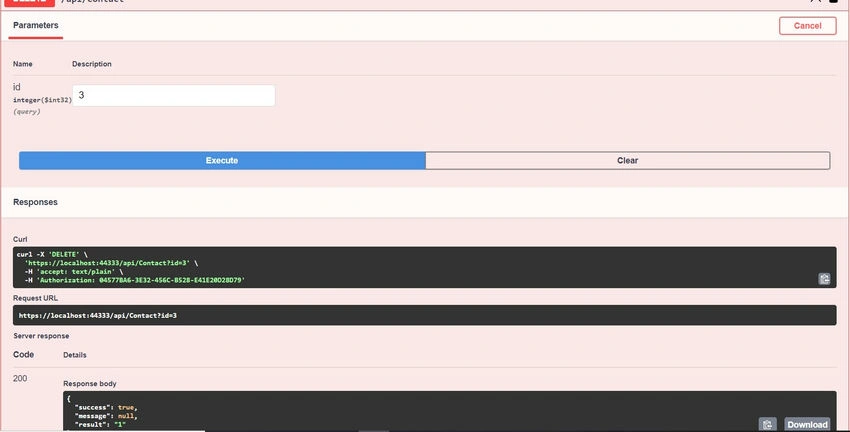
- DELETE: Delete the existing record.
Die VolPosted Jan 8, 2025, 1:35 PM
Thank you, I appreciate this. One question though, where and how do you implement Business logic or Use cases ? Would one create a ContactService.cs in the Application Project, which has the UnitOfWork injected, and then the API Project should call the ContactService.cs rather than the UnitOfWork ?