

Introduction
This blog demonstrates how to bind multiple view models with the knockout. Knockout
is a JavaScript library that helps you to create rich, responsive display and editor user interfaces with a clean underlying data model.
Learn more from here
http://knockoutjs.com/documentation/introduction.html
Download knockout.js from here
http://knockoutjs.com/
The purpose of this blog is only to show how to bind multiple
view models, so I am using mostly code from knockout.js.
So let's make a new asp.net website and add knockout.js.
- <head runat="server">
- <title></title>
- <script src="js/knockout-2.3.0.js"></script>
- </head>
In my code, I have two div
- <div id="EmployeeDiv">
- Choose a employee name:
- <select data-bind="options: employees, optionsCaption: 'Choose...', optionsText: 'name', value: chosenEmployee"></select>
- <button data-bind="enable: chosenEmployee, click: resetEmployee">Clear</button>
- <p data-bind="with: chosenEmployee">
- You have choosen <b data-bind="text: name"></b>
- ($<span data-bind="text: location"></span>)
- </p>
- </div>
- <div id="NameDiv">
- <p>First name: <strong data-bind="text: firstName"></strong></p>
- <p>Last name: <strong data-bind="text: lastName"></strong></p>
- <p>First name: <input data-bind="value: firstName" /></p>
- <p>Last name: <input data-bind="value: lastName" /></p>
- <button data-bind="click: capitalizeLastName">Go caps</button>
- <p>Full name: <strong data-bind="text: fullName"></strong></p>
- </div>
Now let's make view models
- <script>
- function EmployeesViewModel() {
- this.employees = [
- { name: "Nancy Davolio", location: "Seattle WA" },
- { name: "Andrew Fuller", location: "Tacoma WA" },
- { name: "Janet Leverling", location: "Kirkland WA" },
- { name: "Steven Buchanan", location: "London WA" },
- { name: "Margaret Peacock", location: "Redmond WA" }
- ];
- this.chosenEmployee = ko.observable();
- this.resetEmployee = function() {
- this.chosenEmployee(null)
- }
- }
- function AppViewModel() {
- this.firstName = ko.observable("Raj Kumar");
- this.lastName = ko.observable("Choudhary");
- this.capitalizeLastName = function() {
- var currentVal = this.lastName(); // Read the current value
- this.lastName(currentVal.toUpperCase()); // Write back a modified value
- };
- this.fullName = ko.computed(function() {
- return this.firstName() + " " + this.lastName();
- }, this);
- }
- // Activates knockout.js
- //ko.applyBindings(new EmployeesViewModel());
- //ko.applyBindings(new AppViewModel());
- ko.applyBindings(new EmployeesViewModel, document.getElementById("EmployeeDiv"));
- ko.applyBindings(new AppViewModel, document.getElementById("NameDiv"));
- </script>
Bold code shows how to bind multiple view models.
Let's run the application.
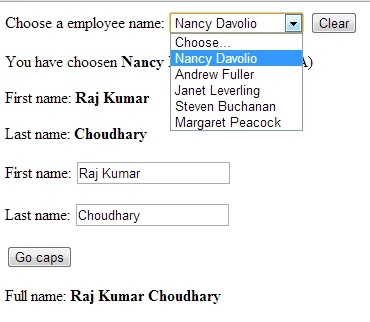
Image 1.
Join the conversation! Your thoughts help the community grow.