

As modern web applications grow more dynamic and complex, traditional UI automation tools like Selenium may fall short in performance, reliability, and developer experience. This is where Playwright, a modern end-to-end testing framework developed by Microsoft, shines.
In this post, we’ll walk through how to migrate a basic Selenium test to Playwright using Node.js with real code examples and test output.
Why Migrate?
Here are a few reasons teams are moving from Selenium to Playwright.
- Faster test execution
- Built-in auto waiting
- Headless browser support out of the box
- Cross-browser testing (Chromium, Firefox, WebKit)
- Rich CLI and HTML reports
- Support for modern JavaScript/TypeScript syntax
Selenium vs. Playwright – A Basic Test
Let’s consider a simple test case: open Google and verify the page title.
1. Selenium (Java)
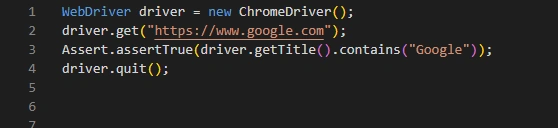
2. Playwright (Node.js)
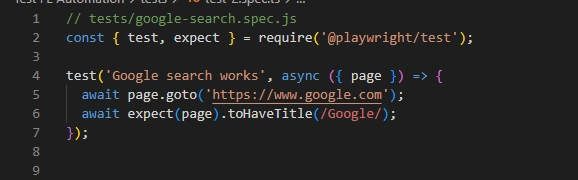
To run the test

Above, you can see the Playwright test code and the output from the terminal after running the test. The test passed successfully in under a second, showing both performance and ease of debugging.
Key Playwright Advantages
- Auto wait for elements: No need to manually add waits.
- Test isolation: Each test runs in a clean browser context.
- Parallel execution: Built-in test runner.
- Native support for screenshots, videos, and trace files.
Conclusion
Migrating to Playwright doesn’t just modernize your automation stack; it simplifies test writing, increases reliability, and reduces flakiness. If you're starting a new automation project or facing limitations with Selenium, now is the perfect time to explore Playwright.
Join the conversation! Your thoughts help the community grow.