
Introduction
Modern organizations need to build applications quickly, automate business processes, analyze growing volumes of data, and provide better digital experiences. Traditional software development can address these requirements, but many business scenarios also benefit from low-code development and reusable integrations.
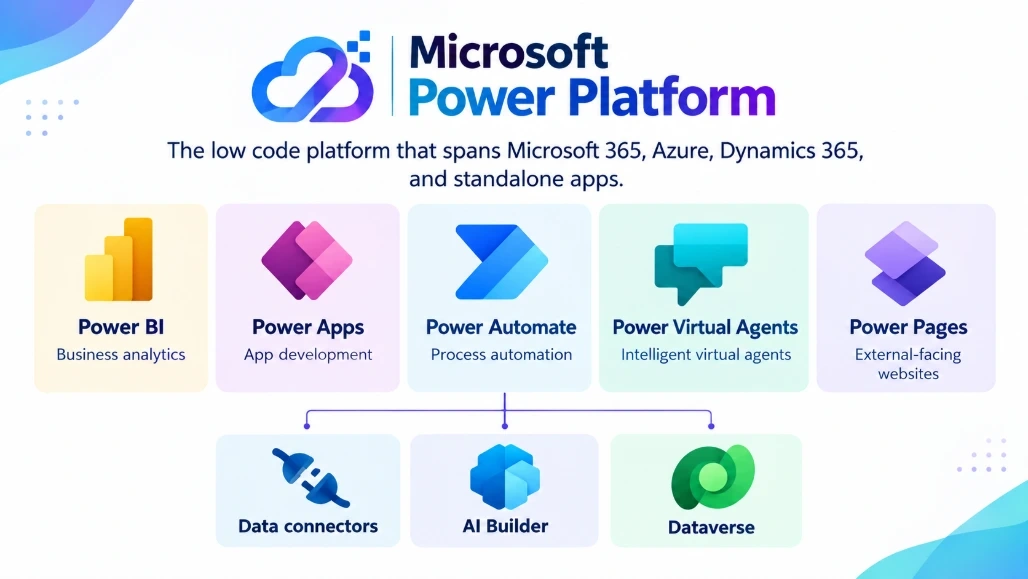
Microsoft Power Platform is a low-code platform for building applications, automating processes, analyzing data, creating external-facing websites, and developing AI-powered agents. Its five core product areas are Power Apps, Power Automate, Power BI, Power Pages, and Microsoft Copilot Studio. These services can be used independently or combined to build connected business solutions.
The platform also includes supporting capabilities such as Microsoft Dataverse, connectors, Power Fx, AI capabilities, APIs, and developer extensibility options. This allows both low-code makers and professional developers to participate in solution development.
What Is Microsoft Power Platform?
Microsoft Power Platform is designed to help organizations solve business problems through a combination of application development, automation, analytics, websites, and AI.
The five major components are:
Component | Primary Purpose |
|---|---|
Power Apps | Build custom business applications |
Power Automate | Automate workflows and business processes |
Power BI | Analyze data and create interactive reports |
Power Pages | Build external-facing business websites |
Copilot Studio | Build and deploy AI-powered agents |
These components can be combined with Microsoft Dataverse and connectors to create integrated solutions across business systems.
Major Components of Microsoft Power Platform
1. Power Apps
Power Apps is used to build custom business applications with low-code development.
Applications can be created for browsers and mobile devices, and Power Apps supports different application approaches, including canvas apps and model-driven apps. Developers can also extend applications using custom connectors, Power Apps Component Framework (PCF), JavaScript, APIs, and other development capabilities.
Key Features
Low-code application development
Canvas and model-driven applications
Integration with Microsoft Dataverse
Connections to external services through connectors
Mobile and browser-based application experiences
Custom components through Power Apps Component Framework
Integration with other Power Platform services
Example Use Cases
Power Apps can be used to build:
Employee management applications
Inventory applications
Approval applications
Field-service applications
Customer service tools
Internal business applications
For example, an organization could build an internal equipment-request application where employees submit requests and managers approve them.
2. Power Automate
Power Automate is used to automate repetitive tasks and business processes across applications and services.
It supports cloud flows and desktop flows and can connect to Microsoft services as well as external systems through connectors.
Key Features
Automated cloud workflows
Scheduled workflows
Event-driven workflows
Desktop automation
Approval processes
Connectors for Microsoft and external services
Integration with Power Apps and other Power Platform services
Example Use Case
Consider an employee expense approval process:
Employee submits expense
        ↓
Power Automate detects submission
        ↓
Manager receives approval request
        ↓
Manager approves or rejects
        ↓
Employee receives notification
        ↓
Expense record is updated
This workflow can reduce manual coordination and provide a consistent process for handling approvals.
3. Power BI
Power BI is Microsoft's business analytics and data visualization platform. It allows organizations to connect to data sources, create interactive reports, and share business insights.
Key Features
Interactive reports and dashboards
Data visualization
Multiple data-source connections
Data analysis
Business intelligence
Report sharing and collaboration
Embedding reports into applications and websites
Example Use Case
A sales organization could combine data from multiple sources and create a Power BI dashboard showing:
Revenue
Sales by region
Product performance
Customer trends
Monthly targets
Sales pipeline
Instead of manually preparing reports, teams can use dashboards to monitor business information interactively.
4. Power Pages
Power Pages is a low-code platform for creating secure, external-facing business websites and data-driven portals. It can integrate with Microsoft Dataverse and other Power Platform capabilities.
Key Features
Low-code website development
Responsive website design
Dataverse integration
Templates and reusable components
External-user experiences
Security and governance capabilities
Integration with Power Automate and Copilot Studio
Example Use Cases
Power Pages can be used to create:
Customer self-service portals
Partner portals
Community websites
Registration portals
Service-request websites
External business applications
For example, a customer could use a Power Pages site to submit a service request while the underlying information is stored in Dataverse and processed through Power Automate.
5. Microsoft Copilot Studio
Microsoft Copilot Studio is a low-code platform for building, deploying, and managing AI-powered agents. Agents can work with knowledge sources, tools, connectors, and workflows to answer questions and perform business tasks.
Key Features
Low-code agent development
Natural-language interactions
Knowledge sources
Connectors and external data sources
Agent actions and workflows
Integration with Power Platform
Deployment across supported channels
Copilot Studio can be used for scenarios such as:
Employee help desks
Customer support
Frequently asked questions
Internal knowledge assistants
Business-process assistance
Automated information retrieval
The important distinction is that an AI agent can go beyond simply presenting information. Depending on its configuration and permissions, it can interact with tools and participate in business workflows.
Microsoft Dataverse: The Data Foundation
Microsoft Dataverse is an important part of the Power Platform ecosystem. It provides a data platform for storing and managing business data used by Power Platform applications and solutions.
For example:
Power Apps
     ↓
Microsoft Dataverse
     ↓
Power Automate
     ↓
Business Process
Power BI can then use business data for analytics, while Power Pages can expose appropriate information through external-facing experiences.
Dataverse also provides capabilities related to data modeling, security, business logic, and integration.
How Power Platform Components Work Together
One of the key strengths of Power Platform is the ability to combine its services into a single business solution.
Consider an employee onboarding scenario:
Power Apps
    ↓
Employee submits onboarding information
    ↓
Dataverse
    ↓
Power Automate
    ↓
Approval and notification workflow
    ↓
Power BI
    ↓
HR onboarding dashboard
    ↓
Copilot Studio
    ↓
Employee onboarding assistant
Power Pages could also be included if external users need to submit or access specific information.
This approach allows different Power Platform components to handle different parts of the same business process.
Why Use Microsoft Power Platform?
1. Rapid Application Development
Low-code development can reduce the amount of traditional application code required for many business scenarios.
Power Apps provides visual development capabilities, while connectors and reusable components can simplify integration with existing services.
2. Business Process Automation
Power Automate can automate repetitive activities and coordinate processes across applications.
Examples include:
Notifications
Approvals
Data synchronization
Document processing
Scheduled tasks
Business workflows
3. Data-Driven Decisions
Power BI provides interactive analytics that can help teams understand business information.
Organizations can connect data sources, create reports, and distribute insights to relevant users.
4. AI-Powered Business Solutions
Copilot Studio allows organizations to create AI-powered agents that can interact with users, access knowledge, and perform configured actions.
This creates opportunities for applications such as internal assistants, customer support agents, and process-specific AI experiences.
5. Low-Code and Pro-Code Collaboration
Power Platform is not limited to non-developers.
Professional developers can extend solutions using:
APIs
Custom connectors
JavaScript
Power Apps Component Framework
Azure services
REST APIs
Developer tools
Microsoft specifically documents extensibility options for developers across Power Apps, Power Automate, Power BI, Power Pages, and Copilot Studio.
This allows citizen developers and professional developers to work on the same business solution while using different levels of abstraction.
Security and Governance Considerations
Low-code development does not eliminate the need for security and governance.
Organizations should establish appropriate controls for:
Identity and authentication
Data access
Environment management
Application permissions
Connector usage
Data loss prevention
Solution lifecycle management
Monitoring and auditing
AI and agent governance
The Power Platform administration capabilities provide tools for managing environments, security, governance, resources, and settings. Microsoft also provides guidance around application lifecycle management and Power Platform architecture.
For larger organizations, governance should be considered from the beginning rather than after applications and automations have already spread across multiple environments.
A Practical Power Platform Architecture
A typical solution might look like this:
                    Users
                      |
          +-----------+-----------+
          |                       |
      Power Apps             Power Pages
          |                       |
          +-----------+-----------+
                      |
                 Dataverse
                      |
          +-----------+-----------+
          |           |           |
   Power Automate  Power BI  Copilot Studio
          |           |           |
       Workflows   Analytics     AI Agents
          |
    External Services
The exact architecture depends on the business requirements, data sources, security model, and integration requirements.
When Should You Use Power Platform?
Power Platform is particularly useful when an organization needs to:
Build internal business applications quickly.
Automate repetitive processes.
Create dashboards and business reports.
Provide external users with secure web experiences.
Build AI-powered business assistants.
Connect multiple business systems.
Allow business users and developers to collaborate.
It may not replace traditional software development for every scenario. Highly customized applications, complex distributed systems, performance-critical workloads, or solutions requiring extensive control over infrastructure may still benefit from conventional development approaches.
The important consideration is choosing the appropriate architecture for the problem rather than assuming that low-code or traditional development is always the correct approach.
Conclusion
Microsoft Power Platform provides a connected set of tools for application development, process automation, business intelligence, external-facing websites, and AI-powered agents.
Its five core product areas—Power Apps, Power Automate, Power BI, Power Pages, and Copilot Studio—can be used individually or combined with Dataverse, connectors, APIs, and other Microsoft services to build end-to-end business solutions.
The platform's value comes from more than low-code development. It provides a common ecosystem in which business users, makers, professional developers, and administrators can collaborate to build and manage business solutions.
For organizations adopting Power Platform at scale, application development should be combined with appropriate security, governance, data management, and lifecycle practices. This creates a foundation for building solutions that are not only faster to develop but also maintainable and manageable over time.
Join the conversation! Your thoughts help the community grow.