

Below I have provided solutions for a few MS Flow syntaxes.
- //Multiple AND condition
- @and(equals(triggerBody()?['Status']?['Value'], 'Approve'),equals(triggerBody()?['Stage']?['Value'], 'Stage-1'))
- //Multiple OR condition
- @or(not(equals(variables('var1'), '')),or(not(equals(variables('var2'), '')),or(not(equals(variables('var3'), '')),not(equals(variables('var4'), '')))))
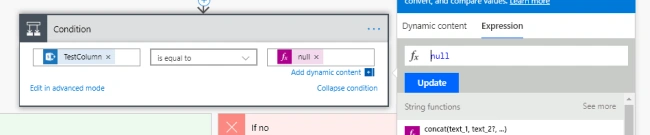
- //Check null values
To check null values, we can tsimply ype NULL under Expression in dynamic values.
- //Date formatting
Add Compose from the action, and type the below syntax under Expression.
- formatDateTime(convertFromUtc(triggerBody()?['Start_x0020_Date'],'Eastern Standard Time'), 'MM/dd/yyyy hh:mm:ss tt')
Apply to each for multiple users,
- It can be useful when we want to iterate from the collection of records. Suppose I want to iterate over a collection of People Picker fields split by a semi-colon which I want to use for sending email.
- Initialize new variable as ‘UserColl’ at the start of Flow. Under Apply to each loop, add compose action, and under Expression type ‘concat(items('Apply_to_each')?['UsersColl'],';',variables('UserColl'))’
- Add Set variable from action set and under name select the variable we created above under Value Type Output from dynamic content.
Join the conversation! Your thoughts help the community grow.