
MERGE feature was introduced by Microsoft in SQL Server 2008.
MERGE statement allows you to perform INSERT, UPDATE & DELETE command with a single statement, and so is very efficient way to perform multiple DML operations.
In earlier version of SQL Server, we had to write multiple DML statements for INSERT, UPDATE & DELETE.
Let's take an example to understand how MERGE statement works.
In the below example we are updating the data from source table data to target table.
For this we are going to write MERGE statement that would be perform INSERT, UPDATE & DELETE with a single MERGE statement
MERGE statement performing below operations:
- UPDATE: If id matched and name not matched, updating name in target table from source table.
- INSERT: If id not matched in target table inserting row from source table to target table.
- DELETE: If id in target table not matched with source table, deleting row from target table
- declare @source table( id int, name varchar(50))
- declare @target table( id int, name varchar(50), status varchar(10))
- insert into @source values (1, 'abc'), (2,'pqr' ), (3, 'xyz')
- insert into @target(id, name) values (1, 'abc'), (2,'sdfdf'), (4, 'abc')
- select * from @target
- merge @target as a
- using
- (
- select * from @source
- )
- as b on a.id = b.id
- when matched and a.name<>b.name then update set a.name = b.name, a.status = 'updated'
- when not matched by target then insert (id, name, status) values (b.id, b.name, 'inserted')
- when not matched by source then delete;
- select * from @target
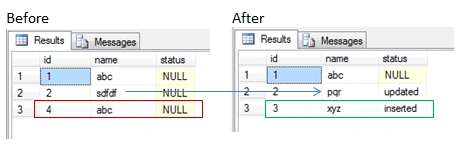
Let's Compare the data of target table before and after merge statement.
- Name updated with id 2.
- Row inserted with id 3.
- Row deleted with id 4.
Santhakumar MunuswamyPosted Dec 4, 2015, 1:53 PM
Nice share