

In this blog you will learn about vertical
menu bar using pure css no toggle method of jQuery.
All Browser Support
google, chrome,Mozilla, opera, Internet Explorer
<!DOCTYPE html>
<html>
<head>
<title>Untitled
Document</title>
<style>
*{ margin:0px; padding:0px;}
#main{ height:800px; width:1024px; background:#5482A7; margin:0px auto;}
#menubar{ width:300px; background:#006464; Border:3px solid #FFFFFF; border-radious:3px;}
#nav {
border:3px solid #3e4547;
box-shadow:2px 2px 8px #000000;
border-radius:3px;
-moz-border-radius:3px;
-webkit-border-radius:3px;
}
#nav, #nav ul
{
list-style:none;
padding:0;
width:200px;
}
#nav ul
{
position:relative;
z-index:-1;
}
#nav li
{
position:relative;
z-index:100;
}
#nav ul li
{
margin-top:-23px;
-moz-transition: 0.4s linear 0.4s;
-ms-transition: 0.4s linear 0.4s;
-o-transition: 0.4s linear 0.4s;
-webkit-transition: 0.4s linear 0.4s;
transition: 0.4s linear 0.4s;
}
#nav li a
{
background-color:#d4d5d8;
color:#000;
text-transform:capitalize;
display:block;
font-size:16px;
line-height:28px;
outline:0;
padding-left:15px;
text-decoration:none;
}
#nav li a.sub
{
background:#d4d5d8 url(icon.png) left no-repeat;
}
#nav li a:hover
{
background-color:#bcbdc1;
}
#nav a.sub:focus
{
background:#bcbdc1 url(icon342.png)left no-repeat;
outline:0;
}
#nav ul li a
{
background-color:#eee;
border-bottom:1px solid #ccc;
color:#000;
font-size:13px;
line-height:22px;
}
#nav ul li a:hover
{
background-color:#ddd;
color:#3300FF;
}
#nav a:focus ~ ul li
{
margin-top:0;
-moz-transition: 0.4s linear;
-ms-transition: 0.4s linear;
-o-transition: 0.4s linears;
-webkit-transition: 0.4s linears;
transition: 0.4s linear;
}
</style>
</head>
<body>
<div id="main">
<div id="menubar">
<ul id="nav">
<li><a href="#">home</a></li>
<li><a href="#" class="sub" tabindex="1">about
us</a>
<ul>
<li><a href="#">home</a></li>
<li><a href="#">home</a></li>
<li><a href="#">home</a></li>
</ul>
</li>
<li><a href="#">service</a></li>
<li><a href="#" class="sub" tabindex="1">compeny</a>
<ul>
<li><a href="#">home</a></li>
<li><a href="#">home</a></li>
<li><a href="#">home</a></li>
</ul>
</li>
<li><a href="#">Job
Discription</a></li>
</ul>
</div>
</div>
</body>
</html>
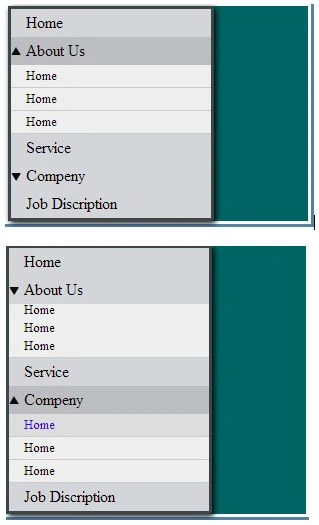
When you
Click on AboutUs then
you will Find sub menu
And After Click any list than sub menu will be hide
Join the conversation! Your thoughts help the community grow.