

Problem
I set up an azure machine using Visual Studio 2015 preview image (here are the steps: http://blogs.msdn.com/b/visualstudioalm/archive/2014/06/04/visual-studio-14-ctp-now-available-in-the-virtual-machine-azure-gallery.aspx). I was very happy as I was going to taste the flavor of new compiler named as ‘roslyn’. I started with a new console app so, I could get into the new features of C# 6.0 as follow:
- public class AutoPropertiesWithPrimaryConstructor(int rollNumber, string firstName)
- {
- public AutoPropertiesWithPrimaryConstructor()
- {
- }
- public AutoPropertiesWithPrimaryConstructor(int rollNumber)
- {
- }
- public int GetNumber { get; set; } = rollNumber;
- public String Name { get; set; } = firstName;
- }
There are not error, IDE is giving me the facility to write new C# 6.0 syntax's. I was again happy.
The drama (I said it drama as its crap) begun when I started build my project. See here what happened: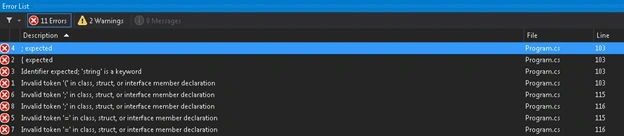
Isn’t it shocking, I was expecting a successful build but it ruined, I don’t like it.
Solution
Then I found an interesting link: https://roslyn.codeplex.com/ which tells me how to make this working.
Here are I created list what I did:
- Installed VS2015 SDK: http://www.visualstudio.com/en-us/downloads/visual-studio-2015-downloads-vs
- Installed Syntax visualizer: https://visualstudiogallery.msdn.microsoft.com/70e184da-9b3a-402f-b210-d62a898e2887
- It provided me Syntax visualizer window: https://roslyn.codeplex.com/wikipage?title=Syntax%20Visualizer&referringTitle=Home
Now, all is set to go.
Enjoy the flavor of Visual Studio 2015 preview and new languages like C# and VB.
Join the conversation! Your thoughts help the community grow.