
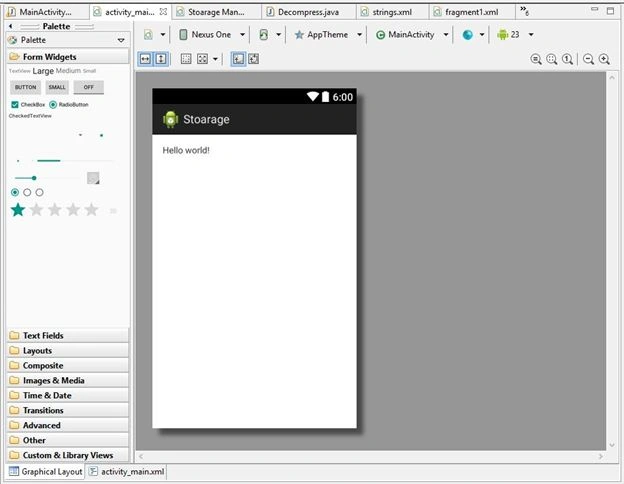
Let us see the steps on how to perform this task in android .Create new project with a valid name, once everything ready our projects looks like below screen.
activity_main.xml code
- <RelativeLayout xmlns:android="http://schemas.android.com/apk/res/android"
- xmlns:tools="http://schemas.android.com/tools"
- android:layout_width="match_parent"
- android:layout_height="match_parent"
- android:paddingBottom="@dimen/activity_vertical_margin"
- android:paddingLeft="@dimen/activity_horizontal_margin"
- android:paddingRight="@dimen/activity_horizontal_margin"
- android:paddingTop="@dimen/activity_vertical_margin"
- tools:context="com.example.stoarage.MainActivity" >
- <TextView
- android:id="@+id/textView1"
- android:layout_width="wrap_content"
- android:layout_height="wrap_content"
- android:text="@string/hello_world" />
- </RelativeLayout>
- package com.example.stoarage;
- import java.io.File;
- import java.io.FileInputStream;
- import java.io.FileOutputStream;
- import java.util.zip.ZipEntry;
- import java.util.zip.ZipInputStream;
- import android.annotation.SuppressLint;
- import android.app.Activity;
- import android.os.Bundle;
- import android.os.Environment;
- import android.view.Menu;
- import android.view.MenuItem;@
- SuppressLint("SdCardPath")
- public class MainActivity extends Activity {@
- Override
- protected void onCreate(Bundle savedInstanceState) {
- super.onCreate(savedInstanceState);
- setContentView(R.layout.activity_main);
- String path = Environment.getDataDirectory().getAbsolutePath().toString() + "/storage/emulated/0/appFolder";
- File mFolder = new File(path);
- if (!mFolder.exists()) {
- mFolder.mkdir();
- }
- File Directory = new File("/sdcard/myappFolder/");
- Directory.mkdirs();
- }@
- Override
- public boolean onCreateOptionsMenu(Menu menu) {
- // Inflate the menu; this adds items to the action bar if it is present.
- getMenuInflater().inflate(R.menu.main, menu);
- return true;
- }
- @
- Override
- public boolean onOptionsItemSelected(MenuItem item) {
- // Handle action bar item clicks here. The action bar will
- // automatically handle clicks on the Home/Up button, so long
- // as you specify a parent activity in AndroidManifest.xml.
- int id = item.getItemId();
- if (id == R.id.action_settings) {
- return true;
- }
- return super.onOptionsItemSelected(item);
- }
- }
<uses-permission android:name="android.permission.WRITE_EXTERNAL_STORAGE"/>
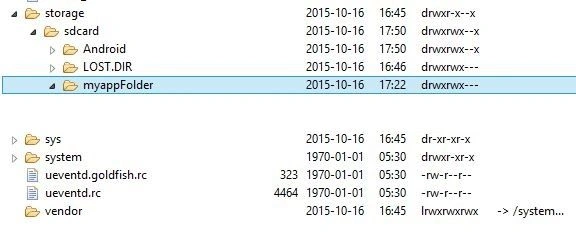
Now Run the Application by pressing Ctrl+F11 and see the output as show like below. Open the File Explorer -> Storage ->Sdcard -> myappFolder.
Final result:
Pavithra TRPosted Oct 19, 2015, 6:11 AM
Thank you
Vinodh NarayananPosted Oct 19, 2015, 6:03 AM
Good one thanks for sharing
Vinodh NarayananPosted Oct 19, 2015, 6:02 AM
Welcome to csharpcorner...