

Here I have an edit text and a Listview, and I will explain how we can filter the Listview according to values entered by the user in the edit text. First create the layout file for this.
- <?xml version="1.0" encoding="utf-8"?>
- <LinearLayout xmlns:android="http://schemas.android.com/apk/res/android"
- android:layout_width="match_parent"
- android:layout_height="match_parent"
- android:background="@android:color/white"
- android:orientation="vertical" >
- <RelativeLayout
- android:id="@+id/wrapper_counrty_search"
- android:layout_width="match_parent"
- android:layout_marginTop="10dp"
- android:layout_marginBottom="10dp"
- android:layout_height="wrap_content"
- android:padding="10dp" >
- <EditText
- android:id="@+id/country_picker_search"
- android:layout_width="match_parent"
- android:layout_height="wrap_content"
- android:hint="search"
- android:paddingLeft="5sp"
- android:paddingRight="5dp"
- android:textCursorDrawable="@null"
- android:textSize="14sp" />
- </RelativeLayout>
- <Lictview
- android:id="@+id/country_picker_Lictview "
- android:layout_width="match_parent"
- android:layout_height="0dp"
- android:layout_marginBottom="10dp"
- android:layout_marginLeft="10dp"
- android:layout_marginRight="10dp"
- android:layout_weight="1"
- android:divider="@android:color/transparent"
- android:dividerHeight="2dp" >
- </Lictview >
- </LinearLayout>
- searchEditText = (EditText) findViewById(R.id.country_picker_search);
- countryLictview = (Lictview ) findViewById(R.id.country_picker_Lictview );
- <?xml version="1.0" encoding="utf-8"?>
- <LinearLayout xmlns:android="http://schemas.android.com/apk/res/android"
- android:layout_width="match_parent"
- android:layout_height="wrap_content"
- android:orientation="vertical" >
- <TextView
- android:id="@+id/country_title"
- android:layout_width="wrap_content"
- android:layout_height="wrap_content"
- android:padding="10dp"
- android:paddingLeft="5dp"
- android:textStyle="bold"
- android:textColor="@android:color/black" />
- <TextView
- android:id="@+id/country_code"
- android:layout_width="wrap_content"
- android:layout_height="wrap_content"
- android:paddingLeft="10dp"
- android:text="asdasdasd"
- android:textColor="@android:color/black"
- android:textSize="12sp" />
- </LinearLayout>
- public class PickerAdapter extends BaseAdapter
- {
- private Context context;
- List < PickerItem > pickerItems;
- LayoutInflater inflater;
- /**
- * Constructor
- *
- * @param context
- */
- public PickerAdapter(Context context, List < PickerItem > contactList)
- {
- super();
- this.context = context;
- this.pickerItems = contactList;
- inflater = (LayoutInflater) this.context
- .getSystemService(Context.LAYOUT_INFLATER_SERVICE);
- }
- @Override
- public int getCount()
- {
- return pickerItems.size();
- }
- @Override
- public Object getItem(int arg0)
- {
- return null;
- }
- @Override
- public long getItemId(int arg0)
- {
- return 0;
- }
- /**
- * Return row for each country
- */
- @Override
- public View getView(int position, View convertView, ViewGroup parent)
- {
- View cellView = convertView;
- Cell cell;
- PickerItem contact = pickerItems.get(position);
- if (convertView == null)
- {
- cell = new Cell();
- cellView = inflater.inflate(R.layout.picker_list_row, null);
- cell.contactName = (TextView) cellView.findViewById(R.id.country_title);
- cell.contactNumber = (TextView) cellView.findViewById(R.id.country_code);
- cellView.setTag(cell);
- }
- else
- {
- cell = (Cell) cellView.getTag();
- }
- cell.contactName.setText(contact.getItemName());
- cell.contactNumber.setText(contact.getItemDetails());
- return cellView;
- }
- /**
- * Holder for the cell
- *
- */
- static class Cell
- {
- public TextView contactName;
- public TextView contactNumber;
- }
- }
- public class PickerItem
- {
- public String getItemName()
- {
- return itemName;
- }
- public void setItemName(String itemName)
- {
- this.itemName = itemName;
- }
- public String getItemDetails()
- {
- return itemDetails;
- }
- public void setItemDetails(String itemDetails)
- {
- this.itemDetails = itemDetails;
- }
- private String itemName = null;
- private String itemDetails = null;
- }
- public class PickerList
- {
- public ArrayList < PickerItem > getPickerList()
- {
- return pickerList;
- }
- public void setPickerList(ArrayList < PickerItem > pickerList)
- {
- this.pickerList = pickerList;
- }
- private ArrayList < PickerItem > pickerList = null;
- }
- adapter = new PickerAdapter(this, selectedCountryList);
- countryLictview.setAdapter(adapter);
- Now we need to set the edittext text change properties
- for filtering
- searchEditText.addTextChangedListener(new TextWatcher()
- {
- @Override
- public void onTextChanged(CharSequence s, int start, int before,
- int count)
- {}
- @Override
- public void beforeTextChanged(CharSequence s, int start, int count,
- int after)
- {}
- @Override
- public void afterTextChanged(Editable s)
- {
- search(s.toString());
- }
- });
- private void search(String text)
- {
- selectedCountryList.clear();
- // boolean needToAdd = true;
- for (PickerItem country: allContactList)
- {
- if (country.getItemName()
- .toLowerCase(Locale.ENGLISH)
- .contains(text.toLowerCase()))
- {
- if (!selectedCountryList.contains(country))
- {
- // needToAdd = false;
- selectedCountryList.add(country);
- }
- }
- }
- adapter.notifyDataSetChanged();
- }
- private static PickerList readFileAsString(Context context)
- throws java.io.IOException
- {
- int id = R.raw.refered_by;
- InputStream inputStream = context.getResources()
- .openRawResource(
- id);
- BufferedReader reader = new BufferedReader(new InputStreamReader(
- inputStream));
- StringBuffer result = new StringBuffer();
- String line;
- while ((line = reader.readLine()) != null)
- {
- result.append(line);
- }
- reader.close();
- Gson gson = new GsonBuilder()
- .create();
- return gson.fromJson(result.toString(), PickerList.class);
- // return result.toString();
- }
See the screen shots below,
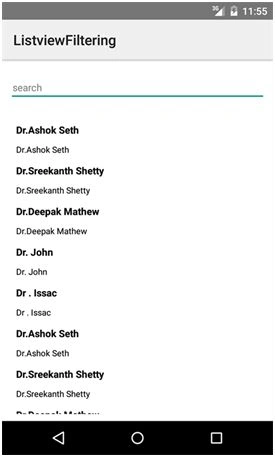
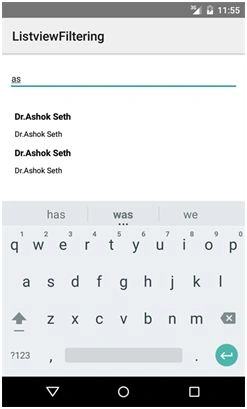
Please find the source code also.
Join the conversation! Your thoughts help the community grow.