

The class List is new in dot net frame work 2 .0, it belongs to the spaceName System.Collections.Generic , it is a collection of objects (Image,int,string ...) accessed by an index , the number of its elements is not fixed you can add and remove any time you want at run time; So it is very useful and so easy to manipulate and that's what I am going to show you :
Code Behind the form:
using System;
using System.Collections.Generic;
using System.ComponentModel;
using System.Data;
using System.Drawing;
using System.Linq;
using System.Text;
using System.Windows.Forms;
namespace Lists
{
public partial class Form1 : Form
{
List<string> countries = new List<string>(); // instance of a string list
public void ListBoxrefresh()
{ // method refreshing the list box when
//we delete or add an item to our countries list
listBox1.DataSource = null;
listBox1.DataSource = countries; // we use "countries" as a datasource to fill the listBox
label1.Text = countries.Count.ToString();
}
public Form1()
{
InitializeComponent();
}
private void Form1_Load(object sender, EventArgs e)
{
countries.Add("ANDORRA"); // add elemnts to our "countries" list
countries.Add("AUSTRIA");
countries.Add("BELGIUM");
countries.Add("BELARUS");
countries.Add("BULGARIA");
countries.Add("CROATIA");
countries.Add("CYPRUS");
countries.Add("DENMARK");
countries.Add("ESTONIA");
countries.Add("FINLAND");
countries.Add("FRANCE");
countries.Add("GERMANY");
listBox1.DataSource = countries; // make "countries" as DataSource of the list box
label1.Text = countries.Count.ToString(); // get the number of "countries" items
}
private void button1_Click(object sender, EventArgs e)
{
if (!string.IsNullOrWhiteSpace(textBox1.Text))
{
countries.Add(textBox1.Text.ToUpper());// add element from the textBox
ListBoxrefresh();
}
}
private void button2_Click(object sender, EventArgs e)
{
if (listBox1.SelectedIndex != -1)
{
countries.RemoveAt(listBox1.SelectedIndex);// remove an element from "countries"
//by specifying it's index retreived from the lisTbox
ListBoxrefresh();
}
}
}
}
The UI
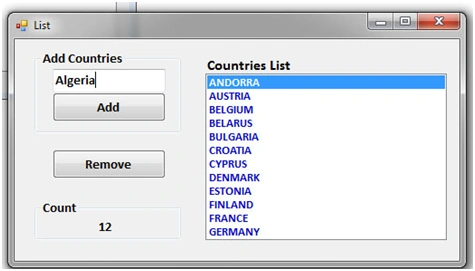
Let's resume:
- We created a list of string :
List<string> countries =new List<string>();
- We added items :
countries.Add("ANDORRA");
countries.Add("AUSTRIA");
- We used Listbox to display items of countries list
- We add an elements by :
countries.Add(textBox1.Text.ToUpper());
- We remove an elements by :
countries.RemoveAt(listBox1.SelectedIndex);
Join the conversation! Your thoughts help the community grow.