

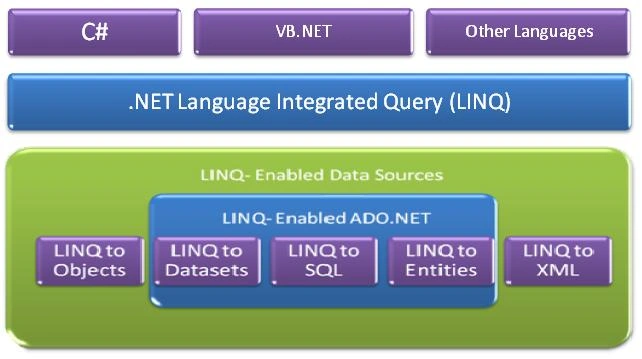
LINQ Providers
1. LINQ to Objects
2. LINQ to XML (XLINQ)
3. LINQ to SQL (DLINQ)
4. LINQ to DataSets
5. LINQ to Entities
LINQ to Objects
LINQ to Objects allows .NET developers to write “queries” over collections of objects.The code generated by this provider refers to the implementation of the standard query operators as defined on the Sequence pattern and allows IEnumerable<T> collections to be queried locally.
In a basic sense, LINQ to Objects represents a new approach to collections. In the old way, you had to write complex for each loops that specified how to retrieve data from a collection. In the LINQ approach, you write declarative code that describes what you want to retrieve.
Following is an example which takes the first four integers from the collection (using LINQ)-
IEnumerable<int> firstFourNumbers = integers.Take(4);
Console.WriteLine("First 4 numbers:");
foreach (var num in firstFourNumbers)
{
Console.WriteLine(num);
}
LINQ to XML (XLINQ)
The LINQ to XML provider converts an XML document to a collection of XElement objects, which are then queried against using the local execution engine
that is provided as a part of the implementation of the standard query operator.
LINQ to XML allows us to create, read and edit XML files and what's more important is that it is done in a very easy and understandable way. To use LINQ
to XML you should add a reference to the System.Xml.Linq.dll (for the XDocument and the other classes) and use the System.Linq namespace (for the LINQ syntax).
LINQ to SQL (DLINQ)
LINQ to SQL provides a runtime infrastructure for managing relational data as objects without losing the ability to query. Your application is free to manipulate
the objects while LINQ to SQL stays in the background tracking your changes automatically.
LINQ to SQL does not use the query engine of LINQ. Instead, it converts a LINQ query to a SQL query that is then sent to SQL Server for processing.
The mapping is done by defining classes that correspond to the tables in the database.
Example-
[Table(Name="Customers")]
public class Customer
{
[Column(IsPrimaryKey = true)]
public int CustID;
[Column]
public string CustName;
}
LINQ to DataSets
LINQ to DataSet makes it easier and faster to query over data cached in a DataSet object. Specifically, LINQ to DataSet simplifies querying by enabling
developers to write queries from the programming language itself, instead of by using a separate query language
LINQ to DataSet allows us to make use of the new superior LINQ querying features in legacy applications without having to rewrite the whole data access
layer.
LINQ to Entities
LINQ to Entities provides Language-Integrated Query (LINQ) support that enables developers to write queries against the Entity Framework conceptual model using Visual Basic or Visual C#. Queries against the Entity Framework are represented by command tree queries, which execute against the object context. LINQ to Entities converts Language-Integrated Queries (LINQ) queries to command tree queries, executes the queries against the Entity Framework, and returns objects that can be used by both the Entity Framework and LINQ. The following is the process for creating and executing a LINQ to Entities query:
- Construct an
ObjectQuery instance from ObjectContext.
- Compose a LINQ
to Entities query in C# or Visual Basic by using the ObjectQuery
instance.
- Convert LINQ
standard query operators and expressions to command trees.
- Execute the
query, in command tree representation, against the data source. Any
exceptions thrown on the data source during execution are passed directly
up to the client.
- Return query
results back to the client.
Kaouther SlimaniPosted Aug 18, 2021, 8:46 AM
Merci beaucoup akash