

Introduction
In C#, we have a primitive type specifically for string. You don’t have to use char array as in C++. We also have a class “String” in C# for extra string operations.
Note
String is a primitive type and String is a class. For better understanding, know that String class is bold.
You can create a string in any of the below methods:
- string firstName;
- firstName = null;
- firstName = string.Empty;
- firstName = "";
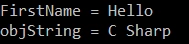
- firstName = "Hello";
- char[] letters = { 'C', ' ', 'S', 'h', 'a', 'r', 'p' };
- string objString = new string(letters);
Concatenation
- string lastName = "World";
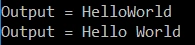
- string output = firstName + lastName;
- Console.WriteLine("Output = " + output);
- output = firstName + " " + lastName;
- Console.WriteLine("Output = " + output);
Join String Array
Syntax : String.Join(delimiter, string_Array);
- string[] joinArray = { "String", "Join", "Done", "Successfully" };
- string joinOutput = String.Join("-", joinArray);
- Console.WriteLine("Output = " + joinOutput);
- string joinOutput2 = String.Join(" ", joinArray);
- Console.WriteLine("Output = " + joinOutput2);
- string joinOutput3 = String.Join(" ", joinArray) + ".";
- Console.WriteLine("Output = " + joinOutput3);

Split String Data into Array
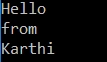
- string splitableContent = "Hello from Karthi";
- string[] splitContent = splitableContent.Split(' ');
- foreach (string word in splitContent)
- {
- Console.WriteLine(word);
- }
Length & Count
- string abc = "Hello";
- char[] lettersArray = { 'C', ' ', 'S', 'h', 'a', 'r', 'p' };
- Console.WriteLine(abc.Length);
- Console.WriteLine(lettersArray.Count());
Length is a property of string & Array.
Output
Length = 5
Count = 7
Format String Value
Format method of String Class is used to format string value based on your needs.
- DateTime todayDate = DateTime.Now;
- string formattedVal = String.Format("Time: {0:t} and Date : {0:D}", todayDate);
- Console.WriteLine("Format String = " + formattedVal);

Copy String
- string a = "Hai";
- string b = string.Copy(a);
- Console.WriteLine("A = " + a);
- Console.WriteLine("B = " + b);

Compare String
Compare method of string compares two string and returns the 0, 1 or -1.
If both are the same, it returns 0.
If the first one is bigger, it returns 1.
If the second one is bigger, it returns -1.
Syntax
- int Compare (string a, string b);
- int Compare(string a, string b, true);
The third parameter is used and set to true when you want to compare two strings ignoring case.
- //Compare
- string sa1 = "Hello";
- string sa2 = "hello";
- Console.WriteLine("Compare = " + string.Compare(sa1, sa2));
- Console.WriteLine("Compare = " + string.Compare(sa1, sa2, true));

String Equality
Equals method checks whether two strings are the same and returns true or false.
- string se1 = "hello";
- string se2 = "hello";
- Console.WriteLine("Equals = " + string.Equals(se1, se2));
- Console.WriteLine("Equals 2 = " + se1.Equals(se2));

Contains & EndsWith
Contains method checks whether the string contains the specified string.
EndsWith method checks whether the string ends with the specified string.
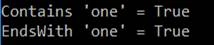
- string stringObj = "this is a big sentence with number one";
- Console.WriteLine("Contains 'one' = " + stringObj.Contains("one"));
- Console.WriteLine("EndsWith 'one' = " + stringObj.EndsWith("one"));
Viknaraj ManogararajahPosted Jul 21, 2018, 11:00 PM
Nice Article, Thank you for sharing