

Introduction
- JSON is a lightweight data-interchange format.
- JSON format is easy to understand.
- It is used to read and write for humans in very easy manner.
- It is also easy for machines to parse and generate.
- It is a subset of the JavaScript Programming Language.
- It is text format that is completely language independent.
Structure
JSON is built on two structures.
- A collection of name/value pairs.
- An ordered list of values.
These are universal data structures.
Forms
In JSON, they take on these forms:
- An object is an unordered set of name/value pairs.
- An object begins with { (left brace) and ends with } (right brace).
- Each name is followed by : (colon).
- The name/value pairs are separated by , (comma).
Example for running JSON in HTML
The following example shows how to use JSON to store the information related to courses based on their name and tutor.
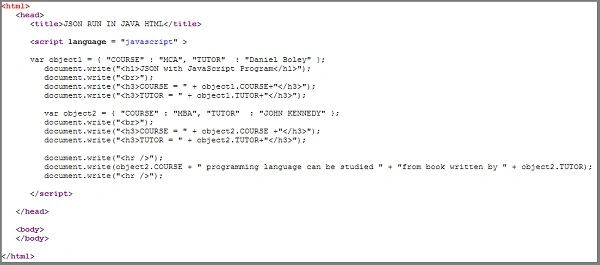
The following example shows how to use JSON to store the information related to courses based on their name and tutor.
- <html>
- <head>
- <title>JSON RUN IN HTML</title>
- <script language="javascript">
- var object1 = {
- "COURSE": "MCA",
- "TUTOR": "Daniel Boley"
- };
- document.write("<h1>JSON with JavaScript Program</h1>");
- document.write("<br>");
- document.write("<h3>COURSE = " + object1.COURSE + "</h3>");
- document.write("<h3>TUTOR = " + object1.TUTOR + "</h3>");
- var object2 = {
- "COURSE": "MBA",
- "TUTOR": "JOHN KENNEDY"
- };
- document.write("<br>");
- document.write("<h3>COURSE = " + object2.COURSE + "</h3>");
- document.write("<h3>TUTOR = " + object2.TUTOR + "</h3>");
- document.write("<hr />");
- document.write(object2.COURSE + " programming language can be studied
- " + "
- from book written by " + object2.TUTOR);
- document.write("<hr />");
- </script>
- </head>
- <body> </body>
- </html>
OUTPUT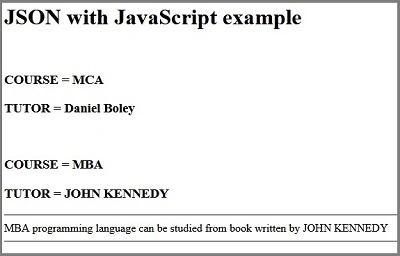
Result
Thus, we have successfully learned an introduction to JSON.
Alagunila MeganathanPosted Nov 30, 2017, 12:06 PM
Good Mam.... Keep going...