

INTRODUCTION
A JSON Array is an ordered sequence of values. Its external text form is a string wrapped in square brackets with commas separating the values. A JSON Object is an unordered collection of name/value pairs.
Simple Array Objects Syntax
JSON objects can be created with JavaScript.
Let us see the various ways of creating JSON objects using JavaScript.
- Creation of an empty Object
var JSONOb = {};
- Creation of a new Object
var JSONOb = new Object(); - Creation of an object with attribute bookname with value in string, attribute price with numeric value. Attribute is accessed by using '.' Operator,
var JSONObj = {"bookname":"VB BLACK BOOK", "price":500};
Example for JSON Array Object run in HTML
- <html>
- <head>
- <title>Creation of array object in javascript using JSON</title>
- <script language = "javascript" >
- document.writeln("<h2>JSON array object</h2>");
- var books = { "Java" : [
- { "Name" : "Core Java", "price" : 600 },
- { "Name" : "Guide to Java", "price" : 400 }],
- "JSP" : [
- { "Name" : "Basics of JSP", "price" : 1000 },
- { "Name" : "Tutorial of JSP", "price" : 1300 }]
- }
- var i = 0
- document.writeln("<table border = '2'><tr>");
- for(i = 0;i<books.Java.length;i++){
- document.writeln("<td>");
- document.writeln("<table border = '1' width = 100 >");
- document.writeln("<tr><td><b>Name</b></td><td width = 50>" + books.Java[i].Name+"</td></tr>");
- document.writeln("<tr><td><b>Price</b></td><td width = 50>" + books.Java[i].price +"</td></tr>");
- document.writeln("</table>");
- document.writeln("</td>");
- }
- for(i = 0;i<books.JSP.length;i++){
- document.writeln("<td>");
- document.writeln("<table border = '1' width = 100 >");
- document.writeln("<tr><td><b>Name</b></td><td width = 50>" + books.JSP[i].Name+"</td></tr>");
- document.writeln("<tr><td><b>Price</b></td><td width = 50>" + books.JSP[i].price+"</td></tr>");
- document.writeln("</table>");
- document.writeln("</td>");
- }
- document.writeln("</tr></table>");
- </script>
- </head>
- <body>
- </body>
- </html>
Output
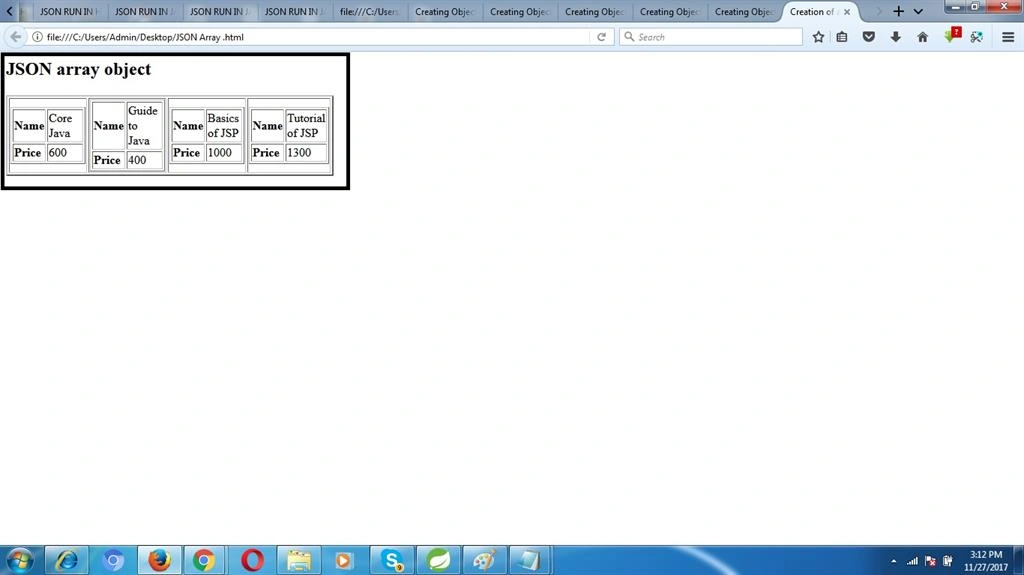
Result
Thus, we have successfully learned the JSON Array object creation program.
Laxmidhar SahooPosted Nov 28, 2017, 1:18 AM
A good article liking to read it