Introduction
The local storage property of JavaScript allows us to access the local storage object. It is similar to the session storage but the only difference is that the local storage has no expiration time.
Core Implementation procedure
The following code snippet accesses the current domain’s local storage object and adds a data item to it using Storage.setItem().
- localStorage.setItem('ObjectName', 'ObjectValue');
Our full JavaScript anonymous function will be as in the following code snippet:
- var Demo = function() {
- var sendRequest = function(o) {
- $.ajax({
- type: "POST",
- url: '/Home/GetResponseAjax',
- contentType: "application/json; charset=utf-8",
- dataType: "json",
- data: JSON.stringify({ university: o }),
- cache: false,
- beforeSend: function () {},
- success: function (result) {
- if (result) {
- alert('sent');
- }
- },
- complete: function () {},
- async: true
- });
- }
-
- var getResponse = function () {
- $.ajax({
- type: "POST",
- url: '/Home/SendUniversityInfoAjax',
- contentType: "application/json; charset=utf-8",
- dataType: "json",
- data: JSON.stringify({}),
- cache: false,
- beforeSend: function () { },
- success: function (result) {
- if (result != null) {
- localStorage.setItem('Info', JSON.stringify(result));
- alert('received and saved to local storage');
- }
- },
- complete: function () { },
- async: true
- });
- }
-
- var actionHandler = function () {
- $('.get-response').unbind('click').on('click', function () {
- debugger;
- getResponse();
- });
-
- $('.read-data').unbind('click').on('click', function () {
- debugger;
- var info = JSON.parse(localStorage.getItem('Info'));
- var o = {};
- o.Name = info[0].Name;
- o.Location = info[0].Location;
- o.NumberofTeachers = info[0].NumberofTeachers;
- o.NumberofStudents = info[0].NumberofStudents;
- sendRequest(o);
- });
- }
-
- var initialize = function () {
- actionHandler();
- }
-
- return {
- init: function () {
- initialize();
- }
- };
- }();
And the two Action methods will be the following:
- public ActionResult SendUniversityInfoAjax()
- {
- var info = new University
- {
- Name = "Jahangirnagar University",
- Location = "Dhaka",
- NumberofTeachers = 2000,
- NumberofStudents = 15000
- };
- var infoList = new List<University> {info};
- return Json(infoList, JsonRequestBehavior.AllowGet);
- }
-
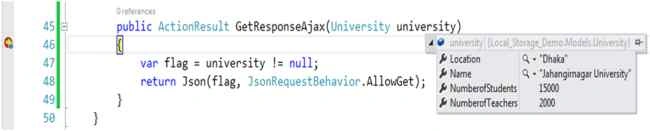
- public ActionResult GetResponseAjax(University university)
- {
- var flag = university != null;
- return Json(flag, JsonRequestBehavior.AllowGet);
- }
Debugging output
GitHub
link.


Santhakumar MunuswamyPosted Sep 22, 2015, 3:17 PM
Nice share
Saineshwar BageriPosted Sep 20, 2015, 1:01 AM
nice one