

Identity field is usually used as a primary key. When you insert a new record into your table, this field automatically assign an incremented value from the previous entry. Usually, you can't insert your own value to this field.
I am going to expose the tips for inserting your own value to this field. It is simple and easy.Please consider following table:
- CREATE TABLE Employee
- (
- ID int IDENTITY,
- Name varchar(100),
- Address varchar(200)
- )
I am trying to insert a record into Employee table with Identity field.
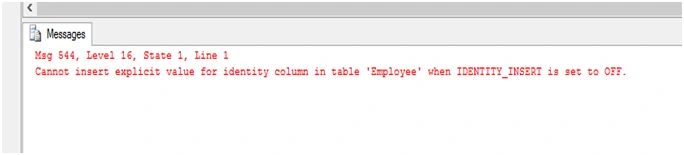
INSERTINTO EMPLOYEE([ID],[Name],[Address])VALUES(1,'AMIT','ALLAHABAD')
It generate an error.
Now allow Insert into identity field:
You can insert into identity field by setting IDENTITY_INSERT ON for a particular table as shown:
SET IDENTITY_INSERTEmployeeON
You can also disallow insert into identity field by setting IDENTITY_INSERT OFF for a particular table.
SET IDENTITY_INSERT Employee OFF
lets see how to insert our own values to identity field ID with in the Customer table.
- SETIDENTITY_INSERT Employee ON
- INSERTINTO EMPLOYEE([ID], [Name], [Address]) VALUES(1, 'AMIT', 'ALLAHABAD')
- INSERTINTO EMPLOYEE([ID], [Name], [Address]) VALUES(2, 'ROHAN', 'ALLAHABAD')
- SETIDENTITY_INSERT Employee OFF
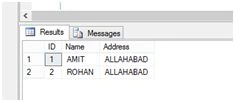
Don’t forget to set IDENTITY_INSERT OFF after inserting your own value.
We use this trick when we have deleted some rows from the table and we want the data in a sequence.
Reseed the Identity field
You can also reseed the identity field value. By doing so identity field values will start with a new defined value.
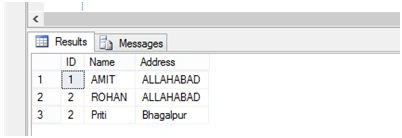
Suppose you want to reseed the Employee table ID field from 3 then the new records will be inserted with ID 4,5,6..and so on.
- DBCC checkident(Employee, RESEED, 1)
- INSERTINTO Employee(Name, Address) VALUES('Priti', 'Bhagalpur')
Join the conversation! Your thoughts help the community grow.