

Here, I will explain how to insert data into master and detail table in C# using single store procedure.
Generally people create a separate store procedure for each table like master and detail table.
But say you execute a store procedure from C# code for master table (salemaster) and it executes successfully, and again you execute store procedure from C# code for the second table (saledetail) table, but what if the second execution fails for any reason like data mistmatch, run time error occured, sql server connection timeout etc.?
Your master table(salemaster) executed successfully but detail table (saledetail) did not. So there is a problem of relationship because your master table has rows (data) but detail table does not. So how to control this? That's why I am demonstrating this solution for said problem.
First, you need to create a sample database with the two tables, Salemaster and Saledetail, with the following fields and store procedure:
SaleMaster
First, you need to create a sample database with the two tables, Salemaster and Saledetail, with the following fields and store procedure:
SaleMaster
- Create Table SaleMaster
- (ID Int NOT NULL identity,
- SaleDate Datetime,
- CustomerName varchar (50)
- )
- Create Table SaleDetail
- (ID Int NOT NULL identity,
- SalesMasterID Int NOT NULL,
- ProdName varchar (50),
- Qty decimal (14,2),
- Rate decimal (14,2)
- )
- Create Procedure ADD_SALE_MASTER_DETAIL_TABLE
- @SaleDate date,
- @Customername varchar (50),
- @StrProduct TEXT,
- @StrQty TEXT,
- @StrRate TEXT,
- @Gridcount smallint
- AS
- Declare
- @Product varchar (50),
- @Qty decimal(14,2),
- @Rate decimal(14,2),
- @C1 int,
- @C2 int,
- @C3 int,
- @COUNT INT,
- @MAXSRNO INT
- SET NOCOUNT ON;
- BEGIN TRAN
- SET @MAXSRNO=(SELECT ISNULL(MAX(ID),0)+1 FROM SaleMaster)
- Insert into SaleMaster(Saledate,customerName)
- Values(@Saledate,@Customername)
- -------------------Prdouct grid-------------------
- SET @C1 = 1
- SET @C2 = 1
- SET @C3 = 1
- SET @COUNT=1
- While @Count<=@Gridcount
- Begin
- SET @Product=CONVERT(CHAR(50),SUBSTRING(@StrProduct ,@C1,20))
- SET @Qty =Convert(DECIMAL(14,2),Substring(@StrQty,@C2,14))
- SET @Rate =Convert(DECIMAL(14,2),Substring(@StrRate,@C3,14))
- Insert Into SaleDetail(SalesMasterID,ProdName,Qty,Rate)
- Values(@MaxSrNo,@Product,@Qty,@Rate)
- SET @Count=@Count+1
- SET @C1=@C1+20
- SET @C2=@C2+14
- SET @C3=@C3+14
- End
- -------------------End grid-------------------
- COMMIT TRAN
- RETURN 0
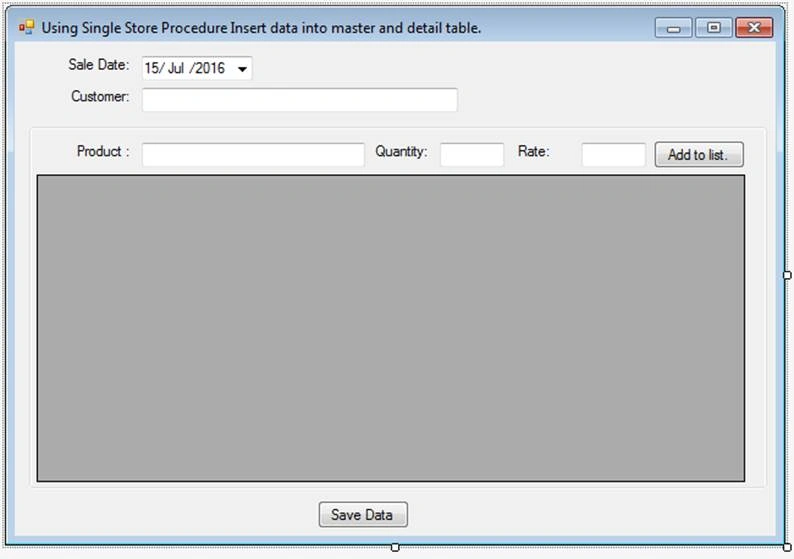
Set the controls name as follows:
- Datetimepicker
- txtCustomer
- txtProduct
- txtQty
- txtRate
- dataGridView
- btnAdd
- private void btnAdd_Click(object sender, EventArgs e)
- {
- int add = dataGridView.Rows.Add();
- dataGridView.Rows[add].Cells["Product"].Value = txtProduct.Text;
- dataGridView.Rows[add].Cells["Qty"].Value = txtQuantity.Text;
- dataGridView.Rows[add].Cells["Rate"].Value = txtRate.Text;
- txtProduct.Text = "";
- txtQuantity.Text = "";
- txtRate.Text = "";
- if (MessageBox.Show("Add more details", "Message", MessageBoxButtons.YesNo, MessageBoxIcon.Question)==DialogResult.Yes )
- {
- txtProduct.Focus ();
- }
- else
- btnSaveData.Focus ();
- }
- private void btnSaveData_Click(object sender, EventArgs e)
- {
- //product grid
- string product = "";
- string qty = "";
- string rate = "";
- int prodcount = 0;
- for (int i = 0; i <= dataGridView.Rows.Count - 1; i++)
- {
- product = product + Convert.ToString(dataGridView.Rows[i].Cells["Product"].Value).PadRight(20);
- qty = qty + Convert.ToString(dataGridView.Rows[i].Cells["Qty"].Value).PadRight(14);
- rate = rate + Convert.ToString(dataGridView.Rows[i].Cells["Rate"].Value).PadRight(14);
- prodcount += 1;
- }
- SaveData(dateTimePicker.Value, txtCustomer.Text, product, qty, rate, prodcount);
- }
- private void SaveData(DateTime _saledate, string _customer, string _product, string _qty, string _rate, int _productcount)
- {
- var connection = new SqlConnection("data source=(local); initial catalog=SampleData; integrated security=SSPI");
- var command = new SqlCommand("ADD_SALE_MASTER_DETAIL_TABLE", connection);
- command.Parameters .Add (new SqlParameter("@Saledate",_saledate ));
- command.Parameters .Add (new SqlParameter("@customername",_customer ));
- command.Parameters .Add (new SqlParameter("@StrProduct",_product ));
- command.Parameters .Add (new SqlParameter("@StrQty",_qty));
- command.Parameters .Add (new SqlParameter("@StrRate",_rate));
- command.Parameters.Add(new SqlParameter ("@Gridcount",_productcount));
- command.CommandType = CommandType.StoredProcedure;
- connection.Open ();
- try
- {
- int result = command.ExecuteNonQuery();
- if (Convert.ToBoolean (result))
- {
- MessageBox.Show("Record has been successfully saved..");
- }
- }
- catch (Exception ex)
- {
- MessageBox.Show (ex.Message ,"Message",MessageBoxButtons.OK,MessageBoxIcon.Error );
- }
- finally
- {
- connection.Close ();
- }
- }
Oluyemi OyewolePosted Oct 18, 2021, 2:41 AM
I thank you for this.
nilesh sseximPosted Mar 25, 2021, 5:20 AM
User Defined Table Type are Better Solution Above Sql Server 2012, and in Sql Server 2016 and above You can Pass Json and Convert it to Table and Insert
SubashPosted Sep 7, 2016, 10:51 PM
Goodone
kalu singh raoPosted Jul 18, 2016, 2:05 AM
Nice...