

This blog will show you how you can import the excel spreadsheet data into the SQL Server database table using c#.net. So for this blog first we will first create a SQL table. Here is the query to create a table.
SET ANSI_NULLS ON
GO
SET QUOTED_IDENTIFIER ON
GO
SET ANSI_PADDING ON
GO
CREATE TABLE [dbo].[Table1](
    [student] [varchar](50) NULL,
    [rollno] [int] NULL,
    [course] [varchar](50) NULL
) ON [PRIMARY]
GO
SET ANSI_PADDING OFF
GO
After this we will prepare an excel sheet.
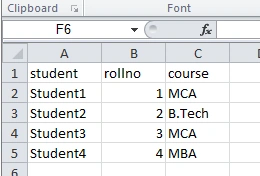
Now check the code to import the excel sheet
public void ImportDataFromExcel(string excelFilePath)
{
    //declare variables - edit these based on your particular situation
    string ssqltable = "Table1";
    // make sure your sheet name is correct, here sheet name is sheet1,
    so you can change your sheet name if have    different
    string myexceldataquery = "select student,rollno,course from [Sheet1$]";
    try
    {
        //create our connection strings
        string sexcelconnectionstring = @"provider=microsoft.jet.oledb.4.0;data source=" + excelFilePath +
        ";extended properties=" + "\"excel 8.0;hdr=yes;\"";
        string ssqlconnectionstring = "Data Source=SAYYED;Initial Catalog=SyncDB;Integrated Security=True";
        //execute a query to erase any previous data from our destination table
        string sclearsql = "delete from " + ssqltable;
        SqlConnection sqlconn = new SqlConnection(ssqlconnectionstring);
        SqlCommand sqlcmd = new SqlCommand(sclearsql, sqlconn);
        sqlconn.Open();
        sqlcmd.ExecuteNonQuery();
        sqlconn.Close();
        //series of commands to bulk copy data from the excel file into our sql table
        OleDbConnection oledbconn = new OleDbConnection(sexcelconnectionstring);
        OleDbCommand oledbcmd = new OleDbCommand(myexceldataquery, oledbconn);
        oledbconn.Open();
        OleDbDataReader dr = oledbcmd.ExecuteReader();
        SqlBulkCopy bulkcopy = new SqlBulkCopy(ssqlconnectionstring);
        bulkcopy.DestinationTableName = ssqltable;
        while (dr.Read())
        {
            bulkcopy.WriteToServer(dr);
        }
        dr.Close();
        oledbconn.Close();
        Label1.Text = "File imported into sql server successfully.";
    }
    catch (Exception ex)
    {
        //handle exception
    }
}
In above first I have read the excel sheet and then uses the sql command to read the excel sheet data. After reading the data I have save the data to the SQL table.
Ray AhernPosted Dec 12, 2021, 4:33 AM
Thanks for this. Very useful as I learn C# after using VBA way too much :-). A couple of observations for other beginners: Make sure your code is Using System.Data.OleDb and System.Data.SqlClient (this had me going for a while). Also note the dollar sign in [Sheet1$] -not sure if any other idiot would not notice that :-)
Chandan BangariPosted Nov 27, 2018, 1:07 AM
Sir can you provide the excel file is saving in existing one.
Shivaranjini BhatPosted Oct 8, 2018, 7:05 AM
Is it a must to create table in sql? can we create table on fly depending upon the columns or the sheet name?
dabbu kumarPosted Mar 5, 2018, 8:08 AM
How to fix: The Microsoft Office Access database engine cannot open or write to the file ''. It is already opened exclusively by another user, or you need permission to view and write its data.
Pranay SailPosted Dec 7, 2017, 4:43 AM
I have problem,excel first row are not save into the Table