

In WPF (Windows Presentation Foundation), storyboards serve as a robust tool for creating animations and visual effects. They enable developers to define intricate animations and transitions for various UI elements in a declarative manner using XAML markup or programmatically through code.
What is Storyboard Animation?
Here's a detailed explanation of what a storyboard animation involves.
- Storyboard: A storyboard acts as a container for animations, allowing developers to group multiple animations together and control them collectively.
- Animations: These define how the properties of visual elements change over time. Commonly animated properties include position, size, color, and opacity. WPF supports various types of animations like DoubleAnimation, ColorAnimation, ThicknessAnimation, and more.
- Keyframes: Keyframes specify specific values of a property at certain points in time during the animation. Multiple keyframes can be used within an animation to create complex motion paths or property transitions.
- Target Property: This refers to the property of the visual element that is being animated. For instance, you may want to animate the Width or Opacity of a Rectangle.
- Easing Functions: Easing functions determine the rate of change of the animation over time, controlling how quickly or slowly the animation accelerates or decelerates. WPF offers several built-in easing functions, such as Linear, Quadratic, Cubic, Bounce, and others.
Advantages of Storyboard Animation within WPF
Storyboard animation within WPF (Windows Presentation Foundation) brings forth numerous advantages.
- Enhanced User Experience: Storyboard animations elevate the user interface by incorporating visually appealing effects, transitions, and interactive elements, resulting in a more captivating user experience.
- Dynamic Visuals: Through Storyboard animations, developers can craft dynamic visuals that react to user actions, events, or alterations in data, thereby enhancing the application interface's intuitiveness and responsiveness.
- Simplicity: WPF's declarative XAML syntax streamlines the creation and management of animations, empowering developers to define intricate animations with minimal code.
- Versatility: Storyboard animations in WPF offer a high level of flexibility, enabling developers to animate virtually any property of UI elements, such as position, size, color, opacity, and more.
- Timeline Management: Storyboards provide precise control over the timing and sequencing of animations via keyframes and timelines, allowing developers to create sophisticated animations with accurate timing and synchronization.
- Reuse: Animations specified in Storyboards can be reused across multiple UI elements or different sections of the application, reducing redundancy and fostering code maintainability.
- Integration: WPF seamlessly integrates with tools like Microsoft Blend, which furnishes a rich design environment for visually creating and editing Storyboard animations, facilitating effective collaboration between designers and developers.
- Optimized Performance: WPF's built-in animation engine optimizes the performance of Storyboard animations, ensuring smooth and fluid animations even on low-powered devices or when animating multiple elements simultaneously.
There are two methods to accomplish this.
1. Implementation using Xaml
<Window x:Class="WpfSplashScreenExample.StoryboardAnimation"
        xmlns="http://schemas.microsoft.com/winfx/2006/xaml/presentation"
        xmlns:x="http://schemas.microsoft.com/winfx/2006/xaml"
        xmlns:d="http://schemas.microsoft.com/expression/blend/2008"
        xmlns:mc="http://schemas.openxmlformats.org/markup-compatibility/2006"
        xmlns:local="clr-namespace:WpfSplashScreenExample"
        mc:Ignorable="d"
        Title="StoryboardAnimation" Height="450" Width="800">
    <Window.Resources>
        <Storyboard x:Key="MyStoryboardWidth">
            <DoubleAnimation
                Storyboard.TargetName="AnimateRectangle"
                Storyboard.TargetProperty="Width"
                From="100"
                To="300"
                Duration="0:0:1"/>
        </Storyboard>
        <Storyboard x:Key="MyStoryboardHeight">
            <DoubleAnimation
                Storyboard.TargetName="AnimateRectangle"
                Storyboard.TargetProperty="Height"
                From="100"
                To="300"
                Duration="0:0:1"/>
        </Storyboard>
    </Window.Resources>
    <Grid>
        <Rectangle x:Name="AnimateRectangle" Width="100" Height="100" Fill="Blue"/>
        <StackPanel Orientation="Horizontal">
            <Button Margin="20,0,0,10" x:Name="Height" Content="Start Height Animation" Click="Height_Click" HorizontalAlignment="Center" VerticalAlignment="Bottom"/>
            <Button Margin="20,0,0,10" x:Name="Width" Content="Start Width Animation" Click="Width_Click" HorizontalAlignment="Center" VerticalAlignment="Bottom"/>
        </StackPanel>
    </Grid>
</Window>
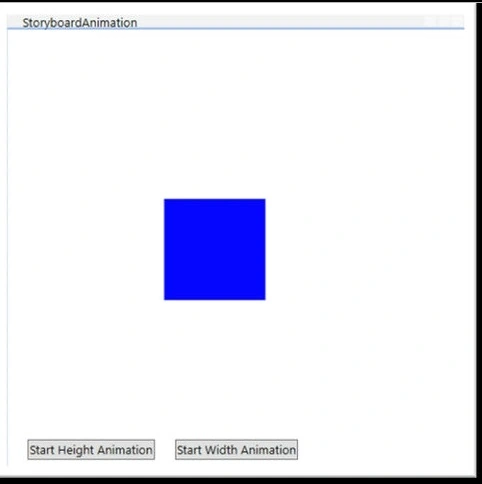
The view's code implementation
using System;
using System.Collections.Generic;
using System.Linq;
using System.Text;
using System.Threading.Tasks;
using System.Windows;
using System.Windows.Controls;
using System.Windows.Data;
using System.Windows.Documents;
using System.Windows.Input;
using System.Windows.Media;
using System.Windows.Media.Animation;
using System.Windows.Media.Imaging;
using System.Windows.Shapes;

namespace WpfSplashScreenExample
{
    /// <summary>
    /// Interaction logic for StoryboardAnimation.xaml
    /// </summary>
    public partial class StoryboardAnimation : Window
    {
        public StoryboardAnimation()
        {
            InitializeComponent();
        }

        private void Height_Click(object sender, RoutedEventArgs e)
        {
            Storyboard myStoryboard = (Storyboard)this.Resources["MyStoryboardHeight"];
            // Start the storyboard
            myStoryboard.Begin();
        }

        private void Width_Click(object sender, RoutedEventArgs e)
        {
            Storyboard myStoryboard = (Storyboard)this.Resources["MyStoryboardWidth"];
            // Start the storyboard
            myStoryboard.Begin();
        }
    }
}
2. Programmatically through code
<Window x:Class="WpfSplashScreenExample.StoryBoardAnimationByCode"
        xmlns="http://schemas.microsoft.com/winfx/2006/xaml/presentation"
        xmlns:x="http://schemas.microsoft.com/winfx/2006/xaml"
        xmlns:d="http://schemas.microsoft.com/expression/blend/2008"
        xmlns:mc="http://schemas.openxmlformats.org/markup-compatibility/2006"
        xmlns:local="clr-namespace:WpfSplashScreenExample"
        mc:Ignorable="d"
        Title="StoryBoardAnimationByCode" Height="450" Width="800">
    <Grid>
        <Rectangle x:Name="AnimateRectangle" Width="100" Height="100" Fill="Blue"/>
        <StackPanel Orientation="Horizontal">
            <Button Margin="20,0,0,10" x:Name="Height" Content="Start Height Animation" Click="Height_Click" HorizontalAlignment="Center" VerticalAlignment="Bottom"/>
            <Button Margin="20,0,0,10" x:Name="Width" Content="Start Width Animation" Click="Width_Click" HorizontalAlignment="Center" VerticalAlignment="Bottom"/>
        </StackPanel>
    </Grid>
</Window>
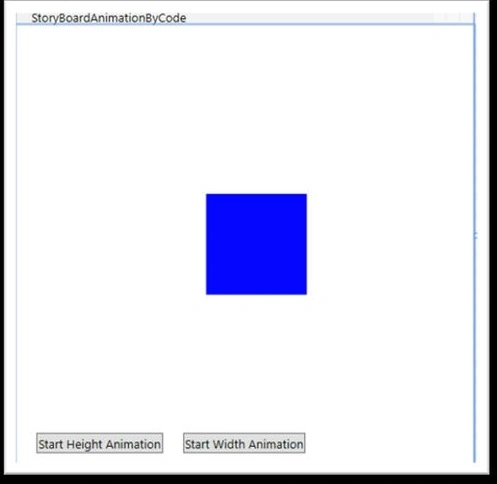
using System;
using System.Collections.Generic;
using System.Linq;
using System.Text;
using System.Threading.Tasks;
using System.Windows;
using System.Windows.Controls;
using System.Windows.Data;
using System.Windows.Documents;
using System.Windows.Input;
using System.Windows.Media;
using System.Windows.Media.Animation;
using System.Windows.Media.Imaging;
using System.Windows.Shapes;

namespace WpfSplashScreenExample
{
    /// <summary>
    /// Interaction logic for StoryBoardAnimationByCode.xaml
    /// </summary>
    public partial class StoryBoardAnimationByCode : Window
    {
        public StoryBoardAnimationByCode()
        {
            InitializeComponent();
        }

        private void Height_Click(object sender, RoutedEventArgs e)
        {
            // Create a new DoubleAnimation
            DoubleAnimation animation = new DoubleAnimation();

            // Set animation properties
            animation.From = 100; // Starting value
            animation.To = 300; // Ending value
            animation.Duration = TimeSpan.FromSeconds(1); // Duration of the animation

            // Create a new Storyboard
            Storyboard storyboard = new Storyboard();

            // Add the animation to the storyboard
            storyboard.Children.Add(animation);

            // Set the target property for the animation
            Storyboard.SetTarget(animation, AnimateRectangle); // Assuming 'AnimatedRectangle' is the name of the element you want to animate
            Storyboard.SetTargetProperty(animation, new PropertyPath(Rectangle.HeightProperty));

            // Begin the animation
            storyboard.Begin();
        }

        private void Width_Click(object sender, RoutedEventArgs e)
        {
            // Create a new DoubleAnimation
            DoubleAnimation animation = new DoubleAnimation();

            // Set animation properties
            animation.From = 100; // Starting value
            animation.To = 300; // Ending value
            animation.Duration = TimeSpan.FromSeconds(1); // Duration of the animation

            // Create a new Storyboard
            Storyboard storyboard = new Storyboard();

            // Add the animation to the storyboard
            storyboard.Children.Add(animation);

            // Set the target property for the animation
            Storyboard.SetTarget(animation, AnimateRectangle); // Assuming 'AnimatedRectangle' is the name of the element you want to animate
            Storyboard.SetTargetProperty(animation, new PropertyPath(Rectangle.WidthProperty));

            // Begin the animation
            storyboard.Begin();
        }
    }
}
Join the conversation! Your thoughts help the community grow.