

Today I am going to show you how to generate id in C# using MS Access Database
Let’s start with create a new windows form. We need one Label, one TextBox one button and one GridView.
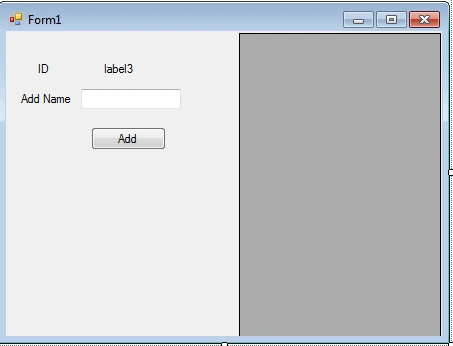
The code is shown below:
- using System;
- using System.Collections.Generic;
- using System.ComponentModel;
- using System.Data;
- using System.Drawing;
- using System.Linq;
- using System.Text;
- using System.Windows.Forms;
- using System.Data.OleDb;
- namespace idgenerator
- {
- public partial class Form1 : Form
- {
- OleDbConnection connectiondb = new OleDbConnection(@"Provider=Microsoft.ACE.OLEDB.12.0;Data Source=D:\C# Cor\database\mydatabase.accdb;Persist Security Info=False");
- OleDbCommand com;
- string str;
- public Form1()
- {
- InitializeComponent();
- new_id();
- showdata();
- }
- private void Form1_Load(object sender, EventArgs e)
- {
- }
- private void new_id()
- {
- if (connectiondb.State == ConnectionState.Closed)
- {
- connectiondb.Open();
- }
- str = "select max(admin_create_id) from tbl_user";
- com = new OleDbCommand(str, connectiondb);
- com.CommandType = CommandType.Text;
- Int32 max = (Int32)com.ExecuteScalar();
- label3.Text = (max + 1).ToString();
- connectiondb.Close();
- }
- private void button1_Click(object sender, EventArgs e)
- {
- if (connectiondb.State == ConnectionState.Closed)
- {
- connectiondb.Open();
- }
- str = "insert into tbl_user (admin_create_id,sName) values (@admin_create_id,@sName)";
- com = new OleDbCommand(str, connectiondb);
- com.Parameters.AddWithValue("@admin_create_id", label3.Text);
- com.Parameters.AddWithValue("@sName", textBox2.Text);
- com.ExecuteNonQuery();
- connectiondb.Close();
- MessageBox.Show("Records Successfuly Inserted");
- showdata();
- new_id();
- }
- private void showdata()
- {
- if (connectiondb.State == ConnectionState.Closed)
- {
- connectiondb.Open();
- }
- string strSql = "Select admin_create_id,sName from tbl_user";
- OleDbCommand cmd = new OleDbCommand(strSql, connectiondb);
- cmd.CommandType = CommandType.Text;
- OleDbDataAdapter da = new OleDbDataAdapter(cmd);
- DataTable dt = new DataTable();
- da.Fill(dt);
- dataGridView1.DataSource = dt;
- connectiondb.Close();
- }
- }
- }
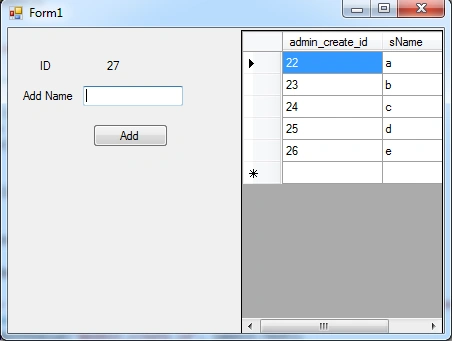
Result
Thanks.!!
Robin ChackoPosted Aug 2, 2018, 8:24 AM
Invalid cast it says
Robin ChackoPosted Aug 2, 2018, 8:24 AM
Its not working
Emmanuel PeterPosted Jul 10, 2016, 7:14 PM
Where is the database