

How to use nested ng-repeat in AngularJS
The ng-repeat directive instantiates a template once per item from a collection like array, list etc. In this blog, I am using nested ng-repeat to show the country list along with their city name.
Create a project and install AngularJS from NuGet Package, add a script file to the project and write Angular code.
Note: If you are not getting the intellisence, add the reference of Angular js to the script file
/// <reference path="angular.min.js" />
JavaScript code-
- var myApp6 = angular.module("myModule6", []).controller("myApp6Controller", function($scope) {
- var countries = [{
- name: "UK",
- cities: [{
- name: "UK City1"
- }, {
- name: "UK City2"
- }, {
- name: "UK City3"
- }]
- }, {
- name: "US",
- cities: [{
- name: "US City1"
- }, {
- name: "US City2"
- }, {
- name: "US City3"
- }]
- }, {
- name: "India",
- cities: [{
- name: "India City1"
- }, {
- name: "India City2"
- }, {
- name: "India City3"
- }]
- }];
- $scope.countries = countries;
- })
Here, I have created a module named myApp6 with the controller my App6Controller. Here, I have used an array named countries having two properties name and cities. Again, cities is an array having a name property.
Now, I will show this data, using nested array.
HTML code-
- <div id="App1" ng-app="myModule6" ng-controller="myApp6Controller">
- <div>
- <ul>
- <li ng-repeat="country in countries">
- {{country.name}}
- <ul>
- <li ng-repeat="city in country.cities">
- {{city.name}}
- </li>
- </ul>
- </li>
- </ul>
- </div>
- </div>
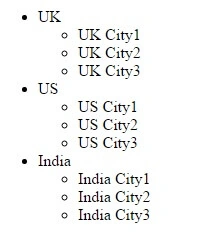
Output
Join the conversation! Your thoughts help the community grow.