

In this blog, I am going to share with you how to use a File Class. File class helps us to perform various operations over a file, like create, delete, read and write etc. Operation on file is the most important activity while writing a program. We use a file to save some data or information. Here, I am going to explain how we can use File class in our application to perform various operations. In the below figure 1, I have used four buttons and one textbox to perform write, read, and delete operations.
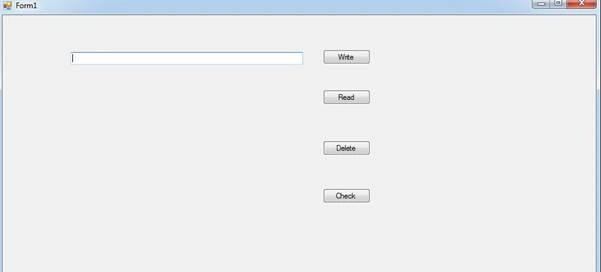
Write Operation Using file Class
Step 1
File class is available inside System.IO Namespace. In order to use the File class, first, you need to use the namespace.
Step 2
Write code on the write button click as shown in the below code. WriteAllText is a static method which is available in the File class. This method takes two parameters - location where you want to write, and content that you want to write. The method creates a file if the filename does not exist in the given location.
- //Write contents on notepad inside the debug folder of application
- private void button1_Click(object sender, EventArgs e)
- {
- File.WriteAllText(Application.StartupPath + @"\demo.txt", textBox1.Text);
- }
Read Operation Using file Class
Step 1
File class is available inside System.IO Namespace. In order to use the File class, first, you need to use the namespace.
Step 2
Write code for the Read button click event as shown in the below code. ReadAllText is a static method which is available in the File class.It takes one parameter, i.e., location from where you want to read the data. ReadAllText returns string value.
- //Read contents from demo.txt file
- private void button2_Click(object sender, EventArgs e)
- {
- string allText= File.ReadAllText(Application.StartupPath + @"\demo.txt");
- }
Check File exists or not Using file Class
Step 1
File class is available inside System.IO Namespace. In order to use the File class, first, you need to use the namespace.
Step 2
Write code on Check button click event as shown in the below code. Exists is a static method which is available in the File class. It takes one parameter - Location. The file Exists method returns bool value. It returns true if the file will available at the target location otherwise false.
- //Delete the existing File
- private void button3_Click(object sender, EventArgs e)
- {
- if( File.Exists(Application.StartupPath + @"\demo.txt"))
- {
- File.Delete(Application.StartupPath + @"\demo.txt");
- }
- else
- {
- MessageBox.Show("File Not Found..");
- }
- }
Delete Operation Using file Class
Step 1
File class is available inside System.IO Namespace. In order to use the File class, first, you need to use the namespace.
Step 2
Write code on Delete button click event as shown in the below code. Delete is a static method which is available inside the File class. It method takes one parameter, the parameter is location from where you want to delete the file. Delete method returns void value. I used Exists method to check whether file exist or not at the target location.
- //Delete the existing File
- private void button3_Click(object sender, EventArgs e)
- {
- if( File.Exists(Application.StartupPath + @"\demo.txt"))
- {
- File.Delete(Application.StartupPath + @"\demo.txt");
- }
- else
- {
- MessageBox.Show("File Not Found..");
- }
- }
denis deschenesPosted Nov 19, 2017, 7:30 PM
Process p = Process.Start("C:/folder/software.exe"); p.WaitForInputIdle(); IntPtr h = p.MainWindowHandle; SetForegroundWindow(h); Thread.Sleep(200); SendKeys.Send("{TAB}"); Thread.Sleep(200); SendKeys.Send("{ENTER}"); Thread.Sleep(200); // the new window open here at this moment and i have to interact in this new window SendKeys.Send("{TAB}"); Thread.Sleep(200); SendKeys.Send("{TAB}"); SendKeys.SendWait("myscrape_7"); Thread.Sleep(200); SendKeys.Send("{ENTER}"); Thread.Sleep(200);
denis deschenesPosted Nov 19, 2017, 7:24 PM
Using System.Runtime.InteropServices;using System.Diagnostics; using System.Threading; [DllImport("User32.dll")] static extern int SetForegroundWindow(IntPtr point); private void button1_Click(object sender, EventArgs e)
denis deschenesPosted Nov 19, 2017, 7:20 PM
Hello Raj !! im trying to find what i need maybe you can help me on this .... i use ( process.start( @"C:/folder/sotware.exe) and ( sendkeys) to open other software and do thing automaticly to save time but when i open the software ,,,some other window open and i what to know how i can send the ( sendkeys function) in this new windows ????example: i have to select an folder in the next window ..but the sendkeys function still functionning in the first window already open ....how to switch to one window to another window ??????