

Introduction
In this blog we will see how to perform add range operation using entity framework.
Step 1: Create console application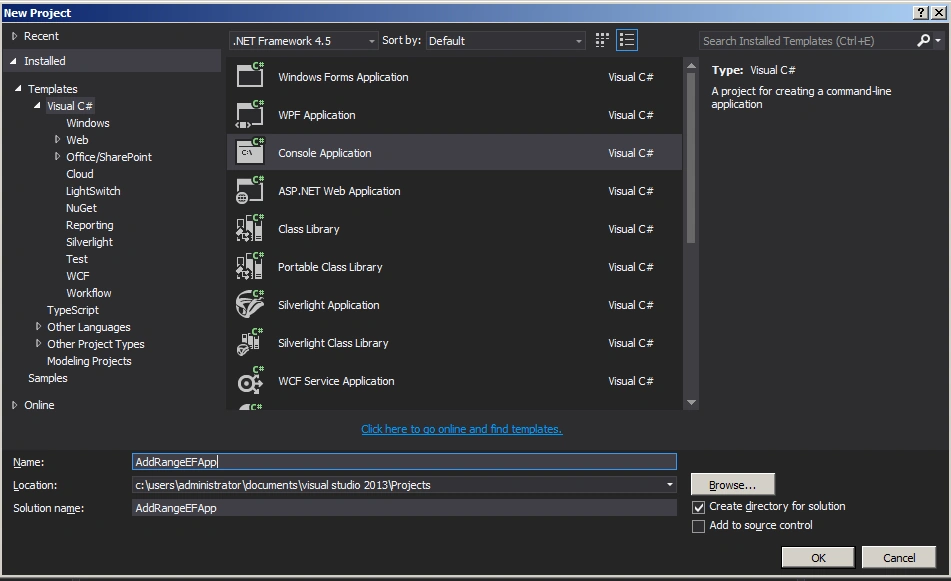
Employee.cs
- namespace AddRangeEFApp
- {
- using System;
- using System.Collections.Generic;
- using System.ComponentModel.DataAnnotations;
- using System.ComponentModel.DataAnnotations.Schema;
- using System.Data.Entity.Spatial;
- [Table("Employee")]
- public partial class Employee
- {
- public int Id { get; set; }
- [StringLength(50)]
- public string FirstName { get; set; }
- [StringLength(50)]
- public string LastName { get; set; }
- }
- }
Employeecontext.cs
- namespace AddRangeEFApp
- {
- using System;
- using System.Data.Entity;
- using System.ComponentModel.DataAnnotations.Schema;
- using System.Linq;
- public partial class EmployeeContext : DbContext
- {
- public EmployeeContext()
- : base("name=EmpConn")
- {
- }
- public virtual DbSet<Employee> Employees { get; set; }
- protected override void OnModelCreating(DbModelBuilder modelBuilder)
- {
- modelBuilder.Entity<Employee>()
- .Property(e => e.FirstName)
- .IsUnicode(false);
- modelBuilder.Entity<Employee>()
- .Property(e => e.LastName)
- .IsUnicode(false);
- }
- }
- }
Web.config
- <connectionStrings>
- <add name="EmpConn" connectionString="data source=WIN-B4KJ8JI75VF;initial catalog=EmployeeDB;user id=sa;password=India123;MultipleActiveResultSets=True;App=EntityFramework" providerName="System.Data.SqlClient" />
- </connectionStrings>
Program.cs
- using System;
- using System.Collections.Generic;
- using System.Linq;
- using System.Text;
- using System.Threading.Tasks;
- namespace AddRangeEFApp
- {
- class Program
- {
- static void Main(string[] args)
- {
- IList<Employee> newEmployee = new List<Employee>();
- newEmployee.Add(new Employee() { FirstName = "Jon", LastName = "Aw" });
- newEmployee.Add(new Employee() { FirstName = "Syed", LastName = "Khan" });
- newEmployee.Add(new Employee() { FirstName = "James", LastName = "Still" });
- using (var objEmpContext = new EmployeeContext())
- {
- objEmpContext.Employees.AddRange(newEmployee);
- objEmpContext.SaveChanges();
- }
- Console.ReadKey();
- }
- }
- }
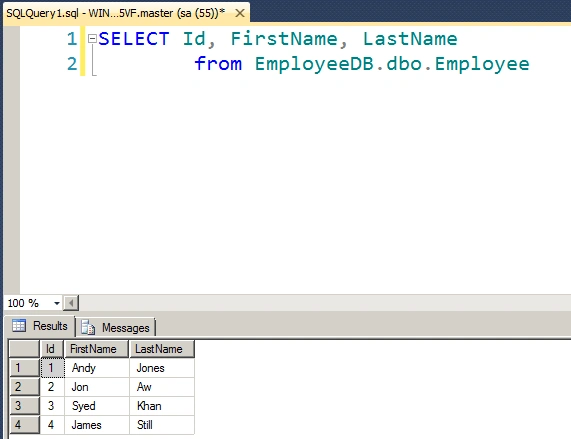
Output of the application looks like this
Summary
In this blog we have seen how we can perform add range operation using entity framework. Happy coding!
Join the conversation! Your thoughts help the community grow.