

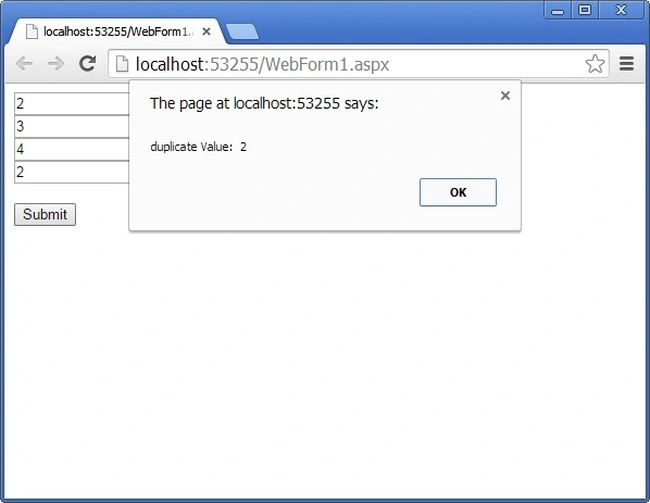
While working on an ASP.Net project, we often will get a scenario to check the duplicate input value like on the textbox value. We can do it like this.
- <%@ Page Title="" Language="C#" MasterPageFile="~/Site.master" AutoEventWireup="true"
- CodeFile="Default3.aspx.cs" Inherits="Default3" %>
- <asp:Content ID="Content1" ContentPlaceHolderID="HeadContent" runat="Server">
- <script type="text/javascript">
- function testValues() {
- var no1 = document.getElementById('<%= TextBox1.ClientID %>').value;
- var no2 = document.getElementById('<%= TextBox2.ClientID %>').value;
- var no3 = document.getElementById('<%= TextBox3.ClientID %>').value;
- var no4 = document.getElementById('<%= TextBox4.ClientID %>').value;
- var arrInput = [no1,no2,no3,no4];
- var sorted_arr = arrInput.sort();
- var results = [];
- for (var i = 0; i < arrInput.length - 1; i++) {
- if (sorted_arr[i + 1] == sorted_arr[i]) {
- results.push(sorted_arr[i]);
- }
- }
- alert("duplicate Value: " + results);
- }
- </script>
- </asp:Content>
- <asp:Content ID="Content2" ContentPlaceHolderID="MainContent" runat="Server">
- <asp:TextBox ID="TextBox1" runat="server" />
- <br />
- <asp:TextBox ID="TextBox2" runat="server" />
- <br />
- <asp:TextBox ID="TextBox3" runat="server" />
- <br />
- <asp:TextBox ID="TextBox4" runat="server" />
- <br />
- <br />
- <asp:Button ID="Button1" Text="Submit" OnClientClick="testValues();" runat="server" />
- </asp:Content>
srinivas prabhuPosted Feb 7, 2018, 11:18 PM
It is working fine but after showing alert it is executing the code behind saving code. I want to stop that how to handle this.
Krishna (TCS)Posted Nov 8, 2017, 5:36 PM
Currently this code wont handle the arrays where elements are repeated more than twice, also this will not work if there are 3 digit numbers in that array because you are using .sort() function.