

Introduction
In this blog, you will learn how to create a pairing game in JavaScript.
Step 1
First, open a Sublime Text editor,
- Open start -> Sublime Text Editor.
- Go to file -> File -> New File
- Name of File -> Weather app.html.
Now let's follow the steps for our game project.
Step 2
Now, I have add css styles inside the <style> tag.
- body,
- p,
- h5 {
- padding: 0;
- margin: 0;
- font-family: 'indie flower'
- }
- body {
- width: 100hw;
- height: 100vh;
- background: url('../libs//img//background.png') no-repeat center
- }
- .main {
- position: absolute;
- width: 400px;
- height: 600px;
- top: 50%;
- left: 50%;
- margin: -300px -200px;
- }
- .top {
- width: 100%;
- height: 18%;
- background: #9f392d;
- position: absolute;
- color: #520b03
- }
- .bottom {
- position: absolute;
- width: 100%;
- height: 82%;
- top: 18%;
- background: #9f392d;
- }
- .board {
- width: 26%;
- height: 90%;
- margin: 2% 0 0 2%;
- background: #f9bbb4;
- float: left;
- }
- .board h5 {
- width: 100%;
- height: 25%;
- font-size: 23px;
- text-align: center;
- }
- .board p {
- width: 100%;
- height: 75%;
- font-size: 4.5em;
- text-align: center
- }
- .mes {
- width: 44.1%;
- height: 90%;
- background: #f9bbb4;
- margin: 2% 0 0 0;
- float: left;
- font-size: 2.5em;
- padding-top: 15px;
- text-align: center;
- }
- .mes div {
- font-size: 0.70em;
- color: #008a00
- }
- .time {
- margin: 2% 0 0 0;
- }
- .box {
- width: 96%;
- height: 98.5%;
- background: #f9bbb4;
- margin: 0.3% 0 0 2%;
- }
- .placer {
- width: 33.3343%;
- height: 25%;
- float: left;
- }
- .holder {
- width: 98%;
- height: 97.8%;
- margin: 1.5%;
- border: 1px solid #9f392d;
- transform-style: preserve-3d;
- transition: all 0.5s ease;
- border-radius: 3px;
- }
- .flip {
- transform: rotateY(180deg)
- }
- .front {
- position: absolute;
- width: 100%;
- height: 100%;
- background: #fed4d1;
- transition: all 0.5s ease;
- }
- .back {
- position: absolute;
- width: 100%;
- height: 100%;
- transform: rotateY(180deg);
- transition: all 0.5s ease;
- backface-visibility: hidden;
- }
- .addSc {
- animation: enable 0.3s linear
- }
- .timeStyle {
- animation: timer 0.3s linear
- }
- @keyframes enable {
- 0% {
- transform: scale(1);
- }
- 60% {
- color: #00cc03;
- transform: scale(1.2);
- }
- 100% {
- transform: scale(1);
- }
- }
- @keyframes timer {
- 0% {
- transform: scale(1);
- }
- 60% {
- color: #0062c4;
- transform: scale(1.2);
- }
- 100% {
- transform: scale(1);
- }
- }
Now we insert a new HTML Page on this pairing game. The code is given below.
- <!DOCTYPE html>
- <html lang="en">
- <head>
- <meta charset="UTF-8">
- <meta name="viewport" content="width=device-width, initial-scale=1.0">
- <meta http-equiv="X-UA-Compatible" content="ie=edge">
- <title>Pairing Game</title>
- <link href="https://fonts.googleapis.com/css?family=Indie+Flower&display=swap" rel="stylesheet">
- <link href="css/bootstrap.css" rel="stylesheet">
- <link href="css/style.css" rel="stylesheet">
- </head>
- <body>
- <div class='main'>
- <div class='top'>
- <div class='board score'>
- <h5>Score</h5>
- <p class='sc'>0</p>
- </div>
- <div class='mes'>Start</div>
- <div class='board time'>
- <h5>Seconds</h5>
- <p class='second'>30</p>
- </div>
- </div>
- <div class='bottom'>
- <div class='box'></div>
- </div>
- </div>
- <audio data-key='select' src='libs/sounds/bounce.mp3'></audio>
- <audio data-key='wrong' src='libs/sounds/wrong.mp3'></audio>
- <audio data-key='correct' src='libs/sounds/correct.mp3'></audio>
- <audio data-key='seconds' src='libs/sounds/seconds.mp3'></audio>
- <audio data-key='yay' src='libs/sounds/yay.mp3'></audio>
- <audio data-key='lose' src='libs/sounds/lose.mp3'></audio>
- </body>
- <script src='./js/script.js'></script>
- </html>
Step 3
Here you can use some JavaScript along with HTML code. Just follow the steps to see how to create this pairing game.
- const fruits = ['carrot', 'cherry', 'apple', 'pineapple', 'pumpkin', 'strawberry']
- const box = document.querySelector('.box')
- const mes = document.querySelector('.mes')
- const score = document.querySelector('.sc')
- const second = document.querySelector('.second')
- const sec = document.querySelector('audio[data-key="seconds"]')
- const select = document.querySelector('audio[data-key="select"]')
- const wrong = document.querySelector('audio[data-key="wrong"]')
- const correct = document.querySelector('audio[data-key="correct"]')
- const yay = document.querySelector('audio[data-key="yay"]')
- const lose = document.querySelector('audio[data-key="lose"]')
- let tim;
- let timer;
- fruits.push(...fruits)
- function shuffle(arr) {
- var val1 = arr.length, temp, index;
- while (val1 > 0) {
- index = Math.floor(Math.random() * val1);
- val1--;
- temp = arr[val1];
- arr[val1] = arr[index];
- arr[index] = temp;
- }
- return arr;
- }
- window.onload = init;
- function init() {
- var divs = (shuffle(fruits))
- for (var x = 0; x < divs.length; x++) {
- box.innerHTML += `
- <div class='placer ${x}'>
- <div class='holder ${divs[x]}'>
- <div class='front'></div>
- <img class='back' src='libs/img/${divs[x]}.png'>
- </div>
- </div>
- `
- }
- showBox();
- }
- function showBox() {
- mes.addEventListener('click', ready)
- }
- function ready() {
- var a = box.children;
- this.innerHTML = 'Ready!'
- tim = new Date().getTime() + 30000
- timer = setInterval(setDate, 1000)
- for (var x = 0; x < a.length; x++) {
- a[x].addEventListener('click', click);
- }
- }
- function click() {
- var b = this.firstElementChild;
- b.classList.add('flip');
- evaluator(this);
- }
- var selectedBox = [];
- function evaluator(a) {
- select.play()
- if (a.classList[1] === undefined) {
- return
- }
- selectedBox.push(a);
- if (selectedBox.length === 1) {
- mes.innerHTML = "Be sure!";
- }
- if (selectedBox.length === 2) {
- if (selectedBox[0].firstElementChild.classList[1] == selectedBox[1].firstElementChild.classList[1]) {
- removePic(selectedBox)
- selectedBox = [];
- } else {
- hidePic(selectedBox);
- selectedBox = [];
- }
- }
- }
- var scoreCard = 1;
- function scoreBoard() {
- score.innerHTML = scoreCard++;
- score.classList.add('addSc')
- if (scoreCard === 7) {
- endGame()
- }
- removeCss(score, 'addSc')
- }
- function endGame() {
- setTimeout(function () {
- mes.innerHTML = `
- <div>You win!</div>
- <div>Start again.</div>
- `
- clearInterval(timer)
- var a = box.children
- for (var x = 0; x < a.length; x++) {
- a[x].removeEventListener('click', click);
- }
- mes.addEventListener('click', reset)
- yay.play()
- }, 700)
- }
- function reset() {
- window.location.reload(true)
- }
- function removeCss(element, cssName) {
- setTimeout(function () {
- element.classList.remove(cssName)
- }, 700)
- }
- function removePic(a) {
- a[0].classList.remove(a[0].classList[1])
- a[1].classList.remove(a[1].classList[1])
- setTimeout(function () {
- correct.play()
- mes.innerHTML = 'Great Job!';
- scoreBoard();
- }, 700)
- }
- function hidePic(a) {
- setTimeout(function () {
- for (var x = 0; x < 2; x++) {
- a[x].firstElementChild.classList.remove('flip')
- }
- mes.innerHTML = "Wrong!";
- wrong.play()
- }, 700)
- }
- function setDate() {
- var newTime = new Date().getTime()
- var remainingTime = tim - newTime
- var remTime = Math.ceil(remainingTime / 1000)
- second.innerHTML = remTime
- second.classList.add('timeStyle')
- mes.removeEventListener('click', ready)
- sec.play()
- if (remTime === 0) {
- mes.innerHTML = `
- <div>You lose!</div>
- <div>Play again.</div>
- `
- clearInterval(timer)
- var a = box.children
- for (var x = 0; x < a.length; x++) {
- a[x].removeEventListener('click', click);
- }
- lose.play()
- mes.addEventListener('click', reset)
- }
- removeCss(second, 'timeStyle')
- }
Output
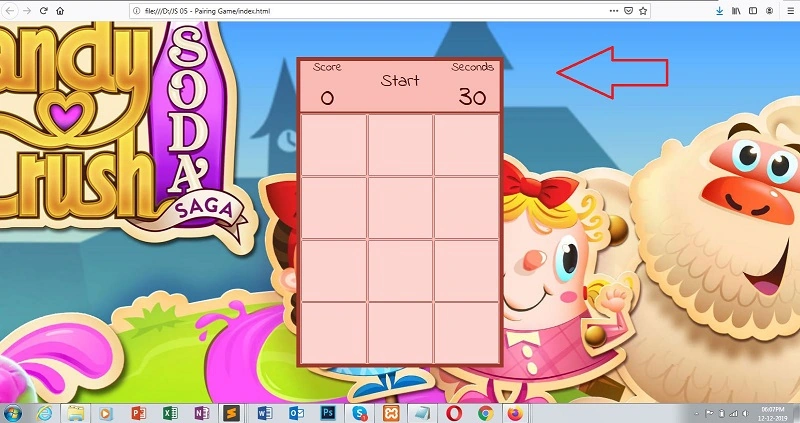
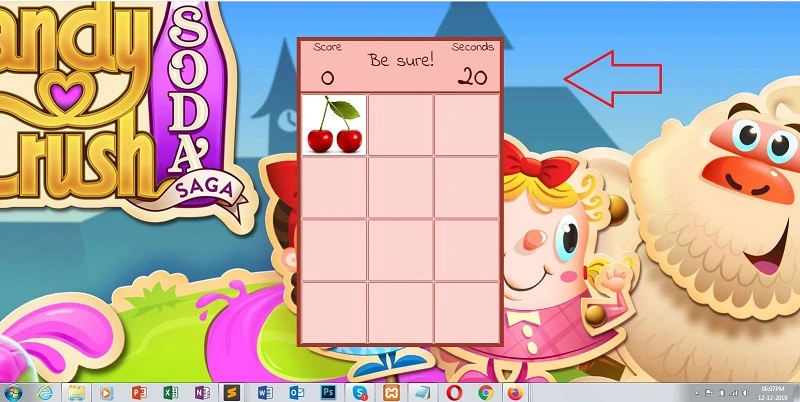
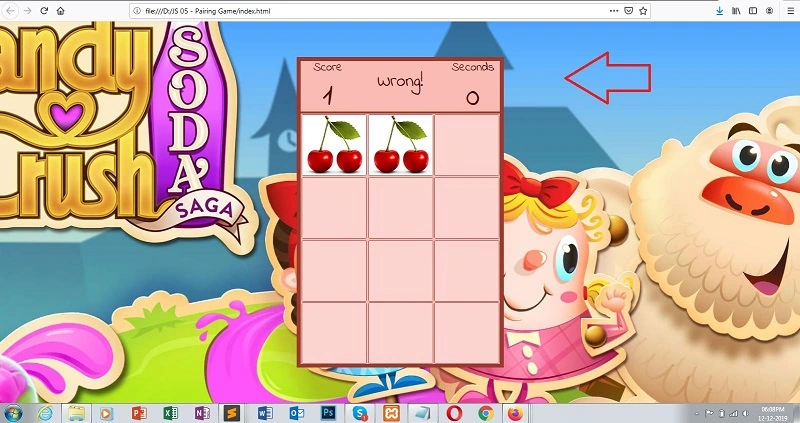
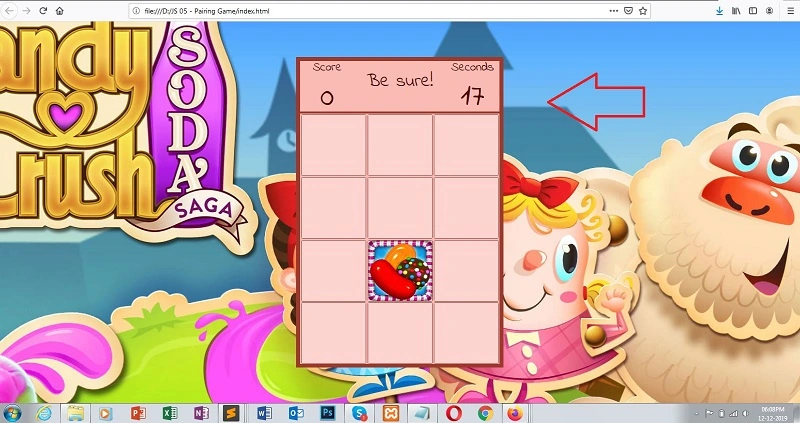
Now, you can right-click on the sublime text window stage. A dialog box appears, select->open a new browser.
Join the conversation! Your thoughts help the community grow.