

Hello Readers and Friends! I am happy to share some of my codes and applications. Today, I am discussing about some of the basic things in C# programming that is Checkbox Control in Windows application.
Step 1: Open Visual Studio (any version you have installed). I have VS2012,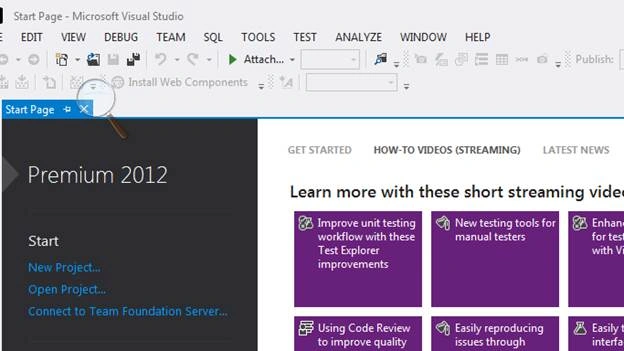
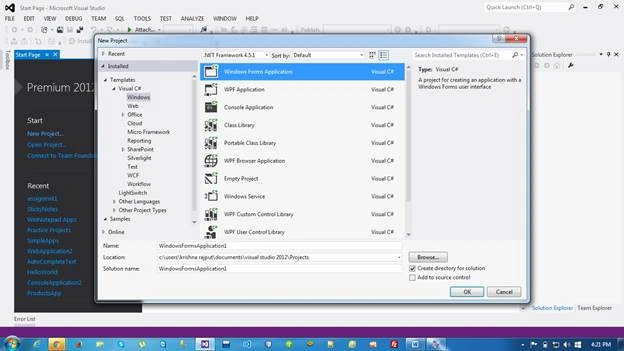
Step 2: Select Windows form application and enter the name of application, then click OK.
Step 3: Design your windows application, like drag and drop the checkbox, buttons and labels, as per your requirement.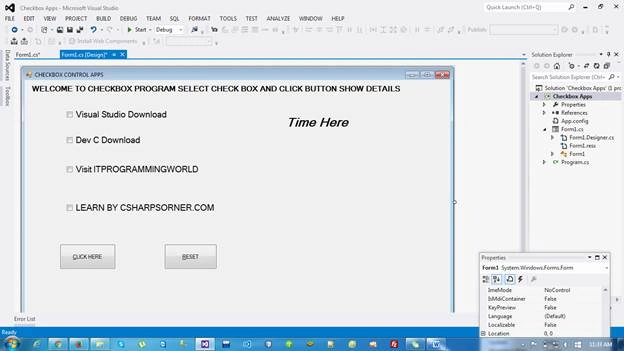
Step 4: The source code of my program is given below.
- using System;
- using System.Collections.Generic;
- using System.ComponentModel;
- using System.Data;
- using System.Drawing;
- using System.Linq;
- using System.Text;
- using System.Threading.Tasks;
- using System.Windows.Forms;
- namespace Checkbox_Apps
- {
- public partial class Form1 : Form
- {
- public Form1()
- {
- InitializeComponent();
- }
- private void checkBox1_CheckedChanged(object sender, EventArgs e)
- {
- checkBox1.ThreeState = true;
- }
- private void label1_Click(object sender, EventArgs e)
- {
- }
- private void checkBox2_CheckedChanged(object sender, EventArgs e)
- {
- checkBox2.ThreeState = true;
- }
- private void checkBox3_CheckedChanged(object sender, EventArgs e)
- {
- checkBox3.ThreeState = true;
- }
- private void checkBox4_CheckedChanged(object sender, EventArgs e)
- {
- checkBox4.ThreeState = true;
- }
- private void button1_Click(object sender, EventArgs e)
- {
- //string messagebox = "";
- if (checkBox1.Checked == true)
- {
- MessageBox.Show("Welcome to Visual Studio DownLoad Page Click Visit");
- System.Diagnostics.Process.Start("www.visualstudio.com");
- }
- if (checkBox2.Checked == true)
- {
- MessageBox.Show("Welcome to Dev C DownLoad Page Click Visit");
- System.Diagnostics.Process.Start("www.krishnasinghprogramming.blogspot.com");
- }
- if (checkBox3.Checked == true)
- {
- MessageBox.Show("Welcome to IT PROGRAMMING WORLD Page Click Visit");
- System.Diagnostics.Process.Start("www.krishnasinghprogramming.blogspot.com");
- }
- if (checkBox4.Checked == true)
- {
- MessageBox.Show("Welcome to CSHARPCORNER Page Click Visit");
- System.Diagnostics.Process.Start("www.csharpcorner.com");
- }
- }
- private void button2_Click(object sender, EventArgs e)
- {
- checkBox1.Checked = false;
- checkBox2.Checked = false;
- checkBox3.Checked = false;
- checkBox4.Checked = false;
- {
- }
- }
- private void label2_Click(object sender, EventArgs e)
- {
- label2.Text = DateTime.Now.ToShortTimeString();
- }
- }
- }
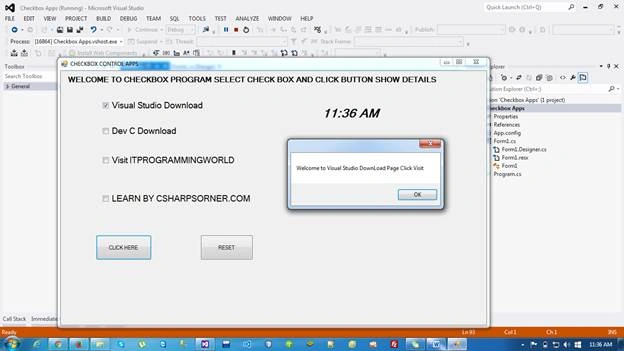
Thank you for reading. I hope this article proves to be helpful to you.
Parvez AhadPosted Jul 14, 2016, 5:04 AM
Good one.
Krishna Rajput SinghPosted Jul 11, 2016, 11:11 AM
Thank you so much for you valuable feedback suresh Molabanti...:)
Suresh MolabantiPosted Jul 11, 2016, 1:00 AM
Nice good one.
kalu singh raoPosted Jul 9, 2016, 12:27 PM
Nice...