

What is Web API?
The ASP.NET Web API is an extensible framework for building HTTP based services that can be accessed in different applications on different platforms such as web, windows, mobile, etc.
Why Web API?
To consume third party data using mobile devices, tablets, browsers Web API is very useful. Web API is easy to consume, less configuration is required as compared to consuming web services. Web API returns data in JSON as well as XML format.
Token Based Authentication in Web API
Token contains information to identify a particular user which needs to be sent to the server by the client with each and every request.
How Does Token Based Authentication Work in Web API?
Client needs to send Username and password to Authorization Server. If user credentials are correct then Authorization Server generates and returns the access token (Each token has expiry time).
Then client needs to include access token in Authorization header of the HTTP request to access the Web API methods.
Step by step method to create Token Based Authentication Web API
Step 1
Create new project in Visual Studio New Project – Web – ASP .NET Web Application – rename as TokenBasedAPI - OK
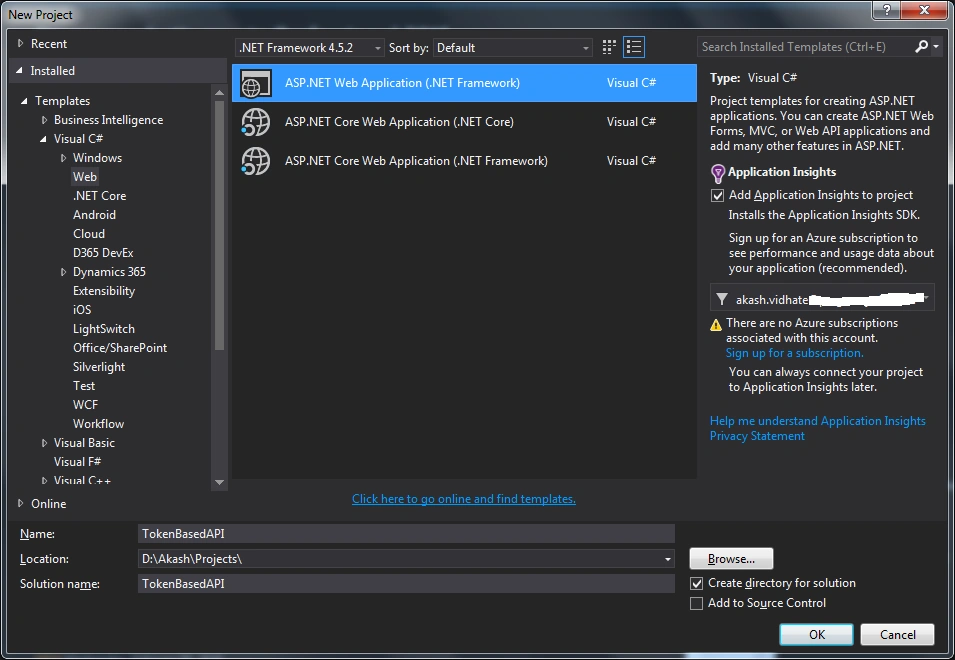
Step 2
Select Empty template and Select Web API option in checkbox list
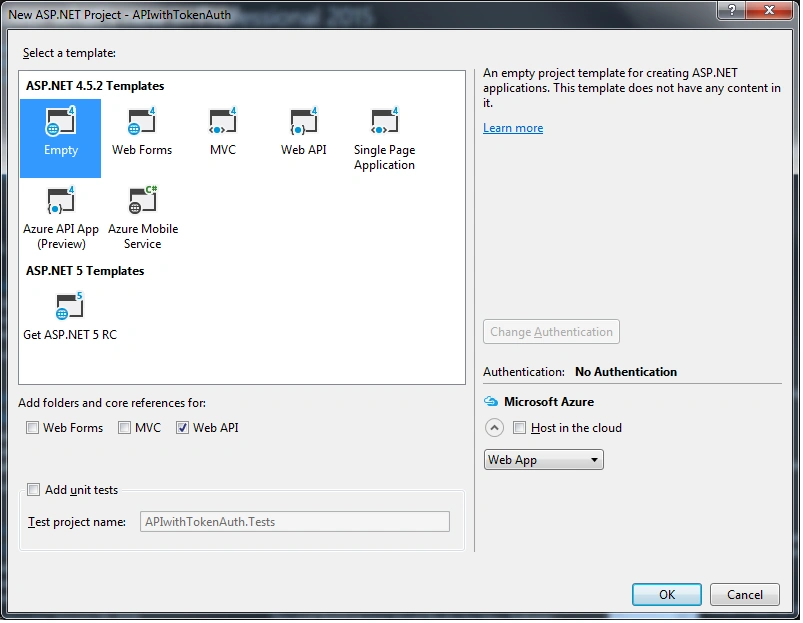
Step 3
Add below references using NuGet Package Manager
Microsoft.Owin.Host.SystemWeb
Microsoft.Owin.Security.OAuth
Microsoft.Owin.CorsNewtonsoft.json
Microsoft.Owin.Security.OAuth
Microsoft.Owin.CorsNewtonsoft.json
Right click on references – Select Manage NuGet Packages – Browse Microsoft.Owin.Host.SystemWeb Select version 4.1.0 – Click install
Follow same procedure for other references for Newtonsoft.json select version 10.0.1
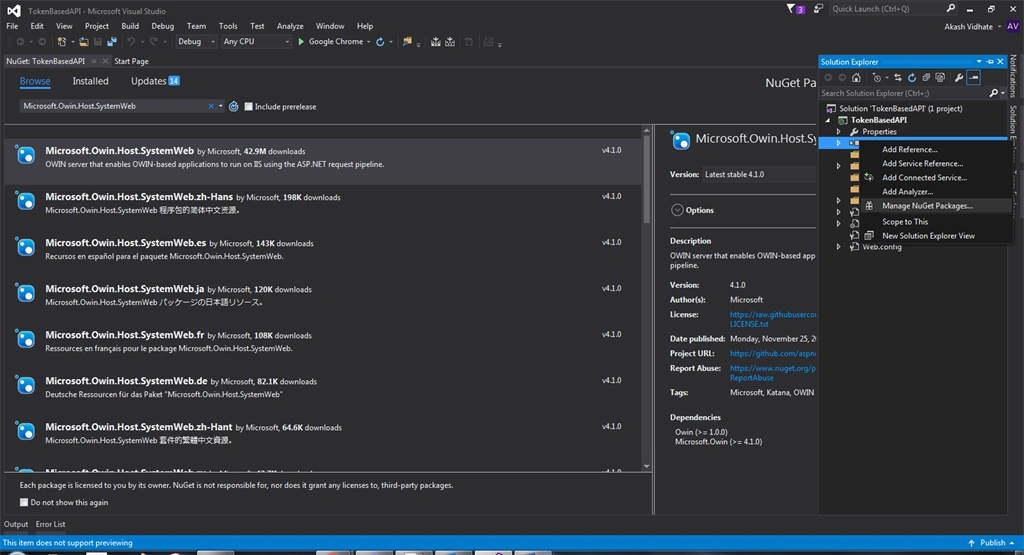
Step 4 - Add new Class in Solution
Right click on project name (TokenBasedAPI) – Add – New Item – Select tab Visual C# - Select Class – rename as UserAuthentication.cs
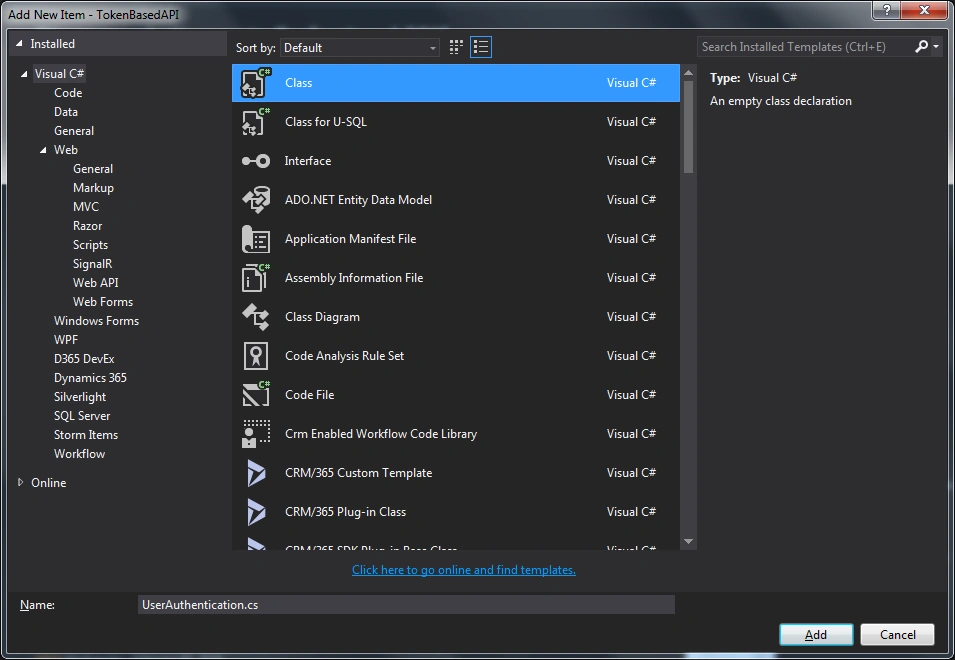
Step 5
Add the below code in UserAuthentication.cs file
- using System;
- using System.Collections.Generic;
- using System.Linq;
- using System.Web;
- namespace TokenBasedAPI
- {
- public class UserAuthentication : IDisposable
- {
- public string ValidateUser(string username, string password)
- {
- string Name = username == "akash" ? "Valid" : "InValid";
- string Pass = password == "vidhate" ? "Valid" : "InValid";
- if (Name == "Valid" && Pass == "Valid")
- return "true";
- else
- return "false";
- }
- public void Dispose()
- {
- //Dispose();
- }
- }
- }
Step 6
Again create a new class, AuthorizationServerProvider.cs, and add the below code in that class
- using Microsoft.Owin.Security.OAuth;
- using System.Security.Claims;
- using System.Threading.Tasks;
- namespace TokenBasedAPI
- {
- public class AuthorizationServerProvider : OAuthAuthorizationServerProvider
- {
- public override async Task ValidateClientAuthentication(OAuthValidateClientAuthenticationContext context)
- {
- context.Validated();
- }
- public override async Task GrantResourceOwnerCredentials(OAuthGrantResourceOwnerCredentialsContext context)
- {
- using (UserAuthentication OBJ = new UserAuthentication())
- {
- var user = OBJ.ValidateUser(context.UserName, context.Password);
- if (user == "false")
- {
- context.SetError("invalid_grant", "Username or password is incorrect");
- return;
- }
- var identity = new ClaimsIdentity(context.Options.AuthenticationType);
- identity.AddClaim(new Claim(ClaimTypes.Role, "SuperAdmin"));
- identity.AddClaim(new Claim(ClaimTypes.Name, "akash"));
- //identity.AddClaim(new Claim("Email", user.UserEmailID));
- context.Validated(identity);
- }
- }
- }
- }
Step 7
Now add new class, OwinStartup class
Solution Explorer – Right click on project name (TokenBasedAPI) – Add – New Item – Select tab Visual C# - Select Class – rename as Startup.cs and add the below code in Startup.cs class
- using System;
- using Microsoft.Owin;
- using Owin;
- using Microsoft.Owin.Security.OAuth;
- using System.Web.Http;
- [assembly: OwinStartup(typeof(TokenBasedAPI.Startup))]
- namespace TokenBasedAPI
- {
- public class Startup
- {
- public void Configuration(IAppBuilder app)
- {
- app.UseCors(Microsoft.Owin.Cors.CorsOptions.AllowAll);
- OAuthAuthorizationServerOptions options = new OAuthAuthorizationServerOptions
- {
- AllowInsecureHttp = true,
- //The Path For generating the Toekn
- TokenEndpointPath = new PathString("/token"),
- //Setting the Token Expired Time (24 hours)
- AccessTokenExpireTimeSpan = TimeSpan.FromDays(1),
- //AuthorizationServerProvider class will validate the user credentials
- Provider = new AuthorizationServerProvider()
- };
- //Token Generations
- app.UseOAuthAuthorizationServer(options);
- app.UseOAuthBearerAuthentication(new OAuthBearerAuthenticationOptions());
- HttpConfiguration config = new HttpConfiguration();
- WebApiConfig.Register(config);
- }
- }
- }
Add a new class, rename it as MyClass.cs and add the below code -- it contains distributed class architecture
- namespace TokenBasedAPI
- {
- public class MyClass
- {
- public string Name { get; set; }
- public string Role { get; set; }
- public string Parameter1 { get; set; }
- public string Parameter2 { get; set; }
- }
- }
Step 9
Now add new API Controller
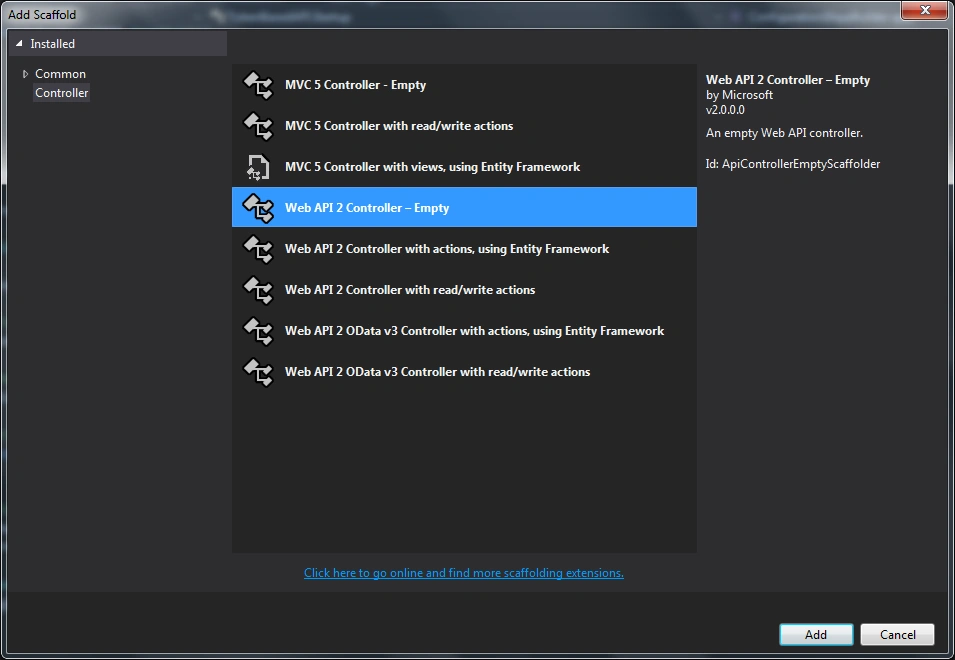
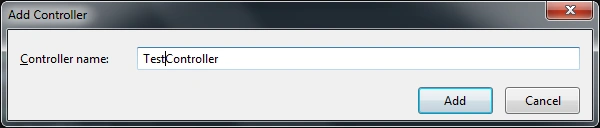
In the project(TokenBasedAPI) right click on Controllers – Add – Controller – Select Web API 2 Controller – Empty – Rename Controller as Test with postfix Controller
Now add the below code in TestController
- using System.Linq;
- using System.Web.Http;
- using System.Security.Claims;
- using System.Net.Http;
- using System.Net;
- namespace TokenBasedAPI.Controllers
- {
- public class TestController : ApiController
- {
- [Authorize(Roles = "SuperAdmin, Admin, User")]
- [HttpGet]
- [Route("api/test/method1")]
- public HttpResponseMessage Post(MyClass myclass)
- {
- var identity = (ClaimsIdentity)User.Identity;
- var roles = identity.Claims
- .Where(c => c.Type == ClaimTypes.Role)
- .Select(c => c.Value);
- myclass.Role = roles.ToString();
- myclass.Name = identity.Name;
- return Request.CreateResponse(HttpStatusCode.Created, myclass);
- }
- }
- }
How to access Token Based Web API using Postman?
We can create token by url http://localhost:PortNumber/token
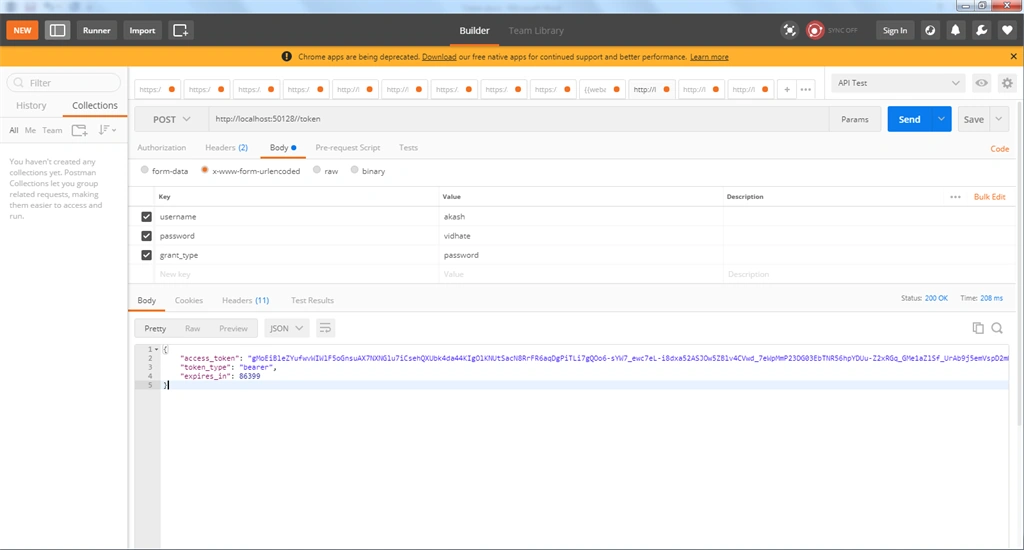
In Postman select Request type as POST and add Request URL in my case it is http://localhost:50128//token
Click on body – select x-www-form-urlencoded – and add key and value as
- username (value : akash)
- password (value: vidhate)
- grant_type (value: password)
Click on Send – you will get the access token
To consume Web API method
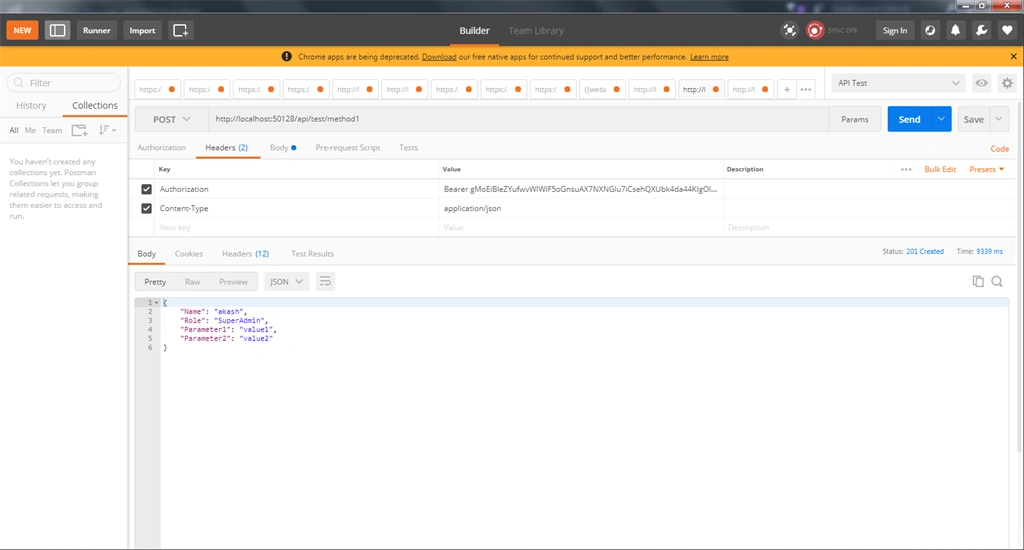
Select request type as POST and add request URL as http://localhost:50128/api/test/method1. Click on Headers tab Add key as Authorization and value as Bearer [Enter Token Here]
You have to enter authorization token preceded by Bearer
Now click on Body – select raw – select Text as JSON (application/json)
Then pass the Jason as below
- {
- "Parameter1": "value1",
- "Parameter2": "value2"
- }
How to consume Token based authentication API in Console Application?
Step 1
Create new Console Application – New Project – Templated – Visual C# - Console Application rename as ConsumeTokenBasedAPI
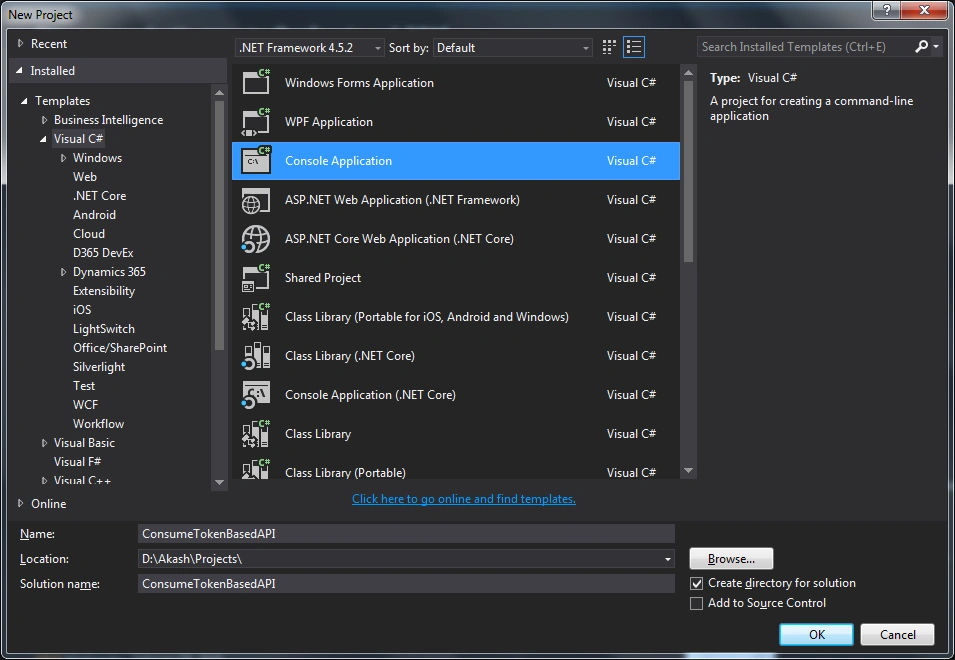
Step 2
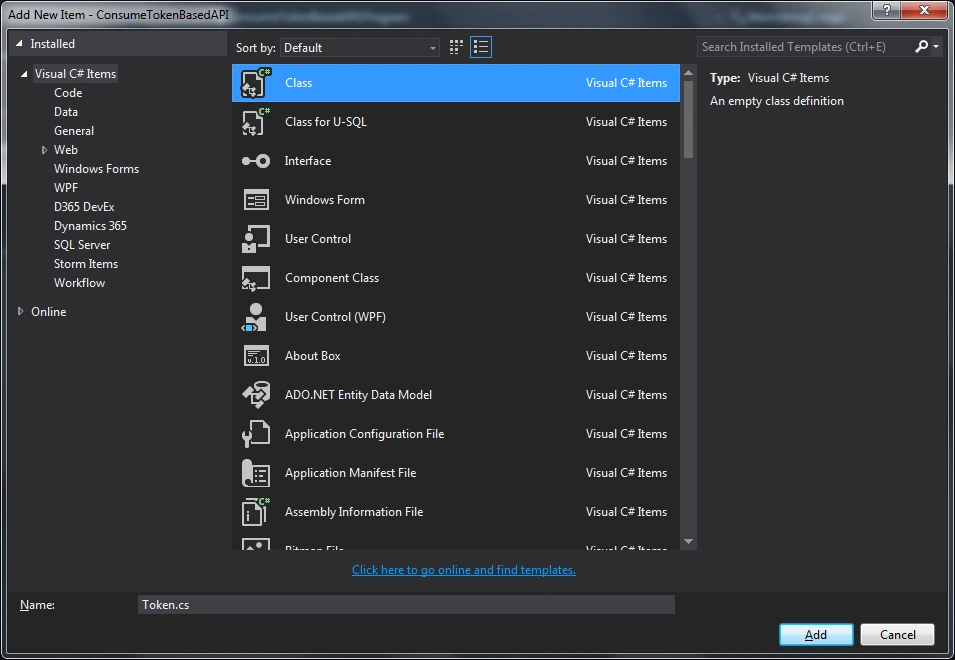
Add new class, rename it as Token.cs and add the below code in Token.cs
- using System;
- using Newtonsoft.Json;
- namespace ConsumeTokenBasedAPI
- {
- public class Token
- {
- [JsonProperty("access_token")]
- public string AccessToken { get; set; }
- public string Error { get; set; }
- public string Name { get; set; }
- public string Role { get; set; }
- public string Parameter1 { get; set; }
- public string Parameter2 { get; set; }
- }
- }
Add Newtonsoft.json reference Using NuGet Package manager
Step 3
Now modify Program.cs file as below,
- using System;
- using System.Collections.Generic;
- using System.Net.Http;
- using System.Net.Http.Headers;
- using Newtonsoft.Json;
- namespace ConsumeTokenBasedAPI
- {
- class Program
- {
- private static string Username = string.Empty;
- private static string Password = string.Empty;
- private static string baseAddress = "http://localhost:50128/";
- static void Main(string[] args)
- {
- Token token = null;
- Username = "akash";
- Password = "vidhate";
- token = GetAccessToken(Username, Password);
- if (!string.IsNullOrEmpty(token.AccessToken))
- {
- CallAPIResource(token.AccessToken);
- }
- else
- {
- Console.WriteLine(token.Error);
- }
- Console.ReadLine();
- }
- public static Token GetAccessToken(string username, string password)
- {
- Token token = new Token();
- HttpClientHandler handler = new HttpClientHandler();
- HttpClient client = new HttpClient(handler);
- var RequestBody = new Dictionary<string, string>
- {
- {"grant_type", "password"},
- {"username", username},
- {"password", password},
- };
- var tokenResponse = client.PostAsync(baseAddress + "token", new FormUrlEncodedContent(RequestBody)).Result;
- if (tokenResponse.IsSuccessStatusCode)
- {
- var JsonContent = tokenResponse.Content.ReadAsStringAsync().Result;
- token = JsonConvert.DeserializeObject<Token>(JsonContent);
- token.Error = null;
- }
- else
- {
- token.Error = "Not able to generate Access Token Invalid usrename or password";
- }
- return token;
- }
- private static void CallAPIResource(string AccessToken)
- {
- HttpClientHandler handler = new HttpClientHandler();
- HttpClient client = new HttpClient(handler);
- client.DefaultRequestHeaders.Authorization = new AuthenticationHeaderValue("Bearer", AccessToken);
- var RequestBody = new Dictionary<string, string>
- {
- {"Parameter1", "value1"},
- {"Parameter2", "vakue2"},
- };
- var APIResponse = client.PostAsync(baseAddress + "api/test/method1", new FormUrlEncodedContent(RequestBody)).Result;
- if (APIResponse.IsSuccessStatusCode)
- {
- var JsonContent = APIResponse.Content.ReadAsStringAsync().Result;
- //Token Message = JsonConvert.DeserializeObject<Token>(JsonContent);
- Console.WriteLine("APIResponse : " + JsonContent.ToString());
- }
- else
- {
- Console.WriteLine("APIResponse, Error : " + APIResponse.StatusCode);
- }
- }
- }
- }
Step 4
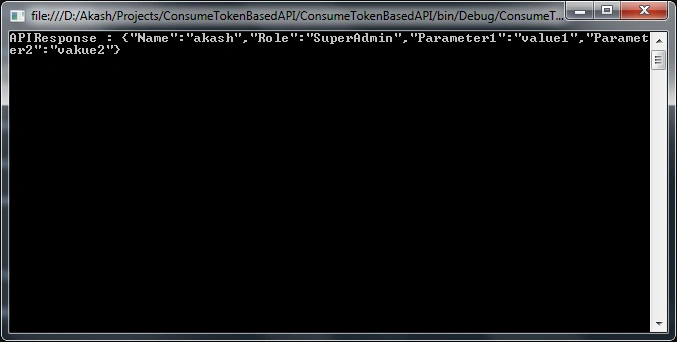
Now debug the code -- you can see the below Output
Summary
In this blog, you learned how to create ASP .Net Web API with Token Based Authentication And Consume ASP .NET Web API in Console Application using HTTP Client. Also Consume Web API in postman.
Thank you for reading.
Rudra NarayanPosted Apr 17, 2024, 7:07 AM
When http://localhost:50128/api/test/method1 api accessing error shows at: Myclass.Role = string.Join(",", roles.ToList()); System.NullReferenceException: 'Object reference not set to an instance of an object.'
Sahil PatelPosted Jul 27, 2022, 9:54 AM
I was follow this same blog for get the barear token and what if i have to pass the static key value like(abcd123465) in authorization of the postman and get the new barear token ?
ahmed elagamyPosted Aug 16, 2021, 4:58 AM
How to consume it in ajax call ?
Tasneem NomaniPosted Mar 16, 2021, 2:30 PM
Hello, I am looking for some help with "Consume ASP .NET Web API in MVC Web Application using HTTP Client with oauth2 client credentials
stanley mhlangaPosted Mar 12, 2021, 7:14 AM
I have followed code I'm glad to say it did help me a lot thanks for sharing this online.
Vern GreenPosted Aug 13, 2020, 3:56 AM
I used your code to try working through authentication. I am getting a 404 error when trying to resolve the the getting of data back. I get the authentication without issue. Can you tell me what may be happening?
ajay kumarPosted Aug 1, 2020, 5:00 AM
I have this kind of json string. please suggest ho could I pass my whole json string into this method ( client.PostAsync(baseAddress1 + "ingest/v1/usagepoint", new FormUrlEncodedContent(RequestBody)).Result;). { "header": { "verb":"Created", "noun":"UsagePointConfig", "revision":"1.0", "context":"TEST", "timeStamp":"2017-01-27T13:00:23.1234567", "source":"SAP-R3", "messageId":"3d3c3ab5-6357-456a-95b3-407d17f36653" }, "usagePoint": { "mrId": "GRID0001", "names": [ { "name": "33 kV GRID" }, { "name": "GRID", "nameType": { "name": "ObjectType" } } ], "configurationEvent": { "effectiveDateTime": "2020-07-04T13:00:23.123" }, "usagePointLocation": { "names": [ { "name": "EAST OF KAILASH" } ], "positionPoints": [ { "xposition": "77.2407225", "yposition": "28.5370525", "sequenceNumber": 1 } ] } } }
ajay kumarPosted Aug 1, 2020, 4:53 AM
Hi, I have jSon string and i have to pass in this "var APIResponse = client.PostAsync(baseAddress + "api/test/method1", new FormUrlEncodedContent(RequestBody)).Result;" Please suggest me the code that could I pass string.