

In this article we will learn to create an application which add action items and menu items to action bar.
When we use ActionBar in the application , few important points are to be remember as follows:
- Extend ActionBarActivity or AppCompatActivity instead of Activity,
public class MainActivity extends ActionBarActivity{
or
public class MainActivity extends AppCompatActivity {
- Select the right title for showAsAction for instance : “always”, “ifRoom”
- <menu xmlns:android="http://schemas.android.com/apk/res/android" Xmlns:app="http://schemas.android.com/apk/res-auto">
- <item android:id="@+id/action_user" android:icon="@drawable/ic_action_user" android:title="@string/action_user" app:showAsAction="ifRoom" /> ...
- </menu>
- Define your Menu in Activity,
- @Override
- public boolean onCreateOptionsMenu(Menu menu)
- {
- // Inflate the menu; this adds items to the action bar if it is present.
- getMenuInflater().inflate(R.menu.menu_main, menu);
- return true;
- }
- @Override
- public boolean onOptionsItemSelected(MenuItem item)
- {
- // Handle action bar item clicks here. The action bar will
- // automatically handle clicks on the Home/Up button, so long
- // as you specify a parent activity in AndroidManifest.xml.
- switch (item.getItemId())
- {
- case R.id.action_user:
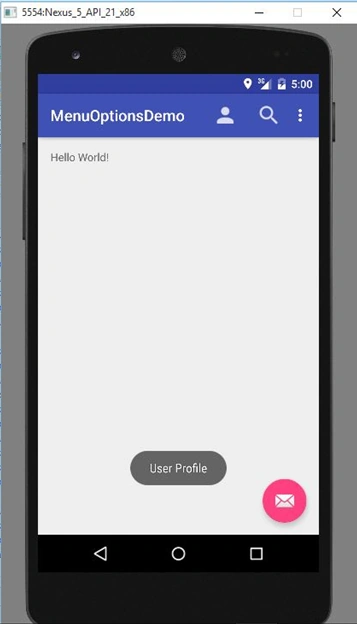
- Toast toast0 = Toast.makeText(getApplicationContext(), "User Profile", Toast.LENGTH_SHORT);
- toast0.show();
- return true;
- case R.id.search:
- Toast toast00 = Toast.makeText(getApplicationContext(), "Search", Toast.LENGTH_SHORT);
- toast00.show();
- return true;
- case R.id.action_settings:
- Toast toast = Toast.makeText(getApplicationContext(), "Action Settings", Toast.LENGTH_SHORT);
- toast.show();
- return true;
- case R.id.help_center:
- Toast toast1 = Toast.makeText(getApplicationContext(), "Help Center", Toast.LENGTH_SHORT);
- toast1.show();
- return true;
- case R.id.Rating:
- Toast toast3 = Toast.makeText(getApplicationContext(), "Rating", Toast.LENGTH_SHORT);
- toast3.show();
- return true;
- case R.id.More:
- Toast toast2 = Toast.makeText(getApplicationContext(), "More", Toast.LENGTH_SHORT);
- toast2.show();
- return true;
- default:
- return super.onOptionsItemSelected(item);
- }
- }
main_menu.xml
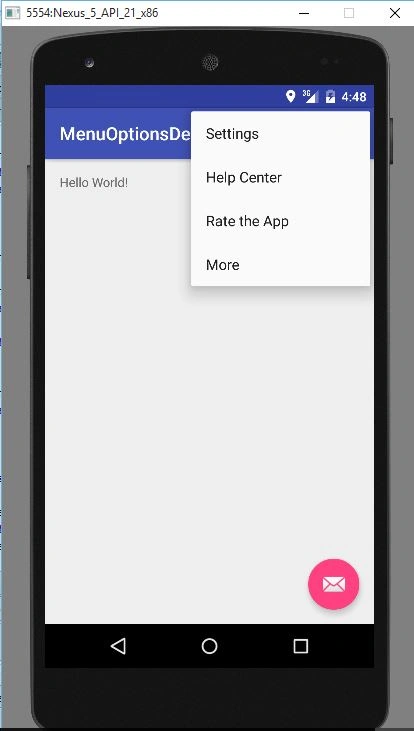
- <menu xmlns:android="http://schemas.android.com/apk/res/android" xmlns:app="http://schemas.android.com/apk/res-auto" xmlns:tools="http://schemas.android.com/tools" tools:context=".MainActivity">
- <item android:id="@+id/action_user" android:icon="@drawable/ic_user" android:title="Profile" app:showAsAction="ifRoom">
- </item>
- <item android:id="@+id/search" android:icon="@drawable/ic_search" android:title="Search" app:showAsAction="ifRoom">
- </item>
- <item android:id="@+id/action_settings" android:title="@string/action_settings" />
- <item android:id="@+id/help_center" android:title="Help Center">
- </item>
- <item android:id="@+id/Rating" android:title="Rate the App">
- </item>
- <item android:id="@+id/More" android:title="More">
- </item>
- </menu>
app:showAsAction="always"
It will force them to be there but take in consideration what is happening if it's still not enough room.
When contained within the action bar there is a finite maximum of action items based on the device's density-independent width. The action items can also not cover more than half the width of the action bar.
Source Code:
MainActivity.java
- package com.example.abhijeet.menuoptionsdemo;
- import android.app.Dialog;
- import android.content.Intent;
- import android.os.Bundle;
- import android.support.design.widget.FloatingActionButton;
- import android.support.design.widget.Snackbar;
- import android.support.v7.app.AppCompatActivity;
- import android.support.v7.widget.Toolbar;
- import android.view.Gravity;
- import android.view.View;
- import android.view.Menu;
- import android.view.MenuItem;
- import android.widget.Button;
- import android.widget.EditText;
- import android.widget.Toast;
- public class MainActivity extends AppCompatActivity
- {
- @Override
- protected void onCreate(Bundle savedInstanceState)
- {
- super.onCreate(savedInstanceState);
- setContentView(R.layout.activity_main);
- Toolbar toolbar = (Toolbar) findViewById(R.id.toolbar);
- setSupportActionBar(toolbar);
- FloatingActionButton fab = (FloatingActionButton) findViewById(R.id.fab);
- fab.setOnClickListener(new View.OnClickListener()
- {
- @Override
- public void onClick(View view)
- {
- Snackbar.make(view, "Replace with your own action", Snackbar.LENGTH_LONG).setAction("Action", null).show();
- }
- });
- }
- @Override
- public boolean onCreateOptionsMenu(Menu menu)
- {
- // Inflate the menu; this adds items to the action bar if it is present.
- getMenuInflater().inflate(R.menu.menu_main, menu);
- return true;
- }
- @Override
- public boolean onOptionsItemSelected(MenuItem item)
- {
- // Handle action bar item clicks here. The action bar will
- // automatically handle clicks on the Home/Up button, so long
- // as you specify a parent activity in AndroidManifest.xml.
- switch (item.getItemId())
- {
- case R.id.action_user:
- Toast toast0 = Toast.makeText(getApplicationContext(), "User Profile", Toast.LENGTH_SHORT);
- toast0.show();
- return true;
- case R.id.search:
- Toast toast00 = Toast.makeText(getApplicationContext(), "Search", Toast.LENGTH_SHORT);
- toast00.show();
- return true;
- case R.id.action_settings:
- Toast toast = Toast.makeText(getApplicationContext(), "Action Settings", Toast.LENGTH_SHORT);
- toast.show();
- return true;
- case R.id.help_center:
- Toast toast1 = Toast.makeText(getApplicationContext(), "Help Center", Toast.LENGTH_SHORT);
- toast1.show();
- return true;
- case R.id.Rating:
- Toast toast3 = Toast.makeText(getApplicationContext(), "Rating", Toast.LENGTH_SHORT);
- toast3.show();
- return true;
- case R.id.More:
- Toast toast2 = Toast.makeText(getApplicationContext(), "More", Toast.LENGTH_SHORT);
- toast2.show();
- return true;
- default:
- return super.onOptionsItemSelected(item);
- }
- }
- }
- <menu xmlns:android="http://schemas.android.com/apk/res/android" xmlns:app="http://schemas.android.com/apk/res-auto" xmlns:tools="http://schemas.android.com/tools" tools:context=".MainActivity">
- <item android:id="@+id/action_user" android:icon="@drawable/ic_user" android:title="Profile" app:showAsAction="ifRoom">
- </item>
- <item android:id="@+id/search" android:icon="@drawable/ic_search" android:title="Search" app:showAsAction="ifRoom">
- </item>
- <item android:id="@+id/action_settings" android:title="@string/action_settings" />
- <item android:id="@+id/help_center" android:title="Help Center">
- </item>
- <item android:id="@+id/Rating" android:title="Rate the App">
- </item>
- <item android:id="@+id/More" android:title="More">
- </item>
- </menu>
Ankur MistryPosted Dec 16, 2015, 6:09 AM
nice share