

To create a unique number in SQL Server, you can use various techniques depending on your requirements. Here are a few approaches you can consider.
- Identity Column
- The simplest way is to use an identity column. It automatically generates a unique number for each row inserted into a table.
- Here's an example
-
 CREATE TABLE YourTable (
    ID INT IDENTITY(1,1) PRIMARY KEY,
	VCH_USER_NAME VARCHAR(150)
    -- Other columns
)
- UUID (Universally Unique Identifier)
- If you need globally unique identifiers, you can use the NEWID() function to generate a unique identifier for each row.
- Here's an example:
-
CREATE TABLE YourTable ( ID UNIQUEIDENTIFIER DEFAULT NEWID() PRIMARY KEY, VCH_NAME VARCHAR(150) -- Other columns ) - Output
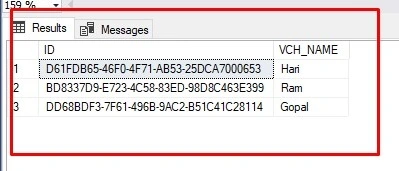
- The NEWID() function generates a unique identifier value for each new row inserted.
- User Definer Unique Code as below
-
declare @vch_UniqueRefNo varchar(30)='',@slno int=0 select @slno=count(int_req_payment_id) from T_COP_REQUEST_PAYMENTS where convert(date,dt_PaymentDate)=convert(date,getdate()); set @slno = @slno + 1; set @vch_UniqueRefNo= convert(varchar,year(GETDATE()))+format(month(GETDATE()),'00')+format(day(GETDATE()),'00')+format(@slno,'0000') select @vch_UniqueRefNo - Output

Join the conversation! Your thoughts help the community grow.