

Introduction
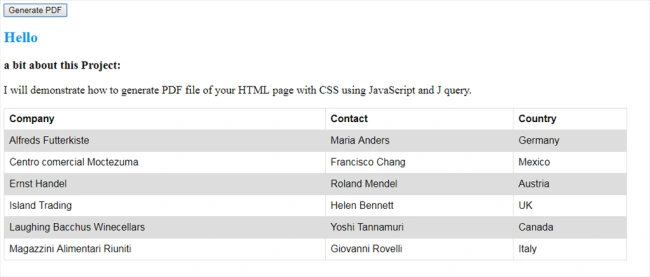
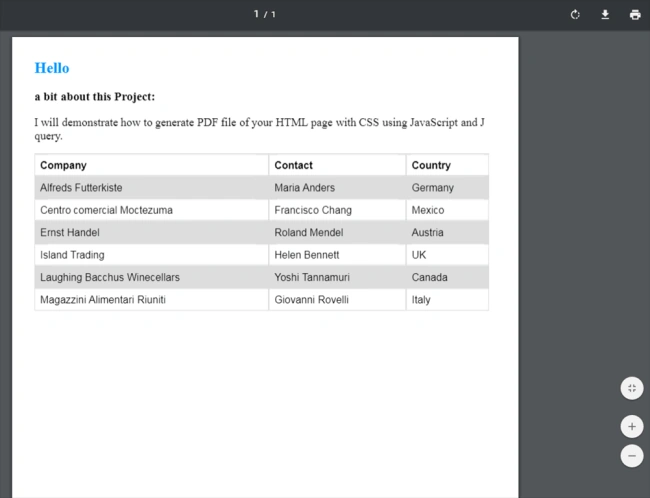
In this blog, I will demonstrate how to generate a PDF file of your HTML page with CSS using JavaScript and jQuery.
In this blog, we have to add two external JS files for converting the PDF - JSPDF.js, and html2canvas.js.
Creating an HTML Page for converting the HTML to PDF
- <form class="form" style="max-width: none; width: 1005px;">
- <h2 style="color: #0094ff">Hello</h2>
- <h3>a bit about this Project:</h3>
- <p style="font-size: large">
- I will demonstrate how to generate PDF file of your HTML page with CSS using JavaScript and J query.
- </p>
- <table>
- <tbody>
- <tr>
- <th>Company</th>
- <th>Contact</th>
- <th>Country</th>
- </tr>
- <tr>
- <td>Alfreds Futterkiste</td>
- <td>Maria Anders</td>
- <td>Germany</td>
- </tr>
- <tr>
- <td>Centro comercial Moctezuma</td>
- <td>Francisco Chang</td>
- <td>Mexico</td>
- </tr>
- <tr>
- <td>Ernst Handel</td>
- <td>Roland Mendel</td>
- <td>Austria</td>
- </tr>
- <tr>
- <td>Island Trading</td>
- <td>Helen Bennett</td>
- <td>UK</td>
- </tr>
- <tr>
- <td>Laughing Bacchus Winecellars</td>
- <td>Yoshi Tannamuri</td>
- <td>Canada</td>
- </tr>
- <tr>
- <td>Magazzini Alimentari Riuniti</td>
- <td>Giovanni Rovelli</td>
- <td>Italy</td>
- </tr>
- </tbody>
- </table>
- </form>
- <style>
- table {
- font-family: arial, sans-serif;
- border-collapse: collapse;
- width: 100%;
- }
- td, th {
- border: 1px solid #dddddd;
- text-align: left;
- padding: 8px;
- }
- tr:nth-child(even) {
- background-color: #dddddd;
- }
- </style>
- <input type="button" id="create_pdf" value="Generate PDF">
- <script src="https://code.jquery.com/jquery-1.12.4.min.js" integrity="sha256-ZosEbRLbNQzLpnKIkEdrPv7lOy9C27hHQ+Xp8a4MxAQ=" crossorigin="anonymous"></script>
- <script src="https://cdnjs.cloudflare.com/ajax/libs/jspdf/1.3.5/jspdf.min.js"></script>
- <script>
- (function () {
- var
- form = $('.form'),
- cache_width = form.width(),
- a4 = [595.28, 841.89]; // for a4 size paper width and height
- $('#create_pdf').on('click', function () {
- $('body').scrollTop(0);
- createPDF();
- });
- //create pdf
- function createPDF() {
- getCanvas().then(function (canvas) {
- var
- img = canvas.toDataURL("image/png"),
- doc = new jsPDF({
- unit: 'px',
- format: 'a4'
- });
- doc.addImage(img, 'JPEG', 20, 20);
- doc.save('Bhavdip-html-to-pdf.pdf');
- form.width(cache_width);
- });
- }
- // create canvas object
- function getCanvas() {
- form.width((a4[0] * 1.33333) - 80).css('max-width', 'none');
- return html2canvas(form, {
- imageTimeout: 2000,
- removeContainer: true
- });
- }
- }());
- </script>
- <script>
- /*
- * jQuery helper plugin for examples and tests
- */
- (function ($) {
- $.fn.html2canvas = function (options) {
- var date = new Date(),
- $message = null,
- timeoutTimer = false,
- timer = date.getTime();
- html2canvas.logging = options && options.logging;
- html2canvas.Preload(this[0], $.extend({
- complete: function (images) {
- var queue = html2canvas.Parse(this[0], images, options),
- $canvas = $(html2canvas.Renderer(queue, options)),
- finishTime = new Date();
- $canvas.css({ position: 'absolute', left: 0, top: 0 }).appendTo(document.body);
- $canvas.siblings().toggle();
- $(window).click(function () {
- if (!$canvas.is(':visible')) {
- $canvas.toggle().siblings().toggle();
- throwMessage("Canvas Render visible");
- } else {
- $canvas.siblings().toggle();
- $canvas.toggle();
- throwMessage("Canvas Render hidden");
- }
- });
- throwMessage('Screenshot created in ' + ((finishTime.getTime() - timer) / 1000) + " seconds<br />", 4000);
- }
- }, options));
- function throwMessage(msg, duration) {
- window.clearTimeout(timeoutTimer);
- timeoutTimer = window.setTimeout(function () {
- $message.fadeOut(function () {
- $message.remove();
- });
- }, duration || 2000);
- if ($message)
- $message.remove();
- $message = $('<div ></div>').html(msg).css({
- margin: 0,
- padding: 10,
- background: "#000",
- opacity: 0.7,
- position: "fixed",
- top: 10,
- right: 10,
- fontFamily: 'Tahoma',
- color: '#fff',
- fontSize: 12,
- borderRadius: 12,
- width: 'auto',
- height: 'auto',
- textAlign: 'center',
- textDecoration: 'none'
- }).hide().fadeIn().appendTo('body');
- }
- };
- })(jQuery);
- </script>
Dream dazzledPosted May 27, 2025, 12:22 PM
Pdf conversion sahi tarika batana chahiye pics to print page leke bhee ho jayega
srinivas prabhuPosted May 6, 2024, 11:18 AM
It is not working if the page contains header and footer images. Please let me know how to export HTML page with header and footer images
ash pandyaPosted Sep 23, 2021, 7:18 AM
Please help me to get output in landscape
Dean Karl ChuaPosted Jul 28, 2021, 6:44 AM
Multiple pages not working
Selva ganapathyPosted Nov 12, 2020, 6:29 AM
Image and more than one page not working, can you guide me.
martin sPosted Sep 25, 2020, 12:44 PM
Thank you very much
martin sPosted Sep 25, 2020, 12:44 PM
Very Useful
F0000_WPosted Jul 29, 2020, 2:29 PM
How do you make this work for multiple pages?
jj ffPosted Jun 26, 2020, 7:15 AM
Hey how can i get the location to where this pdf file is saved and return it on my screen
dennis wangPosted Sep 4, 2019, 7:02 AM
Hi Talaviya thanks for ur post and it worked for me ,however the content of PDF is blurry.
Maulik MananiPosted Aug 8, 2019, 6:28 AM
Not Working for more than one page data.
sindhu kumarPosted Jul 29, 2019, 6:46 AM
Images is not come can you help me?
Milad RamezanzadehPosted Jun 25, 2019, 4:39 AM
Not working in other language like Arabic & Persian. what should I do?
Arthur ShadrackPosted May 30, 2019, 6:15 AM
Not working for me please
Prasad DeshmukhPosted Apr 12, 2019, 7:37 AM
I have added same code with different data information. Its printed but not complete
kasif ShaikhPosted Mar 28, 2019, 10:12 AM
It shows half of the page cut other half
teodoro delintPosted Mar 26, 2019, 1:52 PM
Hi,, what's the code for orientation: Landscape?
Tracy LivingstonPosted Mar 21, 2019, 7:06 PM
How do I generate a PDF without the height and width limitations? The A4 in this sample is fine for width but my form is much taller and crops most of the bottom content in the PDF.
GOURAB ROUTPosted Nov 5, 2018, 4:50 AM
It was download only one page ,how to download multiple i mean auto page breaker if my data is long.
bainapalli krishnaPosted Oct 29, 2018, 8:56 AM
It is not working
vijay akulaPosted Sep 7, 2018, 2:39 AM
We approached the same with your code for our application. But we are facing issue like Unhandled exception at line 143, column 4305 in https://cdnjs.cloudflare.com/ajax/libs/jspdf/1.3.5/jspdf.min.js 0x800a1391 - JavaScript runtime error: 'Promise' is undefined" Will you please help us to resolve this issue. Thanks in advance.
vijay akulaPosted Sep 7, 2018, 2:38 AM
Hi Bhavdip,
Manu TgPosted Aug 24, 2018, 8:58 AM
Hi sir,can u tell me how to convert 15 column table data int pdf?
Pramod YadavPosted Aug 6, 2018, 6:56 AM
Hi sir can u tell me how save this pdf file to server side
bhargav talaPosted Jul 14, 2018, 5:01 AM
Hello i have implement it and its run successfully but resolution is not clear so can you help to improve it?
Shihui WangPosted Jun 16, 2018, 9:26 AM
Why this doesn't work with IE11
rajashri thoratPosted May 22, 2018, 7:39 AM
Hi, I am trying to generate a PDF of SharePoint site page which is having HTML controls ,this code is working but on my page there are some check boxes, if I run the code in Crome the check boxes are displaying but In IE it is not showing the check boxes check ,it shows blank checkbox ,Please suggest
yatin chaudhariPosted May 18, 2018, 10:20 PM
Hello sir i have one image in the page so it not come in pdf file how it come
raju kumarPosted Feb 9, 2018, 8:09 AM
Hi can we print this as Letter size ?
Moeun OrnPosted Feb 8, 2018, 8:55 PM
Sorry i can opacity to good
Chinmoy PaluiPosted Feb 2, 2018, 5:52 AM
Download pdf is not display all content . only display half portion. Any solution for it, I had increases the size but not working.
ankit pandeyPosted Jan 10, 2018, 7:03 AM
Download PDF is not display all content . only display half portion.
ankit pandeyPosted Jan 10, 2018, 7:03 AM
Exporting Data HTML as PDF in 5 Easy Steps
Dave WellerPosted Jan 3, 2018, 2:52 PM
Is there any way for the PDF to also display UL & OL points?
Tarek ShowkotPosted Dec 30, 2017, 1:39 AM
What's the point of half solution? It only generates one page PDF.
Ashish JainPosted Dec 20, 2017, 8:02 AM
Hi Can You make this work for multiple pages. The community would be really grateful to you
Shiva KrishnaPosted Dec 15, 2017, 7:51 AM
I have tried this code ,but it is not working ...can you please check the.... code once
Apexrays TechnologyPosted Dec 5, 2017, 3:43 AM
I have 2 pager html, but when i'll try to generate pdf it display me only single page.
Rajesh KumarPosted Nov 24, 2017, 8:46 AM
Thanku Sir ,It is very useful and PDF is not downloading in IE and Crome
Kanniyappan KrishPosted Nov 21, 2017, 4:50 AM
Thanks, It is very useful and PDF is not downloading in IE and Firefox. Is there any solution for browser compatibility?
Xiuhui LiangPosted Oct 15, 2017, 9:14 PM
How to make it sharper?
Bayram TUĞCUPosted Oct 9, 2017, 5:16 AM
Thanks, very great blog. I wonder to multi page ? The code only one page convert pdf
Kaushik DudhatPosted Sep 28, 2017, 12:51 AM
Thanks ,It is very helpful for me
Hardik PrajapatiPosted Sep 28, 2017, 12:44 AM
Its great blog bhavdip sir, also very helpfull for me..!