

In this blog I will discuss how to call web services and method using Json object. Just follow the simple steps to create web services and Json object.
Steps to follow:
1. First create web services like this.
using
System;
using
System.Collections.Generic;
using
System.Linq;
using
System.Web;
using
System.Web.Services;
using
System.Web.Script.Serialization;using
System.Web.Script.Services;
using
System.Web.Services.Protocols;
//Add this namespace
namespace Json
{
/// Summary description for WebService1
/// </summary>
[WebService(Namespace
= "http://tempuri.org/")]
[WebServiceBinding(ConformsTo
= WsiProfiles.BasicProfile1_1)]
[System.ComponentModel.ToolboxItem(false)]
// To allow this Web Service to be called from script, using ASP.NET AJAX, uncomment the following line.
[System.Web.Script.Services.ScriptService]
public class
WebService1 : System.Web.Services.WebService
{
[WebMethod]
[ScriptMethod(UseHttpGet
= false, ResponseFormat =
ResponseFormat.Json)]
public int Add(int
a, int b)
{
//Provides serialization and
deserialization functionality for AJAX-enabled applications.
JavaScriptSerializer js =
new
JavaScriptSerializer();
return int.Parse(js.Serialize(a
+ b));
}
}
}
2. Go to HTML Page reference following JS file and add the ajax scripts.
<script
src="Scripts/jquery-ui-1.8.1.custom.min.js"
type="text/javascript"></script>
<script
language="javascript"
type="text/javascript">
$(document).ready(function
() {
$("#Button1").click(function
() {
$.ajax({
type: "POST",
url: "WebService1.asmx/Add",
data: "{a:'" + $("#TextBox1").val()
+ "',b:'" + $("#TextBox2").val()
+ "'}",
contentType: "application/json; charset=utf-8",
dataType: "json",
success: OnSuccess,
error: OnError
});
});
});
function OnSuccess(data, status) {
alert('The
addition of two number is : ' + data.d);
}
function OnError(request, status, error) {
alert(request.statusText);
}
</script>
3. Add two TextBoxes and one Button on the page.
<div>
<asp:TextBox
ID="TextBox1"
runat="server"></asp:TextBox>
<asp:TextBox
ID="TextBox2"
runat="server"></asp:TextBox>
</div>
<div>
<input
id="Button1"
type="button"
value="Add"
/>
</div>
4. The output in the browser look like this.
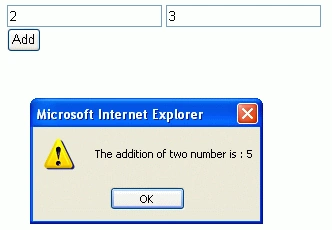
Lajapathy ArunPosted Apr 3, 2012, 12:10 AM
Could you give some example for using Dictionary,list,string as parameter. That would be helpful.